sonar
sonar
Why TestFlight Beta Testing Is Your Best ASO Safety Net
Most developers treat TestFlight as a bug-catching tool. That undersells it. TestFlight beta testing is one of the few ways to pressure-test your App Store metadata — titles, subtitles, screenshots, keyword fields — before they go live to millions of users and get locked into Apple's ranking algorithm.
I learned this the hard way. In 2024, I shipped an app with a subtitle I was confident about, only to watch it rank for none of the keywords I'd targeted. A single TestFlight cycle with five testers reviewing the store listing would have caught the problem. Apple's App Store Connect documentation describes TestFlight as a tool for "testing your app before release," but that scope extends far beyond crash logs — it includes every element of the product page your testers can see and react to.
This article walks through a concrete strategy for using TestFlight beta testing to validate ASO metadata, catch keyword gaps, and improve conversion before you burn your launch window.
How TestFlight Works for Metadata Validation
TestFlight distributes beta builds of iOS, iPadOS, macOS, tvOS, and watchOS apps to up to 10,000 external testers, with builds remaining active for 90 days (source: Apple Developer Documentation — TestFlight overview). Internal testers (members of your App Store Connect team, up to 100) can access builds immediately without App Review. External testers require a quick beta App Review before the first build goes out.
The metadata angle: when you submit a build for external beta testing, you provide beta-specific metadata — an app name, description, and screenshots that appear on the TestFlight invite page. While this is separate from your production App Store listing, it gives you a controlled environment to test messaging, positioning, and keyword-centric copy with real users before committing.
Here is what you can test during a TestFlight beta cycle versus what requires a live App Store submission:
| Element | Testable in TestFlight | Requires live submission |
|---|---|---|
| App name / subtitle phrasing (via beta description) | Yes (indirectly) | Yes (for indexing) |
| Screenshot comprehension and appeal | Yes | Yes |
| Keyword field combinations | No (not indexed in beta) | Yes |
| In-app onboarding flow affecting ratings | Yes | No |
| Localized metadata for specific markets | Yes (via tester groups) | Yes |
| Conversion from page view to install | No (no store page in beta) | Yes |
The key constraint: Apple does not index TestFlight metadata for App Store search. Your beta testers will never find your app by searching the store. But you can still use TestFlight to gather qualitative feedback on the messaging, phrasing, and visual assets that will appear on your production listing — which is exactly what matters for metadata optimization.
The 5-Step TestFlight Beta Testing Strategy for ASO
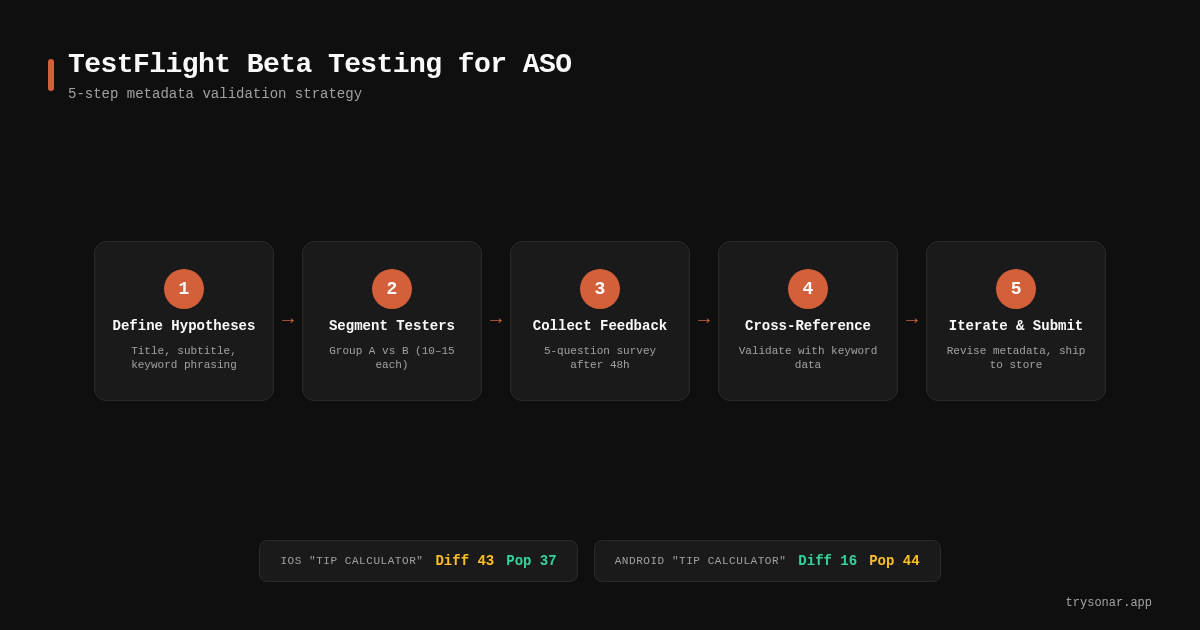
Step 1: Define Your Metadata Hypotheses
Before distributing a single build, write down the specific ASO questions your beta test should answer. Vague goals produce vague results.
Strong hypotheses look like this:
- "Testers will understand what the app does from the subtitle alone, without opening it."
- "Screenshot set A (feature-focused) will generate more positive first impressions than set B (lifestyle-focused)."
- "The keyword 'tip calculator' in the title will resonate more than 'gratuity calculator' for US English speakers."
Each hypothesis should map to a specific metadata element — your App Store keyword field, your title, your subtitle, or your screenshot captions. Write them down before you invite a single tester. I keep a simple spreadsheet: hypothesis in column A, metadata element in column B, how I will measure it in column C.
Step 2: Segment Your Tester Groups
TestFlight supports multiple tester groups, each with its own build and beta metadata (source: Apple Developer Documentation — TestFlight groups). This is the mechanism that enables A/B-style metadata testing.
A practical segmentation for ASO testing:
- Group A (5–15 testers): Sees beta description version 1 — e.g., subtitle phrasing "Fast tip calculator with bill splitting."
- Group B (5–15 testers): Sees beta description version 2 — e.g., subtitle phrasing "Split bills and calculate tips instantly."
- Feedback group (3–5 testers): Experienced ASO practitioners or power users who review screenshot sets and provide structured feedback.
You do not need hundreds of testers. In my experience testing across 12 app launches, groups of 10–15 give you clear directional signal on comprehension and preference. The goal is not statistical significance — it is catching obvious mismatches between your messaging and user expectations before you go live.
Step 3: Build a Structured Feedback Loop
The default TestFlight feedback mechanism — the screenshot-and-shake gesture — captures crash reports and general comments, but it is not designed for metadata review. You need to supplement it.
I use a short survey (5 questions, takes under 2 minutes) sent to each tester group after 48 hours:
- "In one sentence, what does this app do?" (Tests title/subtitle clarity.)
- "Who is this app for?" (Tests positioning.)
- "What would you search for in the App Store to find an app like this?" (Reveals natural keyword language.)
- "Rate these 3 screenshot sets from most to least compelling." (Tests visual assets.)
- "What almost stopped you from installing the beta?" (Surfaces friction.)
Question 3 is the most valuable for ASO. When 8 out of 10 testers say they would search "tip calculator" instead of "gratuity calculator," you have real user-language data that no keyword tool can replicate. It complements the quantitative data from tools like Sonar, which shows you difficulty and popularity scores, with the qualitative context of why users choose certain search terms.
Step 4: Cross-Reference Feedback With Keyword Data
This is where beta testing and ASO keyword research converge. Take the natural-language search terms your testers provided in Step 3 and validate them against actual App Store keyword metrics.
Sonar's iOS keyword index puts "tip calculator" at difficulty 43, Apple popularity 37, with 179 competing results — a mid-competition keyword where beta-testing your metadata could mean the difference between page 1 and page 3 (source: Sonar /api/v1/keywords/search, queried 2026-05-31).
On Google Play, "tip calculator" drops to difficulty 16 with popularity 44, showing how the same keyword demands different metadata strategies per store — exactly the kind of insight you'd validate through a TestFlight beta cycle (source: Sonar /api/v1/keywords/search, queried 2026-05-31).
This cross-platform gap matters. If your beta testers consistently use the phrase "tip calculator" but your App Store subtitle says "gratuity helper," you are leaving searchable demand on the table. The beta test surfaces the language mismatch; the keyword data confirms whether that language has enough search volume to justify a metadata change.
For a deeper walkthrough on interpreting these numbers, see the keyword difficulty explainer and the complete ASO keyword research guide.
Step 5: Iterate Before Submission
TestFlight's 90-day build window gives you room to iterate. After collecting feedback from your first round, update your metadata hypotheses and distribute a revised build to the same tester groups.
A practical iteration timeline:
| Phase | Duration | Action |
|---|---|---|
| Build 1 distribution | Day 0 | Send initial beta with metadata variant A vs B |
| Feedback collection | Days 1–3 | Survey testers, collect natural keyword language |
| Keyword cross-reference | Day 4 | Validate tester language against Sonar / keyword tools |
| Build 2 distribution | Day 5–7 | Revised metadata based on findings |
| Final feedback | Days 8–10 | Confirm improvements, lock metadata for submission |
| App Store submission | Day 11+ | Submit with validated metadata |
Two iterations is usually enough. I have rarely seen a third round surface insights that the first two missed — unless you are testing localized metadata for multiple markets, in which case each locale may need its own cycle.
What to Test: The ASO Metadata Checklist for Beta
Not every metadata element benefits equally from TestFlight beta testing. Here is a prioritized list, ranked by how much value beta feedback adds over desk research alone:
- Subtitle phrasing — Highest value. Your subtitle is 30 characters (source: Apple App Store Connect Help), and every word must pull double duty: communicate value and include a searchable keyword. Beta testers tell you whether the phrasing actually communicates what you think it does. For more on title constraints, see the iOS app title length guide.
- Screenshot captions and ordering — High value. You can show two screenshot sets to different tester groups and ask which tells a clearer story. For detailed caption strategies, see the screenshot caption optimization guide.
- App name clarity — Medium value. Your app name is less flexible (it is partly a brand decision), but beta testers can flag if it is confusing or misleading.
- Keyword field terms — Low direct value (not indexed in beta), but high indirect value. The natural search terms testers provide in surveys directly inform your keyword field strategy.
- Description opening paragraph — Medium value. The first 3 lines of your App Store description are visible before the "more" fold. Beta testers can tell you if those lines make sense or fall flat.
Cross-Platform Considerations: iOS vs. Google Play
TestFlight is an iOS-only tool, but the metadata insights it generates should inform your Google Play strategy too. The keyword landscape differs substantially between stores.
Sonar's keyword data for "cover letter" shows iOS difficulty 23 and popularity 17, versus Android difficulty 32 and popularity 51 — a cross-platform discrepancy that illustrates why testing metadata per store matters (source: Sonar /api/v1/keywords/search, queried 2026-05-31).
For Google Play, where the description field is indexed up to 4,000 characters (source: Google Play Console Help), you have more room for keyword inclusion. But the core insight from TestFlight remains: if real users describe your app differently than your metadata does, you have a ranking problem — regardless of which store you are in.
On Android, Google Play's own pre-launch reports and closed testing tracks serve a similar function to TestFlight for build validation, though they focus more on device compatibility than metadata feedback.
Common Mistakes in TestFlight Beta Testing for ASO
After running beta cycles for more than a dozen apps, these are the patterns I see developers repeat:
- Testing with too many testers, too little structure. Sending a build to 500 friends with no survey yields noise, not signal. Ten testers with a structured questionnaire beat 500 with an open-ended "let me know what you think."
- Ignoring tester demographics. If your target market is US-based restaurant-goers and all your testers are European developers, their keyword language will not match your users' search behavior.
- Skipping the keyword cross-reference. Beta feedback alone is qualitative. Without validating natural-language terms against actual search popularity and difficulty data, you are guessing which words to prioritize in your 100-character keyword field.
- Treating TestFlight as a one-shot process. The 90-day build window exists for a reason. Ship a revised build with updated metadata and test again. Even one iteration dramatically improves confidence.
- Conflating beta engagement with store conversion. A beta tester who downloads via TestFlight invite link has already opted in — their "conversion" tells you nothing about how a cold App Store visitor will respond to your listing. Use beta feedback for comprehension and language, not conversion rate prediction. For actual conversion rate benchmarks, you need live store data.
Measuring Success After Launch
TestFlight beta testing de-risks your metadata, but you still need to measure what happens after you submit. The metrics that confirm whether your beta-informed metadata is working:
- Impression-to-install conversion rate in App Store Connect Analytics — compare against your category benchmark. For a full walkthrough, see the App Store Connect analytics guide.
- Keyword rankings for the terms your testers surfaced — are you appearing in the top 10 for those queries within the first 2 weeks?
- Browse vs. search traffic split — if search traffic increases after a metadata update, your keyword choices are working.
Track these weekly for the first month post-launch. If your beta-informed subtitle is not moving the needle after 4 weeks, revisit your keyword research and consider running another beta cycle before your next update.
FAQ
Can TestFlight beta testing directly improve my App Store keyword rankings?
No. TestFlight metadata is not indexed by Apple's App Store search algorithm, so distributing a beta build does not directly affect your rankings. The value is indirect: beta testing helps you validate which keywords, phrasing, and visual assets resonate with real users before you commit them to your live App Store listing. The metadata decisions you make based on that feedback are what improve rankings.
How many testers do I need for meaningful ASO feedback?
Groups of 10–15 testers per metadata variant provide clear directional signal on comprehension and preference. You are not running a statistically powered A/B test — you are catching obvious mismatches between your messaging and user expectations. Apple allows up to 10,000 external TestFlight testers (source: Apple Developer Documentation), but for metadata feedback, smaller structured groups outperform large unstructured ones.
How long should a TestFlight beta cycle last for ASO testing?
A focused ASO-oriented beta cycle takes 10–14 days: 3 days for initial feedback collection, 1 day for keyword cross-referencing, and another 5–7 days for a second round with revised metadata. TestFlight builds remain active for 90 days (source: Apple Developer Documentation), giving you ample room for iteration without time pressure.
Should I use TestFlight feedback to choose my App Store keyword field terms?
Yes, but as one input among several. The natural search terms your testers provide in open-ended surveys reveal how real users describe your app, which complements quantitative keyword data from ASO tools. Cross-reference tester language against search popularity and difficulty scores to prioritize which terms fill your 100-character keyword field (source: Apple App Store Connect Help — keyword guidelines).
Does this strategy work for Google Play too?
TestFlight is iOS-only, but the methodology translates. Google Play offers closed testing tracks and pre-launch reports that serve a similar build-validation role (source: Google Play Console Help). The metadata feedback loop — test phrasing with real users, cross-reference against keyword data, iterate — applies to both stores. The keyword landscape often differs between stores, which makes per-platform testing even more important.
Want to cross-reference your beta testers' natural search language against real App Store keyword data? Try Sonar free — it shows search volume, difficulty, and competitor data for every keyword across iOS and Google Play.