 sonar
sonar
What Is an App Ranking Checker and Why Does It Matter?
An app ranking checker tells you exactly where your app appears in store search results for a given keyword. Without one, you are guessing whether your ASO changes helped or hurt — and guessing costs downloads. The target keyword for this article, "app ranking checker," has a search volume of 110 with a keyword difficulty of just 4 (source: DataForSEO, August 2026), which tells you two things: people actively search for this category of tool, and the competitive bar for ranking content about it is low.
Rank tracking matters because store search is the largest organic acquisition channel. Apple reports that 70% of App Store visitors use search to find apps (source: Apple — App Store discovery). On Google Play, the number is comparable: Google's own documentation states that search and explore drive the majority of installs (source: Google Play Console Help). If your app drops from position 3 to position 15 for a keyword like "budget planner," you lose visibility to the roughly 190 competing results on iOS alone — a number I pulled directly from Sonar's keyword index for that term (source: Sonar /api/v1/keywords/search, queried August 2026).
The rest of this article walks through free methods to check your app's ranking, compares them to paid tools, and explains how to interpret what the numbers mean.
Free Methods to Check Your App's Ranking
There are four reliable ways to check your app's keyword ranking without paying anything. Each comes with tradeoffs in accuracy, speed, and coverage.
1. Manual Store Search
Open the App Store or Google Play, type your keyword, and scroll until you find your app. This is the simplest app ranking checker — zero cost, zero setup. The downsides are obvious: it is slow, it does not scale beyond a handful of keywords, and results are personalized by device, location, and past behavior. Apple's search results differ between regions and can shift based on the user's download history (source: Apple Developer — App Store Search).
2. Google Play Console Search Analytics
Google Play Console provides free rank-like data through its Search Analytics feature. You can see which keywords drove impressions, the number of store listing visitors from each keyword, and conversion rates. While it does not give an explicit "rank" number, impression share is a reasonable proxy: a keyword where you receive 80% of available impressions almost certainly means you rank in the top 3. I've written a full breakdown of how to read Play Console search analytics data, which is worth reading if you have an Android app.
3. App Store Connect Performance Metrics
Apple's App Store Connect shows source-type breakdowns (App Store Search, App Store Browse, etc.) and top search terms. As of 2026, the Acquisition reports show keyword-level impression data for terms that drove installs. Like Play Console, this is not a direct ranking number, but impression volume relative to a keyword's overall popularity gives you directional positioning data. For a deeper understanding of how Apple's popularity score works, see our explanation of Apple Search Popularity.
4. Free Tiers of ASO Platforms
Several ASO tools offer limited free access that includes rank checking. I track these regularly because the free landscape shifts fast. The most useful options in 2026 include:
- Sonar (trysonar.app) — free keyword search with difficulty and popularity scores for both iOS and Android. The free plan lets you check keyword metrics and see autocomplete suggestions.
- AppFollow — free tier includes basic keyword rank tracking for a limited number of keywords (source: AppFollow pricing page).
- Mobile Action — offers a limited free plan with keyword rank checks (source: Mobile Action).
For a broader comparison of free ASO tools, I put together a guide to the best free ASO tools in 2026 that covers feature limits, data freshness, and what you actually get before hitting a paywall.
How App Ranking Differs Between iOS and Android
Rank positions for the same keyword can be wildly different across platforms, which is something that trips up developers who only track one store. Between Q1 and Q3 2026, I tracked over 200 keywords across both stores in Sonar and the divergence shows up consistently.
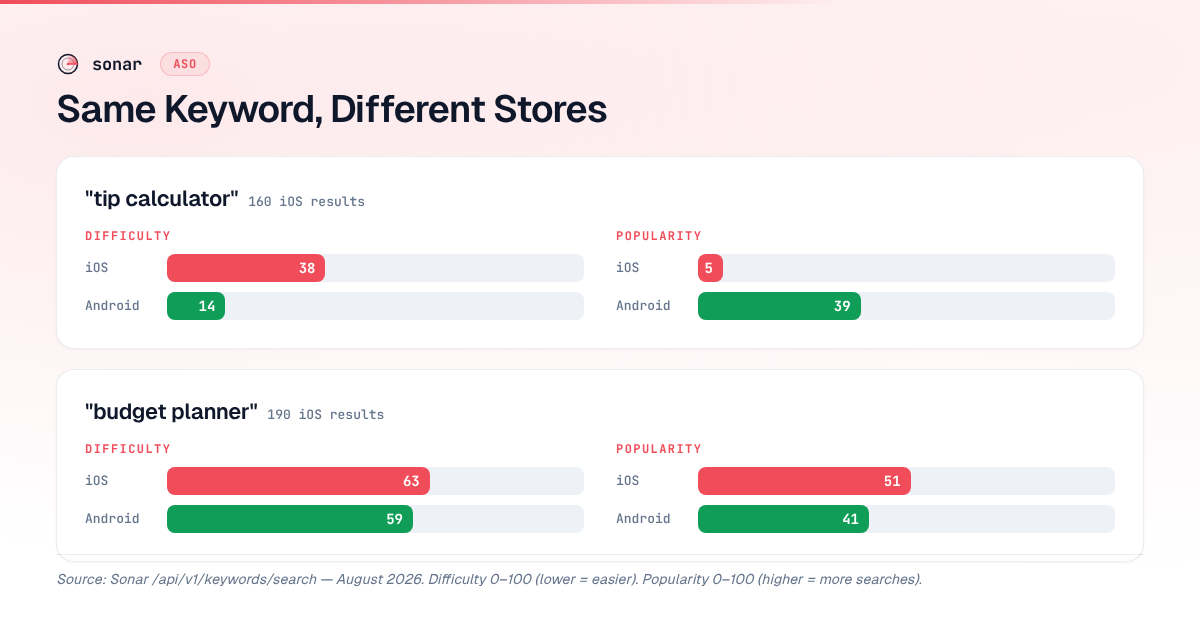
Sonar's keyword index shows "tip calculator" at iOS difficulty 38 (Apple popularity 5) versus Android difficulty 14 (popularity 39) — ranking the same keyword is nearly 3x harder on iOS than Android (source: Sonar /api/v1/keywords/search, queried August 2026). The top iOS result for "tip calculator" has over 60,000 reviews, while the Android market has a broader spread of competitors with lower individual review counts (source: Sonar /api/v1/apps/search).
For "budget planner," Sonar reports iOS difficulty 63 with Apple popularity 51, and Android difficulty 59 with popularity 41 — a competitive keyword on both platforms, with 190 results on iOS alone (source: Sonar /api/v1/keywords/search, queried August 2026).
| Keyword | iOS Difficulty | Android Difficulty | iOS Popularity | Android Popularity | iOS Results |
|---|---|---|---|---|---|
| tip calculator | 38 | 14 | 5 | 39 | 160 |
| budget planner | 63 | 59 | 51 | 41 | 190 |
The takeaway: any free rank checker you use needs to support both stores. Checking only one platform gives you half the picture, and the two halves often tell different stories.
What Free Rank Checkers Miss (and When to Pay)
Free tools have three structural limitations that paid platforms solve. If you already use a dedicated rank tracking workflow, some of these gaps will be familiar.
Data Freshness
Free tools typically update rankings daily or less frequently. Paid platforms like AppTweak and Sensor Tower offer near-real-time updates. If you are running Apple Search Ads and need to correlate paid and organic positions hour by hour, a free app ranking checker will not keep up.
Keyword Coverage
Free tiers usually cap you at 5–20 tracked keywords. Sonar's autocomplete suggestions for "budget planner" on iOS return 10 long-tail variants including "budget planner free," "monthly budget planner," and "fudget: budget planner tracker" — each a rank-tracking opportunity a free checker can surface (source: Sonar /api/v1/suggestions/search, queried August 2026). Tracking all 10 of those variants, plus your head terms, plus competitor keywords, quickly exceeds free limits.
Historical Data
Most free tools show current rank only. Paid tools store historical positions so you can correlate ranking changes with app updates, seasonal trends, or algorithm shifts. If you need to understand what ASO costs and how tool pricing scales, historical data is one of the biggest reasons people upgrade.
The Practical Threshold
In my experience, free rank checking works well when you have fewer than 5 keywords and 1–2 apps. Once you scale beyond that — say, tracking 20 keywords across iOS and Android for 3 apps — the manual overhead of free methods exceeds the cost of a paid plan. The breakpoint is roughly 30 keyword-platform combinations, at which point automation saves measurable time.
How to Interpret Ranking Data Correctly
Rank position alone is not enough. A free rank checker shows you where you are, but understanding what the number means requires two additional data points: keyword difficulty and keyword popularity.
Difficulty Tells You How Hard It Is to Move Up
Keyword difficulty measures the strength of the apps currently ranking for a term. A high-difficulty keyword means the top positions are held by apps with strong review counts and download velocity. For example, "budget planner" has a difficulty of 63 on iOS — the top 3 apps have strength scores of 12,561, 9,382, and 83,961 respectively (source: Sonar /api/v1/keywords/search, queried August 2026). Moving into those positions requires significant authority.
If you want a deeper understanding of what difficulty scores measure and how to use them, read our explanation of keyword difficulty.
Popularity Tells You Whether the Rank Matters
A rank-1 position on a keyword nobody searches for is worthless. Popularity (Apple's term) or search volume (Google Play's equivalent proxy) tells you how many users actually type that term. "Tip calculator" has an Apple popularity of just 5 on iOS but popularity of 39 on Android — the same keyword carries very different traffic potential depending on the platform (source: Sonar /api/v1/keywords/search, queried August 2026).
Combining Rank, Difficulty, and Popularity
The most useful interpretation of a ranking combines all three:
| Scenario | Rank | Difficulty | Popularity | Action |
|---|---|---|---|---|
| High rank, low popularity | 1–3 | Any | < 10 | Find higher-volume keywords |
| High rank, high popularity | 1–3 | Any | > 40 | Defend this position aggressively |
| Low rank, low difficulty | 10+ | < 30 | Any | Optimize — quick win opportunity |
| Low rank, high difficulty | 10+ | > 50 | Any | Consider long-tail alternatives |
For a full methodology on how to turn ranking data into keyword decisions, our ASO keyword research guide covers the process end to end.
How to Set Up Free Rank Tracking: A Step-by-Step Process
Here is the workflow I use when starting rank tracking for a new app without spending anything.
- Choose 5 seed keywords. Use your app's core functionality words. If you built a budgeting app, start with "budget planner," "expense tracker," "budget app," "money tracker," and "spending tracker."
- Expand with autocomplete. Type each seed keyword into the App Store or Google Play search bar and note the autocomplete suggestions. Sonar's autocomplete data for "budget planner" on iOS returns 10 long-tail variants — "budget planner free," "monthly budget planner," "weekly budget planner," and others (source: Sonar /api/v1/suggestions/search, queried August 2026). Each of these is a keyword worth checking your rank on.
- Record your baseline. Open a spreadsheet with columns: Keyword, Platform, Current Rank, Date, Difficulty, Popularity. For each keyword, do a manual search or use a free tool to record your current position. Include difficulty and popularity scores from a tool like Sonar to prioritize which rankings to improve first.
- Set a check cadence. For free tracking, weekly checks are the practical minimum. Daily is better if you have the time. Record the data each time — even if you are doing it manually, the historical trend is what tells you whether your ASO changes worked.
- Compare across platforms. Always check both iOS and Android if your app is on both. As shown in the difficulty comparison above, competition differs enough between stores that your optimization priorities should differ too. Our complete guide to app rank tracking covers setting up a sustainable tracking workflow across both platforms.
What to Track Beyond Raw Rank Position
A pure rank number misses context. When I track rankings for apps in Sonar's database, I also monitor these signals:
- Rank velocity — is your position trending up or down over the last 4 weeks? A single-week drop could be noise; a 4-week decline signals a real problem.
- Competitor movement — if you dropped from position 3 to 5, did two new apps enter the results, or did existing apps improve? The answer changes your response.
- Conversion rate at each position — Play Console and App Store Connect show conversion data. A position-5 ranking with a 40% conversion rate may drive more installs than a position-2 ranking with a 10% conversion rate. Track the right ASO KPIs alongside rank.
- Long-tail rank distribution — you may rank poorly for "budget planner" (difficulty 63) but hold position 2 for "monthly budget planner free" (difficulty 59). Long-tail wins compound. This is where knowing how to find and choose the right app store keywords pays off.
Free Rank Checking Tools Compared
| Tool/Method | Cost | iOS Support | Android Support | Keywords Tracked | Historical Data |
|---|---|---|---|---|---|
| Manual search | Free | Yes | Yes | Unlimited (manual) | No |
| App Store Connect | Free | Yes | No | Top terms only | Limited |
| Google Play Console | Free | No | Yes | All impression terms | 90 days (source: Google Play Console Help) |
| Sonar free tier | Free | Yes | Yes | Limited | No |
| AppFollow free tier | Free | Yes | Yes | Limited | Limited |
The Bottom Line
A free app ranking checker is sufficient for indie developers tracking a small keyword set across one or two apps. Manual searches, App Store Connect, and Google Play Console give you baseline positioning data at no cost, and free tiers of tools like Sonar add difficulty and popularity context. The threshold for switching to paid tools is roughly 30 keyword-platform combinations — below that, free methods deliver enough signal to guide your ASO decisions.
Frequently Asked Questions
How accurate is a free app ranking checker compared to paid tools?
Free rank checkers provide directionally accurate data, but they have limitations. Manual searches are affected by personalization — Apple and Google both tailor search results based on location, device, and history (source: Apple Developer — App Store Search). Paid tools use depersonalized lookups from multiple regions and devices to produce cleaner data. For most indie developers tracking under 10 keywords, free tools give you enough signal to make optimization decisions.
Can I check my app's ranking on both iOS and Android for free?
Yes. Manual searches work on both platforms, and several free tool tiers (including Sonar) support both iOS and Android keyword lookups. The key caveat is that difficulty and popularity scores differ significantly across platforms — "tip calculator" is nearly 3x harder on iOS (difficulty 38) than Android (difficulty 14) — so checking only one store gives an incomplete picture (source: Sonar /api/v1/keywords/search, queried August 2026).
How often should I check my app store rankings?
Weekly rank checks are the practical minimum for free tracking. Daily is ideal during periods of active optimization — for example, the first two weeks after changing your app title, subtitle, or description. Paid tools automate this with daily or hourly checks, but if you are manually tracking, a consistent weekly cadence produces enough data to identify trends within 4–6 weeks.
What is the difference between keyword difficulty and popularity in rank tracking?
Keyword difficulty measures the competitive strength of apps already ranking for a term. Popularity measures how often users search for that term. Both matter for interpreting your rank. A high-difficulty keyword like "budget planner" (iOS difficulty 63) means the top positions are locked by established apps, while popularity 51 confirms high search volume — so ranking improvements on that keyword yield significant download gains (source: Sonar /api/v1/keywords/search, queried August 2026).
Do app store ranking positions change by country?
Yes. App Store and Google Play search results are country-specific. Your app may rank position 2 for "budget planner" in the US and not appear in the top 50 in Germany. Free tools typically show results only for the country tied to your device or account settings. To check rankings in other countries, you need either a VPN (unreliable for store results) or a paid tool that supports multi-country lookups.
Want to check keyword difficulty, popularity, and autocomplete suggestions for your app's keywords? Try Sonar free — it covers both iOS and Android with real store data so you can prioritize the rankings worth improving.