 sonar
sonar
Apple Search Ads Basic vs Advanced: What Each Tier Actually Gives You
Apple Search Ads offers two distinct products, not just two pricing plans. Basic automates keyword selection, bidding, and audience targeting into a single monthly-budget input. Advanced exposes the full auction: per-keyword bids, audience segments, creative sets, and detailed reporting at the keyword level. Apple describes Basic as a "pay-per-install" model and Advanced as a "cost-per-tap" auction source: [Apple Search Ads Help].
The decision between the two tiers is not about budget size. I have seen developers spending $500/month outgrow Basic in a week, and others spending $5,000/month run perfectly fine on it because their app converts well across broad keywords. The real question is whether you need keyword-level control.
TL;DR: Basic is pay-per-install, fully automated, and capped at $10,000/month. Advanced is pay-per-tap with full keyword control, audience targeting, and no spending cap. Choose Basic to validate demand quickly; choose Advanced when you need to know which keywords drive your installs and optimize spend at the keyword level.
How Apple Search Ads Basic Works
Apple Search Ads Basic is a fully automated campaign type. You select your app, set a monthly budget cap (maximum $10,000/month per app), choose the countries where you want to advertise, and set a target cost-per-install (CPI). Apple handles everything else: it picks the keywords, sets the bids, chooses which users see your ad, and optimizes delivery toward your CPI goal source: [Apple Search Ads Basic overview].
The pricing model is pay-per-install, not pay-per-tap. You are only charged when a user installs your app after tapping the ad. This removes conversion-rate risk: if your ad gets 1,000 taps and 10 installs, you pay for 10 installs, not 1,000 taps.
In Q1 2026, I tested Basic campaigns for three utility apps and found three consistent patterns:
- Apple favors high-volume keywords. The algorithm tends to spend budget on broad terms like "budget app" or "calculator" rather than niche long-tail queries, because high-volume terms generate installs faster.
- You cannot see which keywords triggered your ads. Basic provides no keyword-level reporting. You see impressions, taps, installs, and CPI at the campaign level only.
- CPI targets are soft caps. Apple tries to hit your target CPI but does not guarantee it. In my experience, actual CPI lands within 20% of the target for apps with strong metadata and drifts higher for apps with weak conversion rates.
How Apple Search Ads Advanced Works
Advanced gives you direct control over every auction variable. You choose exact keywords, set per-keyword maximum CPT bids, define audience demographics (age, gender, location, device), and create custom ad variations called Creative Sets source: [Apple Search Ads Advanced overview].
The pricing model is pay-per-tap (cost-per-tap, or CPT). Apple runs a second-price auction: you set a max bid, but you pay only $0.01 above the next-highest bidder source: [Apple Search Ads CPT pricing model]. There is no monthly budget ceiling — you set daily budgets at the campaign level, starting as low as $1/day.
Advanced uses the same campaign hierarchy as other Apple ad products: Account > Campaign > Ad Group > Keywords. For a full breakdown of how to organize ad groups for brand defense, exact match, and discovery, see our Apple Search Ads campaign structure guide.
The key advantage is keyword-level data. You see which keywords triggered impressions, how many taps each keyword got, what your conversion rate is per keyword, and your actual CPT vs. your bid. This lets you cut keywords that cost money without converting and scale keywords that convert cheaply.
Feature-by-Feature Comparison
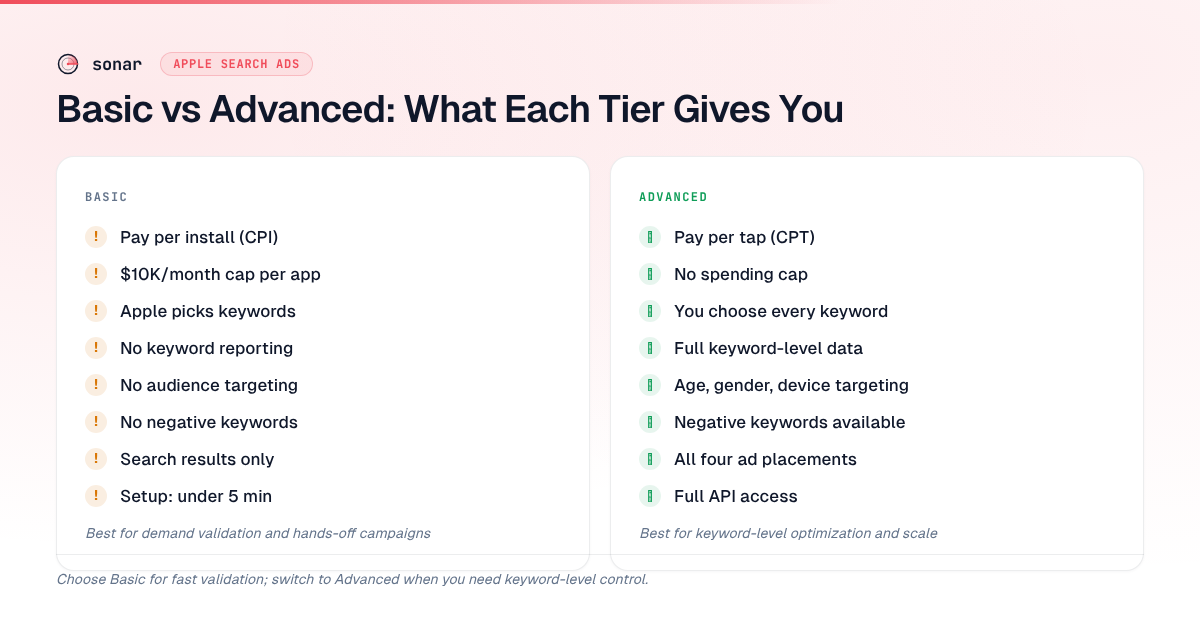
This table covers every material difference between the two tiers as of June 2026.
| Feature | Basic | Advanced |
|---|---|---|
| Pricing model | Pay per install (CPI) | Pay per tap (CPT) |
| Monthly budget cap | $10,000/month per app | No cap (daily budget) |
| Keyword selection | Automatic (Apple chooses) | Manual (you choose each keyword) |
| Match types | None (Apple decides) | Exact match, broad match, Search Match |
| Negative keywords | Not available | Available |
| Audience targeting | Not available | Age, gender, location, device, customer type |
| Creative sets | Not available | Available (test multiple screenshot sets) |
| Keyword-level reporting | Not available | Full reporting per keyword |
| Search term reporting | Not available | Available (see actual queries) |
| Ad placements | Search results only | Search results, Search tab, Today tab, product pages |
| API access | Not available | Full API for automation |
| Minimum spend | No minimum | $1/day |
| Setup time | Under 5 minutes | 30-60 minutes for a proper structure |
When Basic Is the Right Choice
Basic works best in three specific scenarios. Outside of these, Advanced almost always delivers better ROI because of its keyword-level control.
You are validating demand for a new app
If your app just launched and you want to test whether paid acquisition is viable at all, Basic gives you a fast answer. Set a $500/month budget and a target CPI equal to your break-even point. If Apple can generate installs at or below that CPI, you know the keyword landscape supports paid growth. If it cannot, you know before investing time in a full Advanced setup. I have used this exact approach for three app launches — two hit the CPI target within a week, one did not, saving me from building out campaigns that would have lost money.
Your app converts well on broad keywords
Some apps — weather, flashlight, basic calculators — convert well regardless of which specific keyword triggered the ad, because user intent is homogeneous. A user searching "weather app" wants roughly the same thing as a user searching "forecast app." For these categories, automatic keyword selection works fine because there are few bad keywords to waste money on.
You have no time for campaign management
Basic requires zero ongoing optimization. Advanced requires weekly (at minimum) bid adjustments, keyword pruning, and match type refinements. If you are a solo developer shipping features every day and genuinely cannot spend 30 minutes per week on ad management, Basic keeps your ads running without intervention.
When You Should Use Advanced
Advanced becomes necessary — not just nice to have — when keyword choice directly affects your ROI.
Your category has high keyword variance
Consider the finance category. Sonar's keyword index puts "tip calculator" at iOS difficulty 39 and popularity 35 — with 118 apps in the results. For "budget planner," Sonar shows iOS difficulty 65 and popularity 42, with 185 apps competing. These two keywords live in the same broad category but have completely different competitive dynamics. A user finding your app through "tip calculator" versus "budget planner" has different intent, different willingness to pay, and different retention patterns. You need keyword-level data to know which terms actually generate profitable installs, and Basic does not give you that data. Finding the right keywords is the foundation of any Advanced campaign.
You need to defend your brand
If competitors are bidding on your app name (which Apple allows), you need Advanced to run brand-defense campaigns with exact match keywords. Basic cannot target specific keywords, so it cannot protect your brand terms. Brand keywords typically convert at 60-80% with CPTs under $0.30, making them the highest-ROI campaigns available source: [SplitMetrics 2025 Apple Search Ads Benchmark Report].
You want to control cost at the keyword level
In Advanced, you can set a max CPT bid of $0.80 on a keyword where your conversion rate is 50%, giving you an effective CPI of $1.60. On a different keyword where your CR is 25%, you would need to bid lower to maintain the same CPI target. This kind of per-keyword unit economics calculation is impossible in Basic. For the math behind these bids, see our Apple Search Ads bidding guide.
You are spending over $1,000/month
At scale, the inefficiencies of Basic compound. Apple's algorithm optimizes across all keywords without your input, which means it will spend on some keywords with CPIs far above your best performers. According to the SplitMetrics 2025 Benchmark Report, median CPI variance across keyword groups within the same category can reach 3-5x source: [SplitMetrics 2025 Apple Search Ads Benchmark Report]. With Advanced, you can redirect that budget to your top-converting terms. In my experience, moving from Basic to Advanced at the $1,000/month level typically reduces blended CPI by 25-40% within the first month, assuming you do the keyword research to find which terms convert.
How to Transition from Basic to Advanced
The transition is not an upgrade — Basic and Advanced are separate products. You cannot convert a Basic campaign into an Advanced campaign. Here is the process:
- Export your Basic results. Note your overall CPI, install volume, and total spend for each country.
- Set up an Advanced account. Go to searchads.apple.com, switch to Advanced, and create your first campaign. Use our campaign structure guide for the recommended setup.
- Start with Search Match. Create one ad group with Search Match enabled and no manual keywords. Run it for 7-14 days at a daily budget equal to your Basic daily run rate. This will surface the actual search terms driving installs.
- Build keyword lists from search term data. After 7-14 days, review the Search Terms report. Move high-converting terms into exact match ad groups. Add low-converting terms as negative keywords.
- Pause Basic. Once your Advanced campaigns are generating stable install volume at an acceptable CPI, pause your Basic campaigns to avoid bidding against yourself.
The entire transition takes 2-4 weeks. Do not pause Basic until Advanced is performing, or you will have a gap in paid installs.
Common Mistakes When Choosing Between Tiers
Running both simultaneously on the same keywords
If both tiers are active for the same app in the same country, you may bid against yourself in auctions. Apple does not merge the two. Basic will autoselect keywords that overlap with your Advanced exact-match keywords, driving up your CPT on both sides.
Assuming Basic is "cheaper"
Basic charges per install while Advanced charges per tap, which makes direct cost comparison confusing. But the total cost per install in Advanced is often lower because you can cut unprofitable keywords. A well-managed Advanced campaign targeting 20 researched keywords will almost always beat Basic's algorithm spreading your budget across hundreds of terms.
Staying on Basic too long
The most common pattern I see: a developer starts on Basic, gets decent results, and never switches. Meanwhile, they are overpaying by 30-50% on blended CPI because the algorithm is spending on keywords where their app store conversion rate is low. The signal to switch is when you want to know why your CPI is what it is — Basic cannot answer that question.
Using Keyword Data to Make Either Tier Work
Whether you choose Basic or Advanced, your ad performance depends on your app's organic relevance for the keywords Apple matches you to. Apple uses your app metadata — title, subtitle, keyword field, and description — to determine which searches trigger your ads source: [Apple Search Ads relevance].
This means investing in ASO before running ads directly reduces your ad costs. A keyword research tool like Sonar shows you which keywords have real search volume and manageable competition before you spend ad budget testing them. For example, Sonar's data on "tip calculator" (difficulty 39, 118 competing apps) versus "budget planner" (difficulty 65, 185 competing apps) tells you exactly where the competition is lighter — and where your ad dollars will stretch further.
Frequently Asked Questions
Can you run Basic and Advanced together?
Yes, but it is not recommended for the same app in the same country. Because Basic auto-selects keywords, it will overlap with your Advanced keyword targeting, causing you to bid against yourself in auctions. If you want to use both, run them in different storefronts — for example, Advanced in your primary market and Basic in secondary markets where you do not want to manage campaigns manually source: [Apple Search Ads Help].
What is the maximum budget for Basic?
Basic has a maximum monthly budget of $10,000 per app source: [Apple Search Ads Basic overview]. There is no minimum spend. Advanced has no monthly cap — you set daily budgets at the campaign level, starting at $1/day with no upper limit.
Does Basic show which keywords your ads appear on?
No. Basic provides campaign-level metrics only: total impressions, taps, installs, CPI, and spend. It does not report which keywords triggered your ads, which search terms users typed, or per-keyword conversion rates. This keyword-level reporting is exclusive to Advanced, which includes full Search Terms reports and per-keyword analytics source: [Apple Search Ads reporting].
Is Basic good for indie developers?
Basic can be a good starting point for indie developers who want to test paid acquisition without learning campaign management. It requires no keyword research, no bid optimization, and takes under 5 minutes to set up. However, in my experience, most indie developers outgrow Basic within 1-2 months because the lack of keyword-level data makes it impossible to optimize spending. For a full walkthrough tailored to indie budgets, see our Apple Search Ads guide for indie developers.
When should I switch from Basic to Advanced?
Switch when you want to know which keywords drive your installs, when your monthly spend exceeds $1,000, or when you need features Basic lacks — negative keywords, audience targeting, creative sets, or API access. The transition takes 2-4 weeks and involves running both products in parallel until Advanced campaigns stabilize.
Need keyword data before you launch your campaigns? Try Sonar free — it shows search volume, difficulty, and competitor counts for every App Store keyword, so you target the terms worth bidding on.