 sonar
sonar
How to Increase App Downloads: What Actually Works in 2026, Ranked by Effort
Most advice on how to increase app downloads reads like a wish list: "optimize your metadata, run ads, get featured." None of it tells you what to do first when you have 2 hours on a Saturday and zero budget. This guide ranks every meaningful lever by effort-to-impact ratio so you can work through them in order. Every claim links to a source or to data pulled directly from Sonar's keyword index.
The App Store holds roughly 2.49 million apps as of mid-2026 (source: 42matters iOS statistics). Google Play lists over 2.55 million (source: 42matters Google Play statistics). Standing out requires deliberate, sequential work — not scattershot marketing.
1. Fix Your App Store Metadata (Effort: 1–2 Hours)
The single highest-ROI action is rewriting your title, subtitle, and keyword field to target terms people actually search. On iOS, the title field accepts 30 characters, the subtitle adds another 30, and the hidden keyword field gives you 100 more — all indexed for search (source: Apple App Store Connect Help). On Google Play, the title gets 30 characters but the long description gives you 4,000 characters of indexed text (source: Google Play Console Help).
A common pitfall is stuffing the title with brand words that nobody searches for. A better approach is leading with a high-popularity keyword. For 'habit tracker' on iOS, Sonar reports difficulty 68, Apple popularity 59, and an estimated 670 daily downloads at rank 1 (source: Sonar /api/v1/keywords/search, queried 2026-09-12). If your app plausibly fits that category, that's the term to build your title around — not your company name.
For a complete walkthrough, see our app store keyword research workflow.
How to Pick Keywords That Fit Your Competitive Level
Not every keyword is winnable. Sonar's keyword index puts 'budget planner' at iOS difficulty 64 with an Apple-reported popularity of 51 — generating an estimated 410 daily downloads for the #1 ranked app (source: Sonar /api/v1/keywords/search, queried 2026-09-12). That difficulty means the top 3 apps are well-established — a brand-new app would struggle to crack the first page.
Compare that to a lower-competition niche. 'Tip calculator' shows iOS difficulty 40 with Apple-reported popularity of 5 (proxy: 36), while Android difficulty is just 17 with proxy popularity 42 — illustrating how the same keyword can have dramatically different competitive profiles across stores (source: Sonar /api/v1/keywords/search, queried 2026-09-12).
The decision framework is simple:
| Difficulty Score | What It Means | Action |
|---|---|---|
| 0–30 | Low competition, winnable fast | Target immediately |
| 31–50 | Moderate — beatable with strong metadata | Target if relevant |
| 51–70 | Competitive — requires strong app + reviews | Target long-term |
| 71+ | Dominated by top publishers | Avoid unless you're one of them |
Use Sonar's keyword research tool to pull difficulty and popularity scores before committing to any term.
2. Improve Your App Store Page Conversion (Effort: 2–4 Hours)
Ranking for a keyword only matters if visitors actually install. The average iOS page-view-to-install conversion rate sits around 25–27% in the US (source: AppTweak 2026 benchmarks). Below 20% means your screenshots, icon, or description are actively losing users who already found you.
Three elements drive most of the conversion decision:
- Icon. It's the first visual in search results. Test bold, simple shapes against detailed illustrations. Our guide on app icon design covers the data.
- Screenshots. The first two screenshots are visible without scrolling on most devices. Use caption text that states a benefit, not a feature name. Apple's Product Page Optimization lets you A/B test up to 3 treatments.
- Ratings. Apps with ratings below 4.0 stars see up to 67% fewer downloads compared to 4+ star apps (source: Apptentive 2025 study). Raising your rating from 3.8 to 4.0 can lift installs by roughly 20% (source: Appalize ratings analysis). For practical methods, see our post on how to get more app reviews.
3. Localize Into Low-Competition Markets (Effort: 3–6 Hours)
Localization is one of the most underused ways to increase app downloads — and one of the most reliable. Apple supports over 40 store languages; Google Play supports roughly 80 (source: Apple Developer Documentation; Google Play Console Help). Each locale gives you a separate set of indexed metadata — effectively a fresh keyword field with near-zero competition in many languages.
The effort is modest — you're translating 30 + 30 + 100 characters of metadata per locale, not the entire app UI. Because most indie developers never localize at all, even a few translated keyword fields can place your app in searches with little to no competition in that language.
Start with markets where your app category has low saturation. For a deeper strategy, see our guide on keeping home rankings intact while localizing.
4. Build a Landing Page With a Smart Link (Effort: 4–8 Hours)
A mobile app landing page captures traffic that can't come through store search: social media shares, podcast mentions, press hits, and Google web results. The page should do exactly three things: explain what the app does in one sentence, show a screenshot, and link to the store with a smart link that detects the visitor's OS.
This matters because web-to-store traffic doesn't need to compete on store keywords at all — it bypasses the algorithm entirely. Every link you earn to that page also builds domain authority for future SEO.
5. Ask for Reviews at the Right Moment (Effort: 1–2 Hours Setup)
Apple's SKStoreReviewController API lets you prompt for a review up to 3 times per 365-day period per device (source: Apple Developer Documentation). The timing of that prompt is everything.
Trigger the review request after a moment of success: a completed workout, a saved budget, a streak milestone. Avoid triggering after crashes, errors, or first launch. Apps that improved from 3.5 to 4.4 stars saw roughly 25% more downloads (source: Appalize ratings analysis), and 79% of users check ratings before downloading (source: AppTweak 2026 reviews guide).
See our detailed playbook on app store ratings and rankings for the mechanics behind how star ratings feed into rank algorithms.
6. Write App Release Notes That Work for ASO (Effort: 30 Minutes per Update)
Release notes aren't just changelog entries. On Google Play, the "What's New" section is indexed for search. On iOS, the frequency and recency of updates influence algorithmic ranking (source: App Radar ranking factors). Consistent updates signal an active, maintained app — both to the algorithm and to users deciding whether to install.
Our guide on release notes that do real ASO work covers formatting rules and keyword placement.
7. Run Apple Search Ads on Your Own Brand Keywords (Effort: 2–3 Hours Setup)
Apple Search Ads (now called Apple Ads) deliver the lowest CPI among paid channels — a global median of $1.80 per install, though US installs average closer to $2.50–$4.00 (source: AppTweak October 2025 benchmarks, ~3,500 apps and 50,000 campaigns). The cheapest starting point is bidding on your own brand name: competitors are probably already bidding on it, and the CPI for branded terms is typically under $0.50.
This is a defensive move, but it also increases total downloads by catching users who search for your name and might otherwise get distracted by a competitor's ad. For a deeper comparison of paid versus organic investment, read Apple Search Ads vs. organic ASO.
8. Submit for App Store Featuring (Effort: 2–3 Hours)
Getting featured on the App Store's Today tab or a category collection can produce a massive download spike. Apple has a self-nomination form at developer.apple.com/contact/app-store/promote. Google Play offers a similar process through the Play Console.
The bar is high: 95% of featured apps on the App Store maintain average ratings of 4.0 or higher, and Apple favors strong design, accessibility support, and use of latest platform APIs (source: AppTweak ASO Trends & Benchmarks Report 2026). But the application itself takes under an hour. The effort is in building an app worthy of being featured.
For specifics on what Apple's editorial team looks for, see our breakdown of how Apple picks apps for featuring.
9. Create Content That Ranks for Related Web Searches (Effort: 8–20 Hours)
Content marketing is a slow-burn approach to increase app downloads, but the results compound over time. Write blog posts, tutorials, or tools targeting web queries adjacent to your app's use case. A budget planner app could publish "how to budget on minimum wage" and capture search traffic that has high intent to install a financial tool.
This approach works because it builds a funnel that sits above the store. Users discover your content via Google or AI search, hit your landing page, and flow into the store. The cost per install approaches zero over time — the only expense is the writing.
For a full organic acquisition strategy, read why our 90-day app marketing plan puts organic first.
10. Cross-Promote on Social and Communities (Effort: Ongoing)
Reddit, Product Hunt, niche Discord servers, and relevant subreddits drive real downloads when you add genuine value instead of spamming links. Product Hunt launches remain effective for indie apps — a well-executed launch consistently generates hundreds to low-thousands of unique visitors on launch day, according to shared launch retrospectives on the Product Hunt community forums.
The key is providing something useful (a free tool, a template, an insight) alongside the app link. Communities penalize pure self-promotion but reward builders who contribute.
Quick Reference: All 10 Strategies Ranked
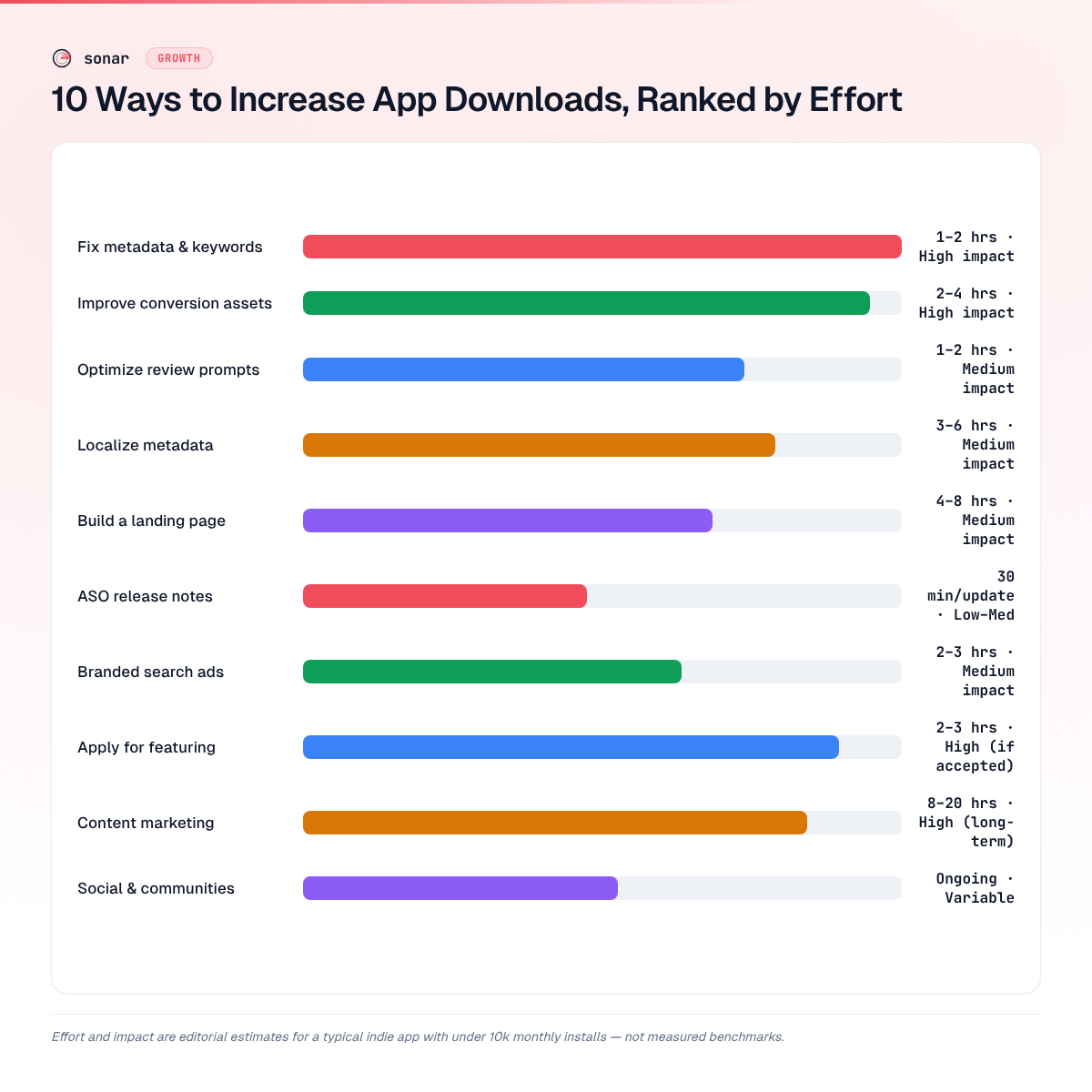
| Rank | Strategy | Effort | Expected Impact | Cost |
|---|---|---|---|---|
| 1 | Fix metadata / keywords | 1–2 hours | High | Free |
| 2 | Improve store page conversion | 2–4 hours | High | Free |
| 3 | Localize metadata | 3–6 hours | Medium | Free–$100 |
| 4 | Build a landing page | 4–8 hours | Medium | Free–$50 |
| 5 | Optimize review prompts | 1–2 hours | Medium | Free |
| 6 | Write ASO release notes | 30 min/update | Low–Medium | Free |
| 7 | Run branded search ads | 2–3 hours | Medium | $50–200/mo |
| 8 | Apply for featuring | 2–3 hours | High (if accepted) | Free |
| 9 | Content marketing | 8–20 hours | High (long-term) | Free |
| 10 | Social / community | Ongoing | Variable | Free |
Frequently Asked Questions
What is the fastest way to increase app downloads for free?
Rewriting your App Store or Google Play metadata to target searched keywords is the fastest free method. On iOS, you have 30 characters for the title, 30 for the subtitle, and 100 for the keyword field — all indexed for search (source: Apple App Store Connect Help). Changes typically reflect in search results within 24–48 hours of a new build going live.
How much do app store ads cost per install?
Apple Search Ads average a global median of $1.80 per install, based on AppTweak's analysis of roughly 3,500 apps and 50,000 campaigns (source: AppTweak October 2025 benchmarks). US installs run higher — $2.50 to $4.00 on average. Google Ads app campaigns vary widely by category and geography, so check Google's own benchmarks for current rates before budgeting.
Do app ratings really affect downloads?
Yes. Apps rated below 4.0 stars lose up to 67% of potential downloads compared to 4+ star apps (source: Apptentive 2025 study). Even a small improvement — moving from 3.8 to 4.0 — can lift installs by roughly 20%. Roughly 79% of users check ratings before deciding to download (source: AppTweak 2026 reviews guide).
Does localizing my app store listing actually increase downloads?
Apple supports over 40 store languages and Google Play supports roughly 80, each with a separate set of indexed metadata (source: Apple Developer Documentation; Google Play Console Help). Each locale you add is a separate chance to rank for keywords that may have little competition in that language — without changing the app itself.
How do I pick the right keywords for my app?
Start with a tool like Sonar that shows keyword difficulty, search popularity, and estimated downloads at rank 1. Focus on keywords with difficulty under 50 if your app is new. For example, 'tip calculator' has iOS difficulty 40 versus 'habit tracker' at difficulty 68 — a new app has a realistic shot at the first term but would struggle with the second (source: Sonar /api/v1/keywords/search, queried 2026-09-12). Our 6-step keyword research workflow walks through the full process.
---
Ready to find the keywords that will actually move your download numbers? Sonar shows real-time difficulty, popularity, and estimated downloads for every keyword in the App Store and Google Play — so you can stop guessing and start ranking.
