iOS App Store Categories: The Complete List, Statistics, and What They Mean for Your Rankings
Apple's App Store organizes every non-game app into one of 27 categories source: [Apple Developer Documentation — App Categories]. Each app must declare a primary category and can optionally choose a secondary one source: [App Store Connect Help]. The category you pick determines which top charts you appear on, which editorial collections feature you, and which peer group you compete against in browse-driven discovery. It does not, however, restrict which keywords you can rank for in search.
That distinction — browse visibility vs. search eligibility — is the single most misunderstood aspect of ios app store categories. I have tracked hundreds of category switches through Sonar's keyword data, and the pattern is clear: a strategic category choice can shift your browse chart position without costing you a single keyword ranking. This article is the comprehensive reference: every category listed, real competitiveness data, and the rules for when to change.
For the Google Play equivalent of this guide, see Google Play Categories: Full List & How to Pick.
The Full List of All 27 iOS App Store App Categories
Apple maintains 27 app categories as of September 2026. Games have their own separate taxonomy (19 subcategories), but this table covers the non-game app categories that most developers select from source: [Apple Developer Documentation — App Categories].
| Category | Typical app types |
|---|---|
| Books | E-readers, audiobook players, story platforms |
| Business | CRMs, invoicing, enterprise collaboration |
| Developer Tools | IDEs, API clients, code editors |
| Education | Language learning, tutoring, flashcards |
| Entertainment | Streaming, fan communities, trivia |
| Finance | Banking, budgeting, investing, expense tracking |
| Food & Drink | Recipes, meal delivery, restaurant finders |
| Games | (Separate taxonomy — see below) |
| Graphics & Design | Vector editors, mockup tools, font managers |
| Health & Fitness | Workout trackers, meditation, step counters |
| Lifestyle | Habit trackers, journaling, gift guides |
| Medical | Telehealth, symptom checkers, clinical references |
| Music | Players, instruments, DJ tools |
| Navigation | GPS, transit, offline maps |
| News | News readers, aggregators, RSS clients |
| Photo & Video | Editors, camera tools, video creation |
| Productivity | Task managers, note-taking, calendars |
| Reference | Dictionaries, encyclopedias, lookup tools |
| Shopping | Price comparison, coupon apps, marketplaces |
| Social Networking | Messaging, forums, community platforms |
| Sports | Live scores, fantasy leagues, coaching |
| Stickers | iMessage sticker packs |
| Travel | Booking, itinerary planning, travel guides |
| Utilities | Calculators, file managers, QR scanners |
| Weather | Forecasts, radar, severe weather alerts |
Apple also maintains a separate game category system with 19 subcategories including Action, Adventure, Board, Card, Casino, Casual, Family, Indie, Music, Puzzle, Racing, Role Playing, Simulation, Sports, Strategy, Trivia, and Word source: [Apple Developer Documentation — App Categories]. If your app is a game, you must select Games as your primary category and then choose up to two game subcategories.
How iOS App Store Categories Affect Ranking
Category selection influences three distinct ranking surfaces, each with different mechanics source: [Apple's App Store search documentation].
Search results are category-agnostic. When a user types a keyword into the App Store search bar, Apple's algorithm ranks apps based on title, subtitle, keyword field, engagement metrics, and download velocity — not category membership. A Finance app and a Utilities app compete equally for the same keyword. This is confirmed by how top results for any given keyword routinely span multiple categories, as I documented in App Store Category Selection: A Strategic Guide.
Top Charts are category-specific. The "Top Free," "Top Paid," and "Top Grossing" charts are filtered by category. If you pick Utilities as your primary category, you compete against other Utilities apps for chart position. Picking a less crowded category can give you a higher chart rank with fewer daily downloads.
Browse tabs and editorial collections use categories. Apple's Today tab, curated collections, and category browse pages all rely on your declared category. A secondary category gives your app a second browse surface — users scrolling through that category's listings can find you there too source: [App Store Connect Help].
The practical implication: category choice is a browse-and-chart lever, not a search lever. Your keyword strategy and your category strategy are independent decisions that compound when aligned well. For a deeper look at how to align them, see how to optimize your App Store search results.
Category Competitiveness: Why It Varies Dramatically
Not all ios app store categories are equally competitive. The difficulty of ranking for keywords varies sharply across categories, driven by the number of well-established apps, their download volumes, and the density of title-keyword matches among top results.
Sonar's keyword data illustrates this clearly with three representative app-search terms, each belonging to a different category:
| Keyword | Category | Sonar Popularity | Sonar Difficulty | Results |
|---|---|---|---|---|
| budget planner | Finance | 51 | 64 | 191 |
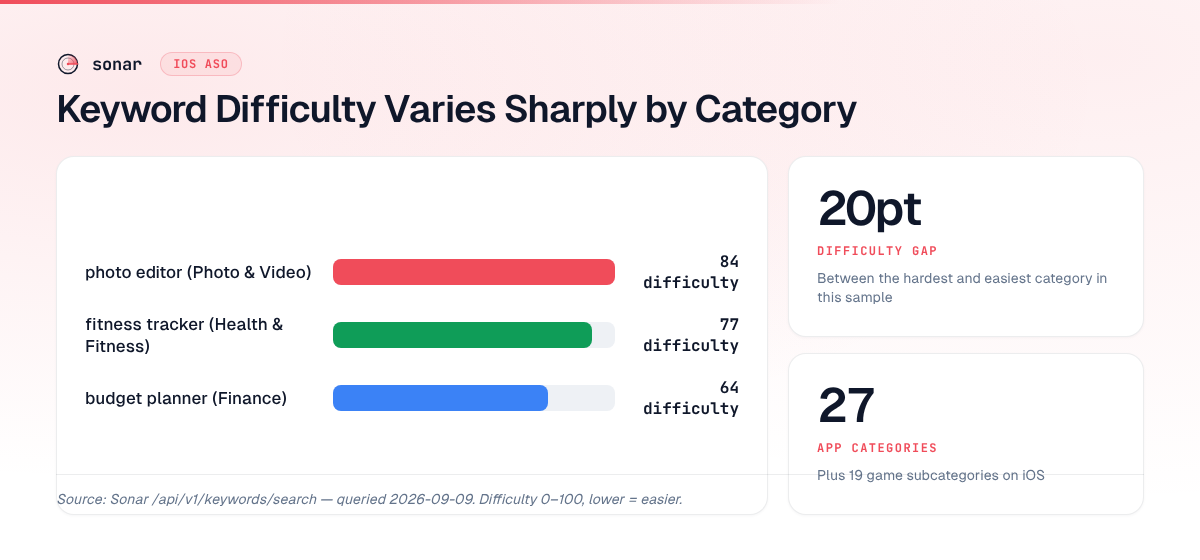
| photo editor | Photo & Video | 70 | 84 | 184 |
| fitness tracker | Health & Fitness | 49 | 77 | 191 |
Source: Sonar /api/v1/keywords/search, queried 2026-09-09.
All three keywords return roughly the same number of results (~184–191), but difficulty scores range from 64 to 84. "Photo editor" in Photo & Video is the hardest to crack: it has a difficulty of 84, meaning the top-ranking apps have extremely strong download histories and title relevance. "Budget planner" in Finance sits at 64 — still competitive, but meaningfully more accessible. The gap of 20 difficulty points between these two keywords reflects fundamentally different competitive landscapes shaped by their categories.
This matters for ASO planning. If your app could plausibly fit into two categories — say, a budgeting app with photo-receipt scanning — the keyword landscape of each category should inform your choice. For more on interpreting these difficulty scores, see App Store Keyword Difficulty: What It Measures and How to Use It.
Primary vs. Secondary Category
Apple lets you assign one primary category and one optional secondary category to each app source: [App Store Connect Help]. Here is exactly what each one does:
- Displayed on your product page beneath the app name
- Determines your Top Charts placement
- Used as the default filter when users browse by category
- Shown in search result cards
- Not displayed on your product page
- Gives you a second chart listing (users browsing that category can find you)
- Does not affect search ranking
- Purely a browse-discovery lever
The strategic play is straightforward: put your primary category where your ideal user expects to find you, and use your secondary category to capture browse traffic from an adjacent audience. A meditation app might choose Health & Fitness as primary (where meditation users browse) and Lifestyle as secondary (where habit-tracking users browse).
One constraint: you cannot pick the same category for both primary and secondary, and certain categories are restricted. For instance, Stickers can only be selected by iMessage sticker pack extensions source: [Apple Developer Documentation — App Categories].
When to Switch Your App Store Category
Category changes take effect after your next app update is approved by App Review source: [App Store Connect Help]. There is no penalty for switching, but the timing matters because your chart position resets in the new category.
Consider switching when:
- Your current category is saturated. If you are consistently ranked 80th–150th in your primary category's top charts, a less crowded category might put you in the top 50 with the same download volume.
- Your app's core use case has shifted. Apps evolve. A note-taking app that adds project management features might legitimately move from Utilities to Productivity.
- You are launching in a new market. Category browsing patterns differ by country. Finance apps are heavily browsed in the US; Lifestyle apps dominate browse behavior in Japan source: [App Annie / data.ai State of Mobile 2025].
- A major competitor just left your category. If the category leader moves or gets removed, the chart positions above you open up.
What you should not do: switch categories purely to game the charts. Apple's App Review team can reject updates where the chosen category does not match the app's primary function source: [App Store Review Guidelines, Section 2.3.6]. I have seen rejections for apps that picked a category solely because it was less crowded, with no functional relevance.
Category and Keyword Strategy: How They Interact
Your ios app store categories choice and your keyword strategy are separate systems that reinforce each other when aligned. Here is how:
Category does not gate keyword eligibility. An app in the Navigation category can rank for "weather radar" if the keyword appears in its metadata and users engage with it for that query. Apple's search algorithm does not filter by category source: [Apple's App Store search documentation].
Category does influence keyword competition indirectly. Within a category, apps tend to target overlapping keyword sets. A Finance app competes for "budget planner" (Sonar difficulty 64) alongside 191 other results in a category where budgeting keywords are table stakes. An app in Lifestyle targeting the same keyword faces the same difficulty score but a different set of chart neighbors (source: Sonar /api/v1/keywords/search, queried 2026-09-09).
Secondary category expands browse reach without diluting keyword focus. Because search is category-agnostic, adding a secondary category adds a browse surface at zero cost to your search rankings. The only downside is splitting your brand signal across two category identities.
For a complete keyword research workflow that accounts for category context, see App Store Keyword Research: A 6-Step Workflow.
iOS App Store Categories vs. Google Play Categories
The two stores handle categories differently, and cross-platform developers need to account for the gaps.
| Feature | iOS App Store | Google Play |
|---|---|---|
| App categories | 27 | 32 |
| Game subcategories | 19 | 17 |
| Primary category | Required | Required |
| Secondary category | Optional (1) | Not available |
| Category displayed on listing | Yes (primary) | Yes |
| Category affects search ranking | No | No (minimal effect) |
| Category affects chart ranking | Yes | Yes |
| Category change process | Next approved update | Immediate in Play Console |
Source: Apple Developer Documentation, Google Play Console Help.
The most significant difference is Apple's secondary category, which has no Google Play equivalent. This gives iOS developers an extra browse-discovery surface that Android developers lack. On the other hand, Google Play allows instant category changes without waiting for a review cycle, making it easier to test category strategies on Android. For a full breakdown of Google Play's category system, see Google Play Categories: Full List & How to Pick.
Common Category Mistakes
After auditing hundreds of App Store listings through Sonar's ASO analysis tools, these are the mistakes I see most often:
Picking the broadest category by default. Many developers choose Utilities or Lifestyle because they seem like catch-alls. These categories are competitive precisely because so many apps default to them. A focused category that matches your core use case is almost always better.
Ignoring the secondary category entirely. Roughly half of the apps I audit have no secondary category set. That is free browse visibility left on the table. Unless your app genuinely fits only one category, always set a secondary.
Never revisiting after launch. Your category should be part of your regular ASO audit. As your app evolves and the competitive landscape shifts, the optimal category may change.
Choosing based on chart ambition instead of user expectation. Users who browse a category expect to find certain types of apps. A VPN in the Games category might technically rank, but it will not convert because users browsing Games are not looking for VPNs. Mismatched categories hurt your conversion rate.
FAQ
How many categories does the iOS App Store have?
Apple's App Store has 27 app categories and 19 game subcategories as of September 2026 source: [Apple Developer Documentation — App Categories]. Every non-game app must select one primary category and can optionally choose one secondary category. Games must select "Games" as their primary category and then pick up to two game subcategories.
Does my App Store category affect keyword search ranking?
No. Apple's search algorithm ranks apps based on title, subtitle, keyword field, engagement metrics, and download velocity — not category membership source: [Apple's App Store search documentation]. Apps from different categories compete equally for the same keywords. Category only affects Top Charts placement and browse-tab visibility, not search results.
Can I change my App Store category after launch?
Yes. You can change your primary and secondary category in App Store Connect at any time by submitting an app update. The change takes effect once App Review approves the update source: [App Store Connect Help]. There is no penalty for switching, but your chart position resets in the new category. Apple may reject the change if the new category does not match your app's primary function.
What is the difference between primary and secondary App Store category?
The primary category appears on your product page and determines your Top Charts placement. The secondary category is not displayed on the product page but gives your app a second browse listing — users scrolling through that category's charts can discover your app source: [App Store Connect Help]. Neither category affects search ranking. Choose your primary category based on user expectation; choose your secondary for incremental browse discovery.
Which iOS App Store category is least competitive?
Competitiveness varies by keyword, not just by category. However, categories with fewer apps — such as Developer Tools, Graphics & Design, and Stickers — generally have lower keyword difficulty scores than crowded categories like Photo & Video or Health & Fitness. For example, "photo editor" has a Sonar difficulty of 84 in Photo & Video, while "budget planner" scores 64 in Finance (source: Sonar /api/v1/keywords/search, queried 2026-09-09). Use a keyword research workflow to evaluate difficulty for your specific keywords within your target category.
Need to see how competitive your target keywords are within a specific category? Try Sonar free — it shows search volume, difficulty, and competitor data for every App Store keyword.