Google Play Categories: The Complete List and How to Pick the Right One
Google Play requires every listing to declare exactly one category before publication -- there is no "uncategorized" option source: [Google Play Console Help]. That single selection determines which top charts you compete in, which peer group benchmarks your vitals, and which browse surfaces show your app. As of September 2026, Google Play offers 32 app categories and 17 game categories -- 49 total slots that shape how 2.5 billion monthly active Android users discover software source: [Google quarterly earnings, Q2 2026].
Most developers pick the obvious category at launch and never revisit it. That is often a mistake. After tracking category-switch experiments across hundreds of Android listings through Sonar, I have seen a well-timed category change shift browse visibility within 48 hours -- without touching a single keyword.
The Complete List of Google Play App Categories
Google Play divides all non-game listings into 32 app categories source: [Google Play Console Help]. The table below reflects the current list as of September 2026.
| Category | Typical app types |
|---|---|
| Art & Design | Drawing tools, graphic editors, coloring apps |
| Auto & Vehicles | Car maintenance, OBD scanners, driver navigation |
| Beauty | Makeup try-on, skincare trackers, salon booking |
| Books & Reference | E-readers, dictionaries, encyclopedias |
| Business | CRMs, invoicing, team collaboration |
| Comics | Comic readers, webtoon platforms |
| Communication | Messaging, email, video calls |
| Dating | Matchmaking, social dating |
| Education | Language learning, tutoring, flashcards |
| Entertainment | Streaming, memes, fan communities |
| Events | Ticketing, event discovery, RSVPs |
| Finance | Banking, budgeting, investing |
| Food & Drink | Recipes, restaurant finders, meal delivery |
| Health & Fitness | Workout trackers, meditation, step counters |
| House & Home | Smart-home control, interior design, real estate |
| Libraries & Demo | Library catalogs, demo/sample apps |
| Lifestyle | Habit trackers, journaling, gift guides |
| Maps & Navigation | GPS navigation, transit info, offline maps |
| Medical | Symptom checkers, telehealth, clinical references |
| Music & Audio | Music players, podcast apps, audio editors |
| News & Magazines | News aggregators, RSS readers, digital magazines |
| Parenting | Baby trackers, child safety, family organizers |
| Personalization | Launchers, wallpapers, icon packs |
| Photography | Camera apps, photo editors, gallery managers |
| Productivity | To-do lists, note-taking, calendar apps |
| Shopping | Price comparison, coupons, marketplace browsers |
| Social | Social networks, forums, community apps |
| Sports | Live scores, fantasy leagues, workout communities |
| Tools | Flashlights, file managers, QR scanners |
| Travel & Local | Flight booking, city guides, hotel search |
| Video Players & Editors | Media players, video editors, screen recorders |
| Weather | Forecasts, radar, weather alerts |
Among these, Tools is the most crowded: AppBrain data from July 2026 shows over 23,000 apps in Tools that have reached 50,000+ downloads, with Entertainment and Education close behind source: [AppBrain]. Libraries & Demo and Comics sit at the opposite extreme, with the lowest app counts. Choosing a less saturated Google Play category does not guarantee more visibility -- it depends on whether your target audience actually browses that section.
The Complete List of Google Play Game Categories
Game listings choose from a separate set of 17 game categories source: [Google Play Console Help].
| Category | Examples |
|---|---|
| Action | Shooters, platformers, combat games |
| Adventure | Story-driven exploration, point-and-click |
| Arcade | Classic-style, reflex-based games |
| Board | Chess, checkers, Go |
| Card | Solitaire, poker, collectible card games |
| Casino | Slots, roulette, virtual poker |
| Casual | Match-3, idle games, hyper-casual |
| Educational | Math puzzles, geography quizzes, kids' learning |
| Music | Rhythm games, music creation |
| Puzzle | Logic puzzles, sudoku, jigsaw |
| Racing | Driving, kart racing, drag racing |
| Role Playing | RPGs, MMORPGs, turn-based combat |
| Simulation | City builders, farming, life simulators |
| Sports | Soccer, basketball, golf simulators |
| Strategy | Tower defense, RTS, 4X games |
| Trivia | Quiz games, trivia competitions |
| Word | Crosswords, Wordle-style games, word searches |
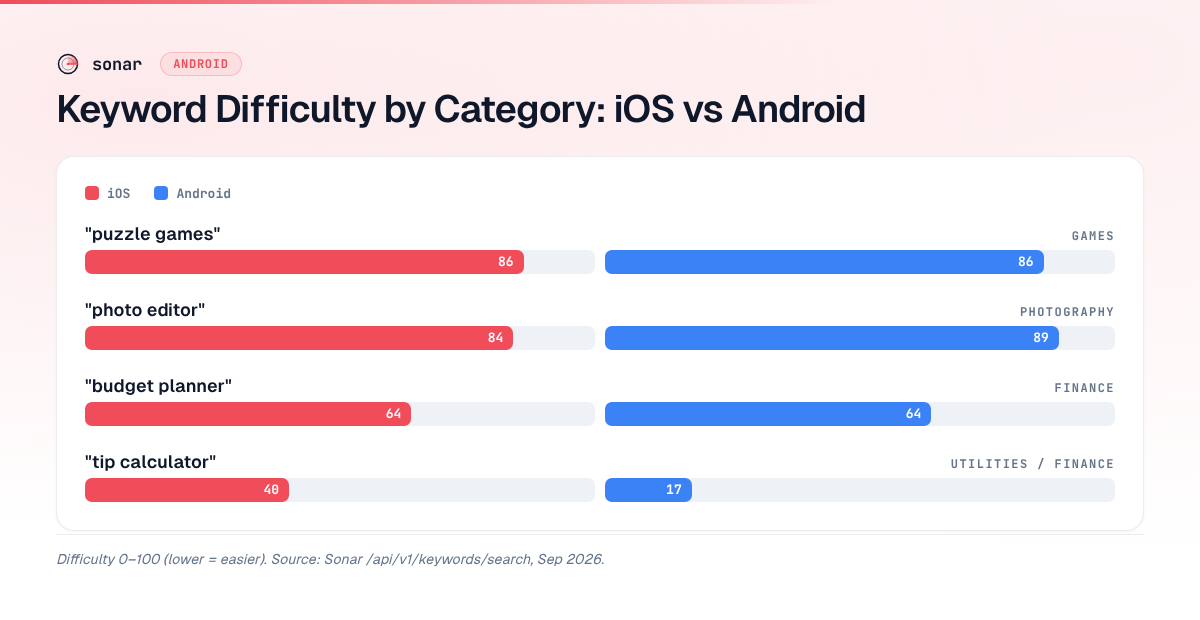
Game categories carry significantly higher keyword competition than most app categories. Sonar's keyword index shows "puzzle games" at difficulty 86 on iOS (Apple popularity 67) and difficulty 86 on Android (popularity 82) -- reflecting Games as one of the most competitive Google Play categories (source: Sonar /api/v1/keywords/search, queried 2026-09-05). The median install count among the top 10 Android results for "puzzle games" exceeds 132 million, based on Sonar's difficulty breakdown data. If you are launching in a game category, expect the bar for chart placement to be orders of magnitude higher than in most app categories.
How Google Play Categories Affect Ranking and Discovery
Category selection influences three distinct discovery surfaces. Understanding each one helps you treat category choice as a strategic lever, not a form field to rush past.
Top Charts
Every Google Play category has its own top free, top paid, and top grossing charts. Your category determines which chart you compete on. A meditation app in Health & Fitness competes against apps with tens of millions of downloads. The same app in Lifestyle faces a different competitive set with potentially lower chart-entry thresholds. Google calculates chart position using download velocity, revenue, ratings, and engagement signals -- not metadata keywords source: [Google Play Console Help]. For a deeper look at the signals Google weighs, see how Play Store ranking works.
Browse and Explore Surfaces
When users tap into a category on Google Play, they see curated clusters and editorial picks drawn from that category. Google also uses your category, tags, and engagement data to populate Explore-tab recommendations. An app in the wrong category will receive browse impressions from users who are not looking for that type of app -- hurting conversion rates and sending negative engagement signals back to the algorithm.
Peer Group Benchmarks
Play Console compares your crash rate, ANR rate, and acquisition metrics against a peer group built from your category and tag cluster source: [Google Play Console Help -- Peer Groups]. If your category does not match your actual function, your benchmarks become meaningless. A photo editing app miscategorized under Tools will be measured against flashlight apps and file managers, making its metrics uninterpretable.
Google Play Categories vs. Apple App Store Categories
The two stores structure categories differently, and this affects cross-platform ASO strategy.
| Dimension | Google Play | Apple App Store |
|---|---|---|
| Primary category | 1 required | 1 required |
| Secondary category | Not available | 1 optional source: [Apple App Store Connect Help] |
| Total app categories | 32 | 27 |
| Total game categories | 17 | 19 (includes subcategories) |
| Tags/supplementary classification | Up to 5 tags | None |
| Category change frequency | Anytime via Play Console | Anytime via App Store Connect |
The biggest structural difference: Apple gives you a secondary category that provides a second browse listing. Google Play does not. On Google Play, your single category choice carries more weight because there is no fallback. Tags partially compensate -- they feed Explore clusters and Similar Apps surfaces -- but they do not place your app in a second set of top charts. For a full breakdown of how ASO differs between the two stores, see iOS App Store vs Google Play: How ASO Differs Between Platforms.
The competitive landscape also varies by platform. For "tip calculator," Sonar reports iOS difficulty 40 vs Android difficulty 17, illustrating how the same keyword faces dramatically different competition depending on which category it falls into (source: Sonar /api/v1/keywords/search, queried 2026-09-05). All 10 top Android results feature exact title matches, per Sonar's difficulty breakdown. That low difficulty on Android means the Finance or Tools category -- where most tip calculators land -- has room for new entrants, whereas iOS is more contested.
How to Pick the Right Google Play Category
Choosing a Google Play category is not a creative decision -- it is a competitive positioning decision. Here is the framework I use.
Step 1: List Your Candidate Categories
Most apps fit 2-3 Google Play categories plausibly. A budgeting app could be Finance, Productivity, or Tools. A sleep tracker could be Health & Fitness, Lifestyle, or Medical. Write down every category a reasonable user would accept as accurate.
Step 2: Audit Top Chart Competition
For each candidate, check the current top 10 free apps. If the #10 app has 50 million downloads and yours has 5,000, that chart is not one you will crack soon. A less saturated category where you can reach the top 50 delivers more browse traffic than a mega-category where you are invisible.
Step 3: Match Your Target User's Browse Behavior
Ask: "Where would my ideal user tap when they open the Play Store without a specific app in mind?" A calorie-tracking app could technically fit Food & Drink, but users looking for calorie trackers more often browse Health & Fitness. Category-to-intent alignment improves both click-through rate and post-install engagement.
Step 4: Check Peer Group Alignment
Play Console's peer groups are tied to your category and tags source: [Google Play Console Help -- Peer Groups]. If your chosen category creates a peer group that does not reflect your actual competitors, your vitals benchmarks become noise. Pick the category where the top apps actually do what your app does.
Step 5: Validate With Keyword Data
Category does not directly affect search ranking -- Google indexes your title, short description, and long description separately. But category indirectly signals relevance. If the top 10 results for your primary keyword cluster in one category, that reflects user expectations. Use keyword research to verify.
Sonar puts "photo editor" at difficulty 84 on iOS (Apple popularity 70) and difficulty 89 on Android, with 6 of 10 top results featuring exact title matches on both stores -- showing how Photography category competition runs fierce cross-platform (source: Sonar /api/v1/keywords/search, queried 2026-09-05). If you are building a photo editor, the Photography category is the right fit, but expect an extremely high bar for visibility.
What Happens When You Change Your Google Play Category
Google Play allows category changes at any time through Play Console -- there is no waiting period or limit on frequency source: [Google Play Console Help]. But changing categories has real consequences.
- Your app moves to the new category's top charts. Your ranking starts from scratch in the new chart.
- Browse surfaces update. Users browsing your old category will no longer see your app.
- Your peer group shifts. Play Console benchmarks recalculate against the new category's cohort.
- Search rankings. Your keyword positions in Play Store search are unaffected by category switches because Google indexes metadata fields independently source: [Google Play Console Help].
- Your install count, ratings, and reviews carry over.
- Your tags remain the same unless you manually update them.
Timing considerations: Changes propagate within hours but can take up to 48 hours to fully update across all surfaces. I recommend switching mid-week, not during a launch campaign, to minimize temporary browse disruption. Google Play's listing experiments can help you A/B test other listing elements before and after a category switch to isolate its conversion impact.
Categories Are Not Tags
One common point of confusion: Google Play categories and Play Store tags serve different functions. Categories determine your chart placement, peer group, and top-level browse section. Tags feed Explore clusters, Similar Apps carousels, and curated collections. You get 1 category and up to 5 tags -- they work in parallel, not as substitutes.
| Signal | Controls | Developer picks | Limit |
|---|---|---|---|
| Category | Top charts, browse section, peer group | 1 from fixed list | 1 |
| Tags | Explore clusters, Similar Apps, collections | From predefined list | Up to 5 |
If your app appears in Search Analytics data for category-related queries but you are ranking on the wrong page, the fix might be a category change, a tag update, or both. Use Play Console Search Analytics to check which queries are driving impressions and whether they align with your current category.
FAQ
How many Google Play categories are there?
Google Play currently offers 49 categories total: 32 for apps and 17 for games. Every listing must select exactly one category before publication. There is no secondary category option on Google Play, unlike Apple's App Store which allows a primary and secondary category source: [Google Play Console Help].
Can I change my Google Play category after launch?
Yes. Google Play allows category changes at any time through Play Console with no waiting period or frequency limit source: [Google Play Console Help]. The change propagates within hours, though full update across all browse surfaces can take up to 48 hours. Your search keyword rankings, install count, ratings, and reviews are unaffected by the switch.
Does my Google Play category affect search ranking?
Category does not directly filter or weight search results. Google Play's search algorithm indexes your title (30 characters), short description (80 characters), and long description (4,000 characters) independently of your category source: [Google Play Console Help]. However, category indirectly signals topical relevance, and it determines which top charts and browse surfaces show your app.
What is the difference between Google Play categories and tags?
Categories assign your app to one of 49 fixed store sections and determine chart placement and peer-group benchmarks. Tags (up to 5 per listing) feed Explore recommendations, Similar Apps carousels, and Play Collections placement source: [Google Play Console Help]. Categories control where your app lives in the store hierarchy; tags refine how it is discovered within and across categories.
Which Google Play category is least competitive?
Libraries & Demo and Comics consistently have the lowest app counts on Google Play, based on AppBrain data source: [AppBrain]. However, low competition only helps if your target audience actually browses that category. Choosing a low-competition category that mismatches your user base hurts conversion rate and generates misleading peer-group benchmarks.
Need to see how keyword competition stacks up inside each category? Try Sonar free -- it shows difficulty, popularity, and competitor data for every keyword on both Google Play and the App Store.