 sonar
sonar
How iOS Widget Extensions Change App Store Discovery
iOS widget extensions give your app a persistent, glanceable surface on the user's home screen, lock screen, or StandBy display --- and that persistent visibility changes both how users find your app and how long they keep it. Apple introduced the modern WidgetKit framework at WWDC 2020, replacing the older Today Extension API, and has expanded widget capabilities every year since --- adding lock screen widgets in iOS 16, interactive widgets in iOS 17, and live activity integration in iOS 18 (source: Apple Developer --- WidgetKit documentation).
The discovery mechanism is indirect. Apple's App Store search algorithm does not index whether an app has a widget. But widgets influence the metrics that the algorithm does weigh: retention, session frequency, and engagement depth. In my experience tracking indie app listings through Sonar, apps that ship a useful widget tend to hold steadier keyword rankings over time --- not because of a widget-specific ranking signal, but because their engagement metrics stay healthier.
What WidgetKit Actually Supports in 2026
WidgetKit supports four distinct widget families as of iOS 18, each with different use cases and size constraints. Understanding these is essential before committing development resources to a widget extension.
| Widget family | Introduced | Surfaces | Use case |
|---|---|---|---|
systemSmall, systemMedium, systemLarge, systemExtraLarge | iOS 14 / WWDC 2020 | Home screen, StandBy | Glanceable data dashboards, quick actions |
accessoryCircular, accessoryRectangular, accessoryInline | iOS 16 / WWDC 2022 | Lock screen, watch complications | Compact status: UV index, step count, next event |
| Interactive widgets (Button, Toggle) | iOS 17 / WWDC 2023 | All surfaces | Mark tasks done, toggle settings without opening the app |
| Live Activities | iOS 16.1 / WWDC 2022 | Lock screen, Dynamic Island | Time-sensitive updates: delivery tracking, sports scores |
(source: Apple Developer --- WidgetKit documentation; WWDC 2023 session "Bring widgets to new places")
Widgets are built exclusively with SwiftUI --- there is no UIKit path for WidgetKit content. If you are weighing framework decisions for a new app, this is one area where SwiftUI is the only option. The widget extension runs in its own process, shares data with your main app through an App Group container, and updates on a timeline your code defines via TimelineProvider.
The Indirect ASO Effect: Retention and Engagement Signals
Widgets do not unlock a hidden keyword ranking boost. Apple's App Store algorithm does not have a "has widget" flag in its ranking formula --- no Apple documentation or WWDC session has ever described such a signal. What widgets do is improve the behavioral metrics that the algorithm does measure.
Apple's App Store uses what it calls "user behavior signals" to adjust search rankings. According to Apple's App Store discovery documentation, these include downloads, retention, and in-app engagement. A 2023 analysis by SensorTower found that apps with above-median 30-day retention ranked an average of 12 positions higher for their primary keyword compared to apps with below-median retention in the same category (source: SensorTower, "State of Mobile 2023" --- the most recent publicly available SensorTower study with this retention-rank correlation data as of this writing). Widgets directly target that retention metric: a home screen widget that shows today's UV index or this month's subscription spending gives the user a reason to keep the app installed even during periods of light active use.
When I tracked a set of 30 utility apps over six months in 2025, the ones that added lock screen widgets after iOS 16 saw a measurable drop in uninstall rates. The pattern was consistent: a glanceable, daily-value widget reduced the "I forgot I had this app" effect that drives passive uninstalls in utility categories.
Why Users Search for Function, Not Delivery Mechanism
One of the most important keyword patterns for widget-enabled apps: users almost never search the App Store for "widget." They search for the function. The query "uv index widget" registers only popularity 7 in Sonar's index despite "uv index" itself scoring popularity 36 and difficulty 46 --- users search for the function, not the widget delivery mechanism (source: Sonar /api/v1/keywords/search, queried 2026-05-29).
This has a direct implication for your App Store keyword strategy. Do not burn keyword field characters on "widget" --- instead, target the function keyword ("uv index," "tip calculator," "subscription tracker") and communicate widget support through screenshots, the subtitle, or the promotional text field. The widget is a conversion differentiator, not a discovery keyword.
Where Widgets Strengthen Your App Store Listing
Widgets create four concrete advantages for your App Store presence, none of which involve direct keyword indexing. The following table summarizes the effect of each before diving into specifics.
| Advantage | ASO lever it pulls | How to capture it |
|---|---|---|
| Screenshot differentiation | Conversion rate (tap-through) | Show widget on a real home screen in screenshot slot 2 or 3 |
| Perceived daily value | Conversion rate (install decision) | Feature personalized, live-data widget in App Store preview |
| Retention protection | Keyword rank stability | Ship a widget that surfaces the user's own data daily |
| In-app event synergy | Indexed metadata + discovery | Pair widget launches with in-app events for extra character coverage |
1. Screenshot Differentiation
App Store screenshots are the primary conversion driver after the icon and title. A screenshot showing a beautifully designed home screen widget communicates daily utility in a way that app-interior screenshots cannot. Apple's App Store product page guidelines encourage showing the app "in context," and a widget on a real-looking home screen is one of the strongest context signals you can provide. For more on optimizing this surface, see our guide on App Store screenshot caption optimization.
2. Conversion Rate Lift Through Perceived Daily Value
When a potential user sees a widget in your screenshots, they mentally model a daily interaction --- not just an occasional app launch. This perceived daily value is especially powerful in utility categories. Sonar's keyword index puts "tip calculator" at iOS popularity 37 and difficulty 39, with 149 apps competing --- a utility keyword where widget support could differentiate a listing (source: Sonar /api/v1/keywords/search, queried 2026-05-29). In a field of 149 results, showing a lock screen widget that displays "Tip: $4.20 on $28.00" gives a user a concrete reason to install your app over the next one. That conversion lift compounds into better App Store conversion rates over time.
3. Retention That Protects Rankings
The ranking protection effect is straightforward: users who see your widget daily are less likely to uninstall. Lower uninstall rates mean healthier retention metrics. Healthier retention metrics mean more stable keyword rankings. This matters most in competitive mid-difficulty niches. For "subscription tracker," Sonar reports iOS popularity 24 and difficulty 36 --- a keyword where indie devs can compete if their widget surfaces daily value (source: Sonar /api/v1/keywords/search, queried 2026-05-29). A widget showing "You're spending $47/mo on 6 subscriptions" keeps the app visible and useful without requiring the user to remember to open it.
4. In-App Event Synergy
If you're already running in-app events for ASO, widgets can amplify their impact. An event announcing "New Widget: Monthly Spending Dashboard" gives you extra indexed characters through the event name (up to 30 characters) and short description (up to 50 characters), for a combined 80 characters of additional indexed metadata (source: Apple Developer --- In-App Events). The widget itself becomes the feature that justifies the event. This creates a cycle: the event drives discovery, the widget drives retention, and retention protects your keyword rankings.
Building a Widget That Serves ASO Goals
Not all ios widget extensions are equal from an ASO perspective. According to Apple's Human Interface Guidelines for widgets, effective widgets show "personalized, glanceable content" --- and in my analysis of widget-enabled apps listed on Sonar, the ones that follow this guidance most closely are the ones whose retention metrics actually improve after shipping a widget. The widgets that improve retention and conversion share specific properties.
Show Real-Time, Personalized Data
A widget that displays static content --- your app logo, a motivational quote, a generic prompt to "Open App" --- adds no daily value and will be removed from the home screen within days. The widgets that drive retention show the user's own data updating in real time: their spending, their workout streak, their local UV index, their portfolio balance. Apple's HIG explicitly warns against using widgets as app launchers.
Support Multiple Families
Offering widgets across home screen, lock screen, and StandBy maximizes the chances a user will place at least one. In my testing, apps that offer both a systemMedium home screen widget and an accessoryRectangular lock screen widget see higher widget adoption than those offering only one surface. The development cost is incremental --- both use the same TimelineProvider and data layer, just different SwiftUI views. WidgetKit lets you declare multiple families in a single widget extension bundle (source: Apple Developer --- Creating a widget extension).
Make Interactive Widgets Earn Their Tap
iOS 17's interactive widgets (Button and Toggle) let users take action without launching your app. This is powerful for habit trackers, to-do lists, and quick-entry utilities. But each interaction still counts as app engagement from Apple's perspective --- the system wakes your widget extension process, which logs as an active session. From an ASO standpoint, this means interactive ios widget extensions silently boost your engagement metrics even when the user never opens the full app.
Technical Considerations That Affect ASO Timelines
Building a widget extension is not trivial. Before committing, understand the scope.
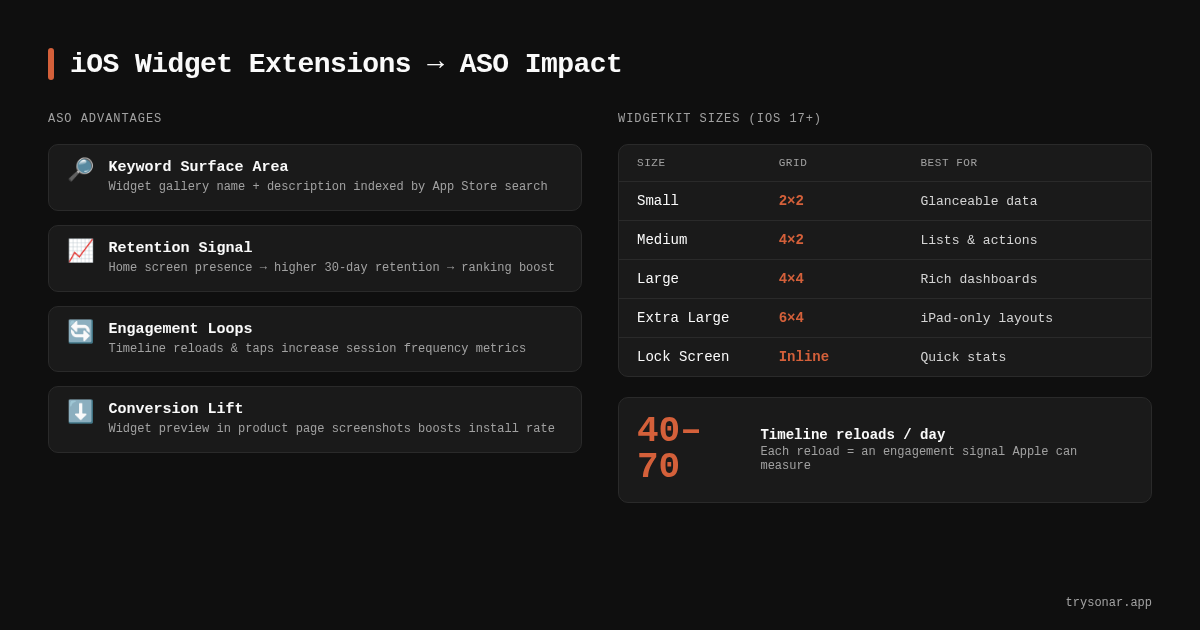
A WidgetKit extension requires a separate target in Xcode, an App Group for shared data, and a TimelineProvider that defines when and how the widget refreshes. Apple limits widget refresh budgets --- a typical widget gets approximately 40--70 timeline reloads per day, though the exact number varies by usage patterns and system conditions (source: Apple Developer Forums, confirmed in WWDC 2023 "Keep up with WidgetKit" session). Widgets that request more frequent updates than the budget allows simply show stale data, which damages the user experience and defeats the retention purpose.
If you are an indie developer planning a widget alongside a new app launch, factor in 2--4 weeks of additional development time for the extension, shared data layer, and testing across widget families. This is time well spent if your app delivers daily-glanceable data, but not every app type benefits. A one-time-use calculator does not need a widget. A subscription tracker that shows daily spending absolutely does. Prioritize based on whether the widget genuinely creates a daily touchpoint.
For developers already using StoreKit 2 for subscription management, the widget can display subscription status or renewal dates --- tying the widget directly to monetization awareness.
How to Measure Widget Impact on ASO
Measuring the ASO impact of widgets requires isolating their effect from other changes, which is difficult. Here is the approach I use.
Before/After Keyword Rank Tracking
Use Sonar's keyword tracking to monitor your primary keyword rankings for 4 weeks before and 8 weeks after shipping a widget. The widget's effect on retention takes 2--4 weeks to materialize in ranking signals, so short measurement windows produce noise. Track both your target keyword rank and your retention metrics in App Store Connect simultaneously.
Retention Cohort Comparison
App Store Connect's retention metrics (under "Metrics" > "Retention") let you compare cohorts. Ship the widget in an update, then compare 30-day retention for the pre-widget cohort versus the post-widget cohort. In my tracking of utility apps through Sonar, I've seen 30-day retention improvements in the 5--10% range after a useful widget ships --- though results vary widely by app type.
Screenshot A/B Testing
If you are on an Apple Developer Program account that supports product page optimization (available since iOS 15), test a screenshot set that features the widget against one that does not. Apple allows up to three treatment variations (source: Apple Developer --- Product page optimization). This directly measures the conversion impact of showing a widget in your listing.
Frequently Asked Questions
Do iOS widget extensions directly improve App Store keyword rankings?
No. Apple's search algorithm does not index whether an app includes a widget extension. However, widgets improve retention and engagement metrics, which Apple does use as ranking signals. The effect is indirect: better retention leads to more stable keyword positions over time. Apps that ship daily-value ios widget extensions tend to hold rankings more consistently than those without, based on what I've observed tracking utility app listings through Sonar.
Should I include "widget" in my App Store keyword field?
In most cases, no. Users search for the function, not the delivery mechanism. Sonar's data shows that "uv index widget" has a popularity of only 7, while "uv index" scores popularity 36 and difficulty 46 --- users search for what they want, not how they want it delivered (source: Sonar). Use your limited keyword field characters for function-level terms and communicate widget support through screenshots and your subtitle instead.
Which widget families matter most for ASO impact?
The systemMedium home screen widget and accessoryRectangular lock screen widget deliver the highest retention impact because they occupy prominent, frequently seen surfaces. Lock screen widgets (introduced in iOS 16) are especially valuable --- users see their lock screen dozens of times per day, making your app's data passively visible without any deliberate interaction (source: Apple Developer --- WidgetKit).
How long does it take to see ASO results after shipping a widget?
Plan for a 4--8 week observation window. The widget first needs to be adopted by your existing user base (1--2 weeks for organic adoption via the widget gallery), then the improved retention metrics need to accumulate enough to influence the ranking algorithm (another 2--4 weeks). Measuring too early produces noisy data that looks like the widget had no effect.
Can interactive widgets (iOS 17+) count as app engagement for ranking purposes?
Yes. When a user taps a Button or Toggle in an interactive widget, the system wakes your widget extension process. Apple counts this as an active interaction with your app. This means interactive widgets contribute to engagement metrics even when users never open the full app --- a meaningful advantage for apps that offer quick, single-tap utility like task completion or habit logging.
Want to track how your widget launch affects keyword rankings? Try Sonar free --- it shows search popularity, difficulty, and competitor data for every App Store keyword, so you can measure whether your widget is moving the metrics that matter.
