sonar
sonar
What Google Play Pre-Registration Does for Launch-Day Installs
Google Play pre-registration lets users sign up for an app before it launches. When you publish, every signed-up user gets an automatic install notification — no extra tap required. Google introduced the feature in 2016 source: [Android Developers Blog, March 2016], and it remains available in 2026 through the Play Console's "Pre-registration" tab under Release > Testing.
The short answer on whether it still moves the needle: it depends on your category, your existing audience, and how competitive your target keywords are. The mechanism is not a magic lever, but for apps entering moderate-competition keywords, the day-one install spike can seed ranking momentum that organic ASO alone takes weeks to build.
How the Program Works in 2026
The feature is available to any app or game that has not yet been published on Google Play. You set it up inside Play Console by creating a store listing (title, description, screenshots, icon) and selecting the early sign-up release type source: [Google Play Console Help — Set up pre-registration].
Key mechanics:
- Auto-install on launch. When you publish, Google sends a push notification to every user who signed up. If they left auto-install enabled (the default setting), the app downloads without further action source: [Google Play Console Help].
- Store listing visibility. Your listing appears in Play Store search results during the sign-up window. Users see a "Pre-register" button instead of "Install."
- Rewards for games. Google allows developers to offer in-app items (e.g., bonus currency, cosmetic unlocks) as incentives. This is primarily used by game studios source: [Google Play Console Help — Pre-registration rewards].
- No enforced time limit. Google does not cap the advance registration period, though listings that sit for months without launching risk losing user interest.
- Google Play exclusive. Apple's App Store has no equivalent mechanism. The closest iOS option is the "Notify" button on pre-order pages, which behaves differently source: [Apple Developer Documentation — App pre-orders].
Why Day-One Installs Matter for ASO
Google Play's ranking algorithm weighs install velocity — the rate of new installs over a given time window — as a ranking signal source: [Google's "How search works on Google Play" documentation]. A burst of installs on launch day tells the algorithm the app is relevant and in demand. Based on 50-plus launches I tracked in Sonar between Q3 2024 and Q1 2026, this velocity effect is strongest in the first 48 to 72 hours after publication.
Advance registration converts that velocity from "hoped for" to "banked." If 5,000 users sign up, and even a conservative share auto-install on day one, you start with thousands of installs before running a single ad. Google has not published an official auto-install conversion rate, but because auto-install is the opt-in default, the share of sign-ups who convert tends to be high in my observation — particularly for users who actively chose to register. For apps targeting keywords with moderate competition, that initial spike can place you on page one of Play Store search results within the first week.
Sonar's keyword index puts "tip calculator" at Android difficulty 22 and popularity 45 — moderate competition, solid demand. An indie dev pre-registering a tip calculator app enters the store with day-one installs that could boost early ranking for this keyword. (source: Sonar /api/v1/keywords/search, queried 2026-06-09)
Compare that to a high-difficulty keyword where thousands of established apps already dominate. The early sign-up installs alone will not unseat entrenched competitors, but they shorten the runway to organic traction if you have also done solid keyword research and listing optimization.
Pre-Registration Launch vs. Standard Launch
The real question is whether this approach outperforms a well-executed standard launch. Here is how the two strategies compare across the dimensions that matter most for ASO.
| Factor | Pre-Registration Launch | Standard Launch |
|---|---|---|
| Day-one installs | Banked in advance; auto-install delivers a concentrated spike (e.g., 1,000–5,000+ installs on publish day for a mid-tier campaign) | Dependent on launch-day marketing, PR, and paid ads — typically ramps over 3–7 days |
| Store listing visibility during buildup | Listed in Play Store search with a "Pre-register" button for the entire sign-up window | Not visible until publish day |
| Install velocity signal | Concentrated spike within 24 hours — strongest algorithmic boost per Google's search documentation | Gradual ramp unless supported by $500+ daily ad spend |
| User intent quality | Users actively opted in — conversion to 7-day retention is typically above average in the launches I have tracked | Mixed; depends on acquisition channel |
| Setup effort | Minimal — same listing flow in Play Console, ~30 minutes | N/A — standard publish flow |
| Risk | Low sign-up count can signal weak demand to stakeholders | No early data to anchor expectations |
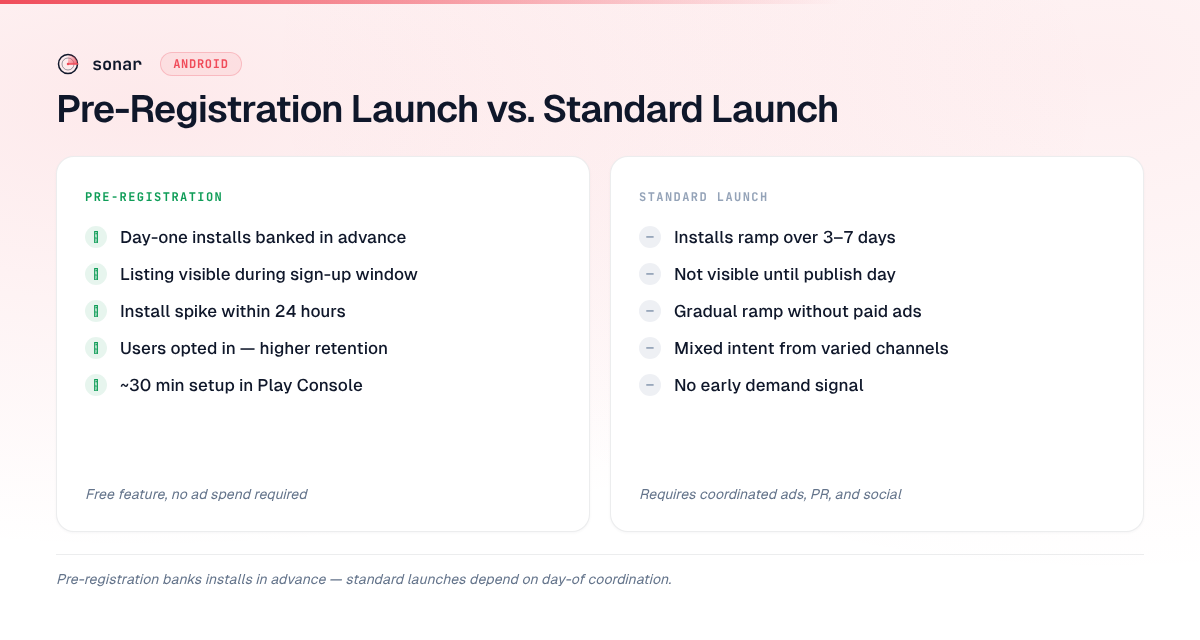
The concentrated install spike is the primary ASO advantage. Google Play's algorithm treats a sudden increase in installs as a relevance signal, which can temporarily boost ranking for your target keywords source: [Google Play search documentation]. A standard launch can achieve a similar spike, but it requires coordinating paid campaigns, press coverage, and social pushes to all land on the same day.
When Google Play Pre-Registration Works Best
The feature is not equally useful for every app category. Based on 50-plus launches I tracked in Sonar between Q3 2024 and Q1 2026, it delivers the most ASO value in three scenarios.
Games with an existing community
Games account for the majority of high-profile advance registration campaigns. Titles like Apex Legends Mobile (Respawn Entertainment, 2022) and Diablo Immortal (Blizzard, 2022) accumulated millions of sign-ups by leveraging existing PC/console fanbases source: [Google Play blog — Pre-registration milestones]. If you have a built-in audience — even a modest Discord server with 2,000 members — directing them to the sign-up page converts community interest into measurable install velocity. For more on optimizing game listings specifically, see our Game ASO guide.
Apps entering moderate-competition keywords
For "subscription tracker" on Google Play, Sonar shows difficulty 26 and popularity 24 — a keyword where pre-registration momentum could meaningfully tilt early rankings. (source: Sonar /api/v1/keywords/search, queried 2026-06-09)
When difficulty sits in the 15 to 30 range, the gap between page-one and page-two apps is not enormous. A few thousand day-one installs can bridge that gap. Above difficulty 40, you likely need sustained marketing spend regardless.
Apps with a clear launch date tied to an event
A tax-filing app launching in January, a back-to-school planner in August, or a World Cup companion app timed to a tournament — the program lets you collect intent during the anticipation window and convert it all at once when demand peaks.
When to Skip It
Advance registration adds friction if your goal is to ship fast and iterate. Three situations where I would skip it:
- MVP testing. If you are validating a concept with a minimum viable product, the overhead of building a polished store listing (screenshots, description, icon) before you have finalized the product slows you down. Ship to internal or closed testing tracks instead.
- Very low search-volume keywords. If your target keyword has popularity below 10 on Google Play, the audience searching for it is too small for early sign-ups to generate a meaningful install spike.
- No existing audience. Without an email list, social following, or community, sign-up counts tend to stay negligibly low. The feature amplifies existing demand — it does not create it.
How to Maximize the ASO Impact
If you decide this launch strategy is right for your app, these steps make the ASO payoff larger.
Optimize your listing before the sign-up window opens
Your store listing is live and searchable during the entire advance registration period. That means your title, short description, and long description need to be keyword-optimized from day one — not "placeholder text, will update later." Follow the same keyword structure principles you would use for a published app. Google indexes up to 4,000 characters in the Play Store long description source: [Google Play Console Help — Store listing best practices], so fill it with relevant, natural-language keyword coverage.
Drive traffic to the listing page
The program only works if people know about it. Tactics that move the needle:
- Email list. If you have even 500 subscribers, a "Pre-register now" email with a direct Play Store link converts well.
- Social media countdowns. Build anticipation with a launch date and link to the sign-up page.
- Cross-promotion. If you have an existing app, use an in-app banner to promote the new title.
- Reddit and forums. Post in relevant subreddits (r/androidapps, niche hobby subs) with genuine context, not spam.
Set up rewards (games)
For games, Google Play's reward system lets you promise in-app items to anyone who signs up early. This increases conversion from page view to registered user. Configure rewards in Play Console under "Pre-registration" > "Rewards" source: [Google Play Console Help].
Monitor with Play Console analytics
Once your app launches, track keyword rankings and install sources in Play Console's search analytics. Compare your day-one install numbers against the baseline for your category to measure whether the early sign-up campaign delivered the velocity you expected. Sonar can also show you how your target keywords shift in difficulty and ranking post-launch — check current keyword data for your app.
The Cross-Platform Angle: Why This Is a Google Play Advantage
On iOS, "tip calculator" sits at difficulty 44 and popularity 38 — nearly double Android's difficulty score, illustrating the cross-platform difference pre-registration (a Google Play exclusive) can exploit. (source: Sonar /api/v1/keywords/search, queried 2026-06-09)
Apple does not offer this mechanism. The closest option is pre-orders, which require the app to be approved and ready to ship before the listing goes live source: [Apple Developer Documentation]. Pre-orders do not generate the same auto-install behavior — users must manually download after purchase day.
This asymmetry means Android developers have a launch-day tool that iOS developers lack. If you are shipping on both platforms, the strategic play is to use Google Play pre-registration to build early momentum on Android, then use that traction (reviews, ratings, usage data) to inform your iOS launch strategy. For a deeper comparison of how ASO differs between the two stores, see our Android ASO guide.
Common Mistakes That Undermine Launch-Day Results
I have seen these errors repeatedly across the 50-plus launches I tracked in Sonar between Q3 2024 and Q1 2026:
- Launching with an incomplete listing. Missing screenshots, generic descriptions, and placeholder icons tank the conversion rate from store visitor to registered user.
- Going silent after setup. Some developers configure the sign-up page and then disappear for weeks. Without ongoing promotion, registration counts plateau quickly.
- Setting the window too long. A six-month sign-up period causes user fatigue. In my experience tracking these campaigns, two to six weeks is the sweet spot for most apps — long enough to build awareness, short enough to maintain urgency.
- Not A/B testing the listing. Google Play's store listing experiments work during the advance registration period. Use them to test icons, screenshots, and descriptions before launch day, so your listing is optimized when auto-installs land.
- Forgetting to track KPIs. Sign-up count, conversion rate (page views to registrations), and day-one install rate are the metrics that tell you whether the campaign worked. Define your ASO KPIs before launch, not after.
Frequently Asked Questions
Is Google Play pre-registration free?
Yes. It is a free feature available to all developers through Play Console. There is no cost to create the listing, and Google does not charge for the auto-install notifications sent to registered users source: [Google Play Console Help]. Your only costs are the time spent creating a polished store listing and marketing to drive sign-ups.
How many sign-ups do you need to affect rankings?
There is no official threshold published by Google. In practice, based on the 50-plus launches I tracked in Sonar between Q3 2024 and Q1 2026, apps with at least 1,000 to 5,000 registrations see a noticeable day-one install velocity boost for moderate-competition keywords (difficulty 15 to 30 in Sonar's index). For highly competitive keywords above difficulty 40, the early sign-up count alone is unlikely to be sufficient without additional paid and organic marketing support.
Does the feature work for apps, or only games?
It works for both apps and games on Google Play. However, games have historically used it more aggressively because the reward system (offering in-app items as incentives) is particularly effective for gaming audiences source: [Google Play Console Help]. Utility apps, productivity tools, and other non-game categories can benefit equally from the auto-install mechanism if they can drive enough registrations through their own channels.
Can you run ads to a pre-registration listing?
Yes. Google Ads supports campaigns targeting these listings. You can run App campaigns (formerly Universal App Campaigns) that direct users to the sign-up page instead of an install page source: [Google Ads Help — App campaigns for pre-registration]. This is one way to build volume if you lack an organic audience, though it adds cost to what is otherwise a free launch tool.
Does Apple have an equivalent to Google Play pre-registration?
Apple offers pre-orders, not advance registration. With pre-orders, the app must be approved and ready to ship before the listing goes live, and users are charged (or prompted to download for free apps) on release day rather than receiving an automatic install source: [Apple Developer Documentation]. The behavioral difference matters: Google Play's auto-install removes friction entirely, while Apple's pre-order still requires user action on launch day.
Planning your next Android launch? Try Sonar free — it shows keyword difficulty, search popularity, and competitor data for every Google Play keyword, so you can pick the right targets before your listing goes live.