Games Play by Different ASO Rules
App store optimization for games is not the same as ASO for productivity apps or utilities. The visual standards are higher, the keyword landscape shifts with seasons and cultural moments, and the conversion factors that matter most -- screenshots, video previews, ratings -- carry more weight than they do for a calculator or weather app.
Games account for roughly 75% of App Store revenue and over 60% of Google Play downloads. The competition is intense but the audience is massive. If your game's store listing is not optimized, you are leaving installs on the table every day.
This guide covers game ASO strategies that differ from general app optimization: keyword approaches, screenshot and video best practices, seasonal optimization, category selection, and ratings management.
Game-Specific Keyword Strategies
Genre + Mechanic Combinations
The biggest keyword mistake game developers make is targeting single broad terms like "puzzle game" or "rpg." These are dominated by studios with millions of downloads and four-digit review counts. You will not crack the top 10.
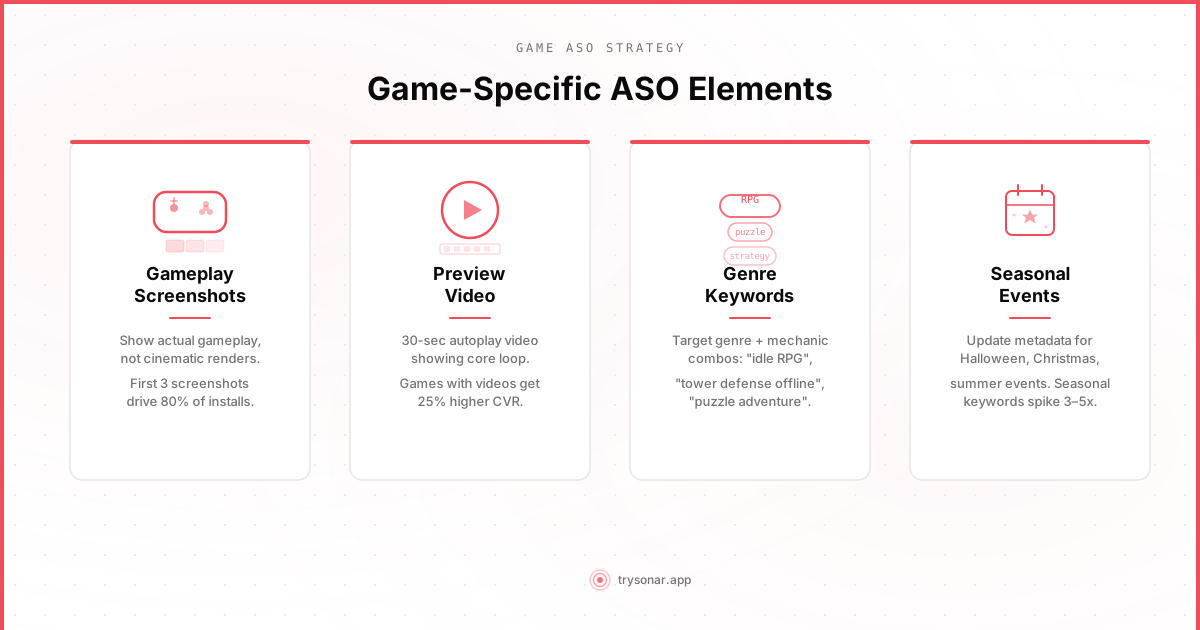
Instead, target compound keywords that combine genre with mechanic, theme, or audience:
- "puzzle game for adults" instead of "puzzle game"
- "idle rpg offline" instead of "rpg"
- "tower defense strategy" instead of "tower defense"
- "word game multiplayer" instead of "word game"
- "racing game no wifi" instead of "racing game"
These combinations have lower search volume individually, but they convert better because the user's intent is specific. For more on finding low competition keywords, see our dedicated guide — and check the karaoke app keyword difficulty page to see how niche game-adjacent keywords compare. Someone searching "idle rpg offline" knows exactly what they want. If your game matches, your conversion rate will be far higher than ranking #8 for "rpg."
Leverage Game-Specific Modifiers
Certain modifiers are unique to game searches and carry real volume:
- Connectivity: "offline," "no wifi," "no internet" -- these matter because gamers play on commutes, flights, and in areas with poor connectivity
- Monetization model: "free," "no ads," "premium," "no in app purchases"
- Play session length: "quick," "casual," "endless"
- Social features: "multiplayer," "co-op," "pvp," "2 player"
- Platform feel: "console quality," "pc games on phone"
Build your keyword field (iOS) or description (Google Play) around your core genre plus these modifiers. Our metadata optimization guide covers field-by-field strategy for both stores. On iOS, you have 100 characters in the keyword field -- do not waste any on spaces after commas or on your app name (Apple already indexes it).
Trending and Cultural Keywords
Games can ride cultural waves in ways other app categories cannot. When a survival horror show trends on Netflix, searches for "zombie game" and "survival game" spike. When a fantasy franchise releases a new season, "rpg" and "adventure game" see bumps. These patterns repeat predictably.
Monitor trending entertainment and consider whether your game naturally fits emerging search patterns. Do not force irrelevant keywords -- both stores penalize stuffing and irrelevance -- but if there is a genuine connection, update your metadata to capture the moment.
Screenshots: Your Most Important Conversion Asset
For games, screenshots are not just important -- they are the primary reason someone taps "Get" or keeps scrolling. Unlike utility apps where a clean UI screenshot communicates value, game screenshots need to sell an experience.
Show Gameplay, Not Menus
The single most common mistake in game ASO is leading with a title screen, menu, or loading screen. Nobody downloads a game because the menu looks good. Lead with your most visually impressive gameplay moment.
Your first two screenshots are critical because they appear in search results without the user tapping into your listing. On iOS, these two frames are your entire pitch to someone scrolling through search results. Make them count.
Design Principles for Game Screenshots
Capture action moments. Show combat, puzzle-solving, building, racing -- whatever your core loop is, show it at its most dynamic. A tower defense game should show towers firing at a wave of enemies, not an empty map.
Use text overlays sparingly. A short callout like "200+ Levels" or "Real-Time PVP" adds information. A paragraph of text covering your gameplay defeats the purpose. Two to four words per screenshot is the right range.
Show progression and variety. If your game has multiple worlds, biomes, or game modes, spread them across your screenshots. This communicates depth and replayability -- two things that drive game installs.
Maintain visual consistency. Use a consistent color scheme, font, and border style across all screenshots. Inconsistent screenshots signal a low-quality product.
Match your orientation. If your game plays in landscape, your screenshots should be landscape. Mixing orientations looks sloppy.
A/B Test Your Screenshots
Google Play offers built-in A/B testing through store listing experiments. Test different screenshot orders, gameplay moments, and text overlays. Even small conversion improvements compound into thousands of additional installs over time.
On iOS, App Store Connect supports product page optimization tests with up to three treatment variants. Test your first screenshot aggressively -- it has the highest impact on conversion.
App Preview Videos
Both stores support short video previews, and for games, video is far more effective than static screenshots at communicating the feel of gameplay. A well-made preview video can increase conversion rates by 20-30%.
What Makes a Good Game Preview
Start with your hook. The first three seconds determine whether someone keeps watching. Open with your most impressive visual moment -- an epic boss fight, a satisfying puzzle completion, a dramatic race finish. Do not open with your studio logo or a slow pan across a map.
Show the core loop. After the hook, show what the player will actually spend most of their time doing. If your game is a match-3, show matching. If it is a builder, show building. Trailers that only show cinematics mislead users and lead to negative reviews.
Keep it short. Both stores allow up to 30 seconds, but you do not need to use all of it. A tight 15-20 second video that shows three distinct gameplay moments beats a 30-second video that drags.
No voiceover needed. Most users watch previews with sound off. Use text overlays for any information you need to convey. If your game has great audio, it is a bonus for those who do listen, but do not depend on it.
Show real gameplay. Both Apple and Google require that preview videos show actual gameplay. Pre-rendered cinematics alone will get your video rejected on iOS and erode trust on Google Play.
Seasonal and Event-Based Optimization
Games have a unique advantage in game ASO: seasonal relevance. Search patterns for games shift dramatically around holidays, events, and cultural moments.
Key Seasonal Windows
Halloween (October): Horror games, spooky themes, zombie games. Search volume for "scary game," "horror game," and "zombie" spikes significantly. If your game has any horror or dark theme elements, update your screenshots with Halloween-themed visuals and adjust keywords.
Christmas/Holiday Season (December): Overall app downloads peak. Family-friendly games, multiplayer party games, and cozy games see boosted search volume. "Christmas game," "holiday game," and "family game" all spike.
Summer (June-August): Casual games see higher search volume as students are out of school. "Offline game" and "road trip game" increase as families travel.
Back to School (September): Brain training games, educational games, and quick-play games see a bump.
New Year (January): Brain games, puzzle games, and self-improvement related games benefit from New Year's resolution traffic.
How to Execute Seasonal Updates
Plan your metadata updates two weeks before each seasonal window. App review times can take a day or two, and keyword ranking takes time to stabilize. If you update your Halloween keywords on October 28th, you have missed the window.
On iOS, use custom product pages to show seasonal creative without replacing your default listing. On Google Play, use store listing experiments to test seasonal variants. After the season ends, revert your metadata -- keeping "Christmas game" in your keywords in February signals neglect.
Category Selection
Choosing the right category affects your visibility in browse rankings and category charts.
Primary category matters most. If your game is a puzzle game with RPG elements, ask: will users browsing the Puzzle category or the RPG category be more likely to download it?
Consider category competition. "Games - Action" is one of the most competitive categories. "Games - Board" or "Games - Word" are less crowded. If your game legitimately fits a less competitive category, you will rank higher in category charts with fewer downloads.
Secondary category on iOS. Apple lets you choose a secondary category. Use it to double your browse exposure.
Google Play tags. Use all available tag slots. These influence where your game appears in browse recommendations.
Ratings and Reviews: The Trust Signal
Games receive more reviews per install than most app categories because players are emotionally invested. This is both an opportunity and a risk.
Timing Your Review Prompts
Do not ask for a review during a frustrating moment. The worst time to prompt for a review is after a player loses a level, runs out of lives, or encounters an ad. The best times are:
- After completing a level or achieving a milestone
- After unlocking a new character, item, or feature
- After a win streak or personal best
- When returning to the game after a break (they came back -- they probably like it)
On iOS, you are limited to three SKStoreReviewController prompts per year per user. Make them count by triggering at peak positive moments.
Responding to Negative Reviews
Game reviews skew emotional. A player stuck on level 47 might leave a one-star review saying the game is "impossible." Responding with a helpful tip can sometimes get them to update their review. On Google Play, developer responses are visible to all potential users -- a thoughtful response to a negative review builds trust with everyone who reads it.
Managing Rating Drops After Updates
A common pattern: you push an update that changes game balance or introduces bugs, and negative reviews flood in. Have a plan for this. Monitor reviews closely after every update and respond quickly. If you broke something, acknowledge it and ship a fix fast. Your rating is your most important conversion factor after screenshots. For detailed strategies, see our guide on how to get app reviews.
Localization: Multiply Your Reach
Games are inherently more localizable than text-heavy utility apps. Gameplay screenshots often need minimal text changes. If your game has universal appeal -- puzzles, racing, platformers -- localizing your metadata into the top 10 languages can dramatically increase your addressable market.
At minimum, localize your app name, subtitle, keyword field (iOS), descriptions (Google Play), and screenshot text overlays. You do not need to localize the game itself -- many players are comfortable playing games in English as long as the gameplay is intuitive. But they will only find your game if your metadata matches their search language.
Tracking What Works
Game ASO is not a one-time optimization. Keywords shift, competitors enter and leave, seasonal patterns repeat annually. Track your keyword rankings over time to understand what is working.
Use a tool like Sonar to monitor rankings, track competitor movements, and spot new keyword opportunities as search patterns evolve. The developers who treat ASO as an ongoing process -- updating keywords quarterly, testing screenshots monthly, optimizing for seasonal windows -- consistently outperform those who set their listing once and forget it.
The Game ASO Checklist
Before your next update, run through this list:
- Keywords: Are you targeting genre + mechanic combinations, not just broad terms?
- First two screenshots: Do they show your best gameplay, not menus?
- Video preview: Does it open with a hook and show real gameplay?
- Seasonal relevance: Is a seasonal window approaching that your game fits?
- Category: Are you in the most strategically advantageous category?
- Review prompt timing: Are you asking at positive emotional peaks?
- Localization: Have you localized metadata for your top markets?
- Description: Does it lead with what makes your game fun, not your studio history?
Game ASO rewards consistency. Start with the highest-impact item on this list that you have not addressed yet, measure the results, and iterate.