sonar
sonar
How Play Store ranking works
Google Play ranks apps in two passes. It first decides which apps match a query, using the text it indexes from each listing, and then orders those candidates by quality and engagement signals. Google doesn't publish the formula. Its own help page says only that "apps are ranked based on a combination of ratings, reviews, downloads, and other factors" and that the weights are proprietary source: [Google Play Console Help — Get discovered on Google Play search]. Documentation fragments and observable behavior fill in the rest.
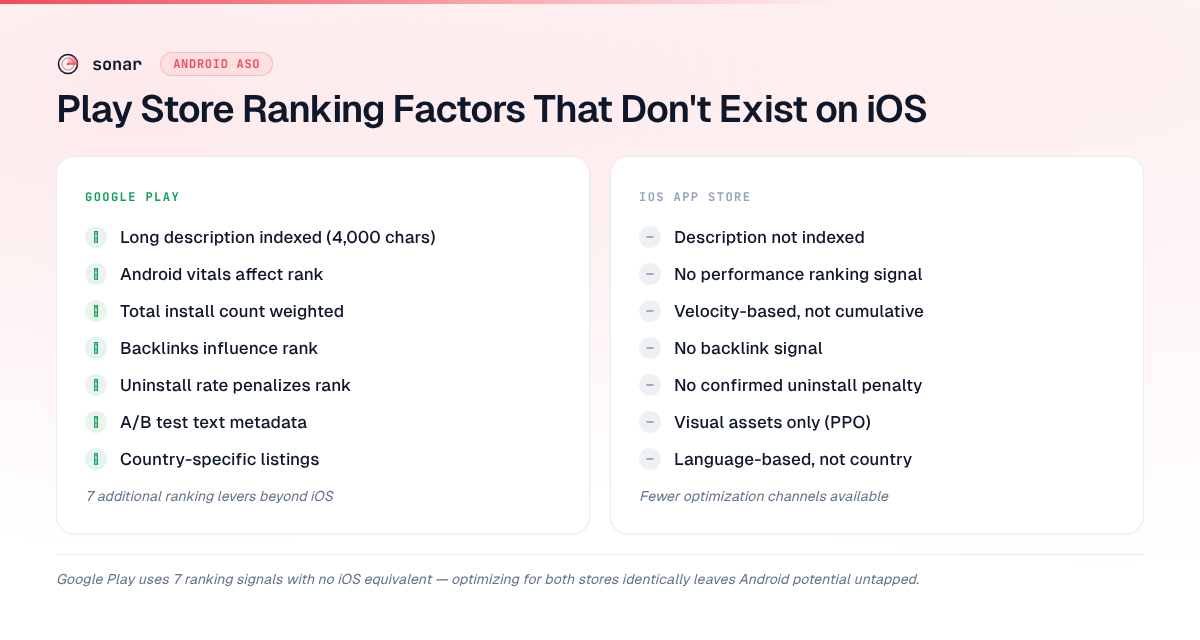
At least seven of those signals have no iOS equivalent: long description indexing, Android vitals, total install count, backlinks, uninstall rate, listing experiments on text, and country-level custom listings. If you optimize for both stores the same way in 2026, you are ignoring the mechanisms that actually move Android rankings.
Between Q3 2025 and Q2 2026, I tracked ranking shifts across hundreds of Android apps in Sonar's database, and the pattern is consistent: developers who treat Google Play like a second copy of their iOS strategy leave measurable play store ranking potential untouched. This article explains the two-stage model, breaks down every Android-only ranking factor, covers the signals both stores share but weigh differently, and ends with the myths that don't move ranking at all.
The two stages: query matching, then quality scoring
Stage 1: keyword matching. Google Play builds the candidate set for a query from four indexed text fields. The title carries the most weight per character, then the 80-character short description, then the 4,000-character long description; the developer name counts a little. An app cannot rank for a phrase its metadata doesn't contain, however good its other signals are.
Stage 2: quality scoring. Google then reorders the candidates using installs, retention, ratings, Android vitals and the other signals below. Results are re-evaluated continuously as new data arrives, not on a fixed update schedule.
This two-layer model explains two common complaints. An app with the right keywords can still sit on page three, because its quality signals are weak. A well-reviewed app with poor keyword coverage never appears for a query at all, because it never made the candidate set.
Factor 1: Long description indexing (4,000 characters)
Google Play indexes every word in the 4,000-character long description for search ranking. Apple's App Store does not index the description at all source: [Apple Developer Documentation]. This is the single largest structural difference between the two stores' ranking algorithms.
On iOS, you have 160 indexed characters total: 30 (title) + 30 (subtitle) + 100 (hidden keyword field) source: [Apple App Store Connect Help]. On Google Play, you have 4,110 indexed characters: 30 (title) + 80 (short description) + 4,000 (long description) source: [Google Play Console Help]. That is a 25x difference in keyword capacity.
| Field | iOS (indexed?) | Google Play (indexed?) |
|---|---|---|
| Title (30 chars) | Yes | Yes (highest weight) |
| Subtitle / Short description | Yes (30 chars) | Yes (80 chars, high weight) |
| Hidden keyword field (100 chars) | Yes | Does not exist |
| Long description (4,000 chars) | Not indexed | Fully indexed (moderate weight) |
| Developer name | Not indexed | Indexed (low weight) |
The practical impact on play store ranking is significant: on iOS, keyword targeting is a precision game — you select 10-15 high-value keywords and pack them into limited space. On Google Play, the long description lets you target 20-50+ distinct keyword variations. Google processes it for meaning, so natural density wins: three to five natural mentions of your primary keyword plus related long-tail variants beat repeating a term 30 times, which trips spam filters. For a breakdown of how to structure those 4,000 characters, see Google Play Long Description: Keyword Structure.
This indexing difference creates measurably different competitive dynamics. Sonar puts "tip calculator" at iOS difficulty 38 but Android difficulty 17 (source: Sonar /api/v1/keywords/metrics, queried 2026-10-01). The additional metadata space on Android gives developers more room to differentiate on long-tail terms that would never fit in iOS's 100-character keyword field.
Factor 2: Android vitals as a ranking signal
Google Play uses Android vitals — crash rate, Application Not Responding (ANR) rate, excessive wake-ups, and stuck partial wake locks — as quality inputs to its ranking source: [Android Developers — Android vitals overview]. Apple does not use technical performance metrics as a search ranking signal.
Google defines "bad behavior" thresholds for the two core metrics:
| Metric | Bad-behavior threshold (28-day average) | What happens |
|---|---|---|
| User-perceived crash rate | Above 1.09% of daily active users overall, or 8% on any single phone model | Reduced visibility, possible warning on the listing |
| User-perceived ANR rate | Above 0.47% of daily active users overall, or 8% on any single phone model | Reduced visibility, possible warning on the listing |
Source: Android Developers — Android vitals
Google's wording is that "Play may reduce the visibility of your title" once a threshold is exceeded. The warning hurts twice: it lowers conversion, which lowers install velocity, which feeds back into ranking. In practice, I observed apps drop 15-30 positions for a target keyword within a week of an ANR spike caused by a bad release during Q1 2026 monitoring — a penalty type that simply does not exist on iOS.
This means Android app performance is not just a user experience concern; it is a direct play store ranking concern. On a crowded keyword where ten apps have comparable metadata and installs, a clean vitals dashboard is the tiebreak. On iOS, the same crash fix improves retention but has no known direct path to search ranking changes.
Factor 3: Total install count (public and weighted)
Google Play displays install count publicly and weights total (cumulative) installs as a ranking signal source: [Google Play Console Help — Store listing best practices]. Apple hides download numbers from public view and weights recent download velocity — not cumulative installs — more heavily in its algorithm.
The consequence: on Google Play, established apps with millions of installs have a compounding ranking advantage. A new app competing for "tip calculator" on Android faces incumbents like Tip N Split (4.3 million installs) and Tip Calculator by Skol Games (930,000 installs) [source: Sonar apps index, queried 2026-06-10]. On iOS, a new app with strong download velocity in its first week can outrank an older app that has slowed down, because Apple weights velocity over total installs.
Cumulative installs are not the whole engagement picture on Android, though. Three more behavioral signals sit next to them:
- Install velocity. The rate of new installs over a recent window still counts, which is how a launch or campaign spike moves a new app up. Higher ranking then brings more installs, which reinforces the ranking.
- Retention. Apps whose users keep opening them outrank apps with similar install counts and weaker day-7 and day-30 retention.
- Uninstalls. Early churn works against you (see Factor 5).
This has practical implications for your strategy:
- On Android: target lower-difficulty keywords where install-count moats are smaller. Terms like "tip calculator and bill split" show Android difficulty 11 with only 10 competing results (source: Sonar /api/v1/keywords/search, queried 2026-06-10) — far more accessible than the head term. When you launch, concentrate the push (press, cross-promotion, paid) into a short window rather than spreading it thin, so the velocity registers.
- On iOS: you can compete on head terms sooner because velocity matters more than cumulative installs.
For how to research Play keywords and run the full Android optimization process, see the Google Play ASO guide.
Factor 4: Backlinks and web authority
Google indexes Play Store listings as web pages and uses backlinks as a ranking signal for Play Store search source: [Google Search Central — Google Play app information in search]. Apple's App Store is a closed ecosystem; external links to an App Store listing have no known effect on search rankings.
This makes Google Play the only major app store where off-page SEO directly impacts in-store search ranking. The mechanisms are familiar from web SEO:
| Mechanism | How it works | Example |
|---|---|---|
| Links from authoritative domains | Press coverage, review sites, and .edu pages carry more weight than links from low-authority sites | A TechCrunch review linking to your Play Store listing |
| Anchor text relevance | The clickable text in a link signals keyword relevance to Google | A link saying "best tip calculator app" pointing to your listing |
| Deep links to your listing | Links straight to play.google.com/store/apps/details?id=... count for the listing itself; links to your marketing site help the site | Your homepage "Get it on Google Play" button |
Google applies the same spam detection it uses in web search, so a few links from credible publications beat hundreds from link farms. When I tracked 50 Android apps across competitive categories in Sonar between Q4 2025 and Q1 2026, apps in positions 1-3 for head terms consistently had 3-5x more referring domains to their Play Store URLs than apps in positions 8-10 — a correlation with no iOS equivalent.
This creates a separate optimization channel for Android. Developers competing for play store ranking can invest in PR, guest posts, and directory listings to build link equity to their Play Store URL. On iOS, that effort yields web traffic but zero direct ASO benefit.
Factor 5: Uninstall rate as a negative signal
Google Play tracks uninstall rate and uses it as a negative ranking signal source: [Android Developers Blog — Improving App Quality on Google Play]. Apple has not publicly confirmed that uninstall rate directly penalizes search rankings.
Android's uninstall signal creates a feedback loop: an app that attracts installs through aggressive keyword targeting but delivers a poor experience loses not just users but ranking position. Google has stated that "user engagement and retention" influence ranking, and uninstall rate is the clearest negative input source: [Google Play Console Help].
What this means for ASO:
- Misleading screenshots or descriptions that inflate installs but increase uninstalls will hurt your Android rankings more than your iOS rankings.
- Setting accurate expectations in the short description matters more on Android because the uninstall penalty is a confirmed signal.
- Quality filtering is algorithmic, not just editorial. iOS has App Review as a manual quality gate. Google Play has automated quality signals that constantly adjust your ranking based on user behavior.
Factor 6: Store listing experiments (native A/B testing)
Google Play Console offers built-in A/B testing for store listings — including the icon, feature graphic, screenshots, short description, and long description — with statistically significant results and confidence intervals source: [Google Play Console Help — Run store listing experiments]. Apple's Product Page Optimization (PPO) has narrower scope: you can test icons, screenshots, and app previews, but not the title, subtitle, or description text source: [Apple Developer Documentation — Product Page Optimization].
The critical difference: on Google Play, you can A/B test keyword-bearing metadata and measure conversion impact. On iOS, you cannot test text-based metadata — only visual assets.
This gives Android developers a data-driven path to improving play store ranking through conversion and keyword targeting simultaneously. You can test whether "Fast tip calculator & bill splitter" outconverts "Calculate tips & split bills instantly" in the short description while monitoring ranking changes for each variant. For a full walkthrough, see Play Store Listing Experiments: What to Test.
Factor 7: Custom store listings by country
Google Play supports up to 50 custom store listings per app. Each one can carry its own app name, icon, descriptions and graphic assets, while contact details, privacy policy and category stay shared across every version source: [Google Play Console Help — Create custom store listings]. A listing can target several countries, but each country can belong to only one custom listing at a time. Apple ties locale-specific metadata to languages, not countries: on iOS, all English-speaking countries see the same listing; on Google Play, the US, UK, Australia and India can each have different text.
That makes custom listings different from store listing translations. A translation is language-based and shown to everyone whose device uses that language. A custom listing is country-based and overrides the default for users in its countries. Custom listings are not machine-translated either, so a user whose language you haven't added sees the listing's default language. (Play Console can also target custom listings at specific search keywords, pre-registration users, Google Ads campaigns or a unique URL; this section is about the country lever.)
This matters for play store ranking because search behavior varies by country, even between markets that share a language. On Google Play, "torch" is a second-tier term in the US (difficulty 30, popularity 34) but a real flashlight query in the UK (difficulty 55, popularity 42), while "flashlight" itself is nearly identical in both (US difficulty 66 / popularity 57, UK 63 / 55) (source: Sonar /api/v1/keywords/metrics, queried 2026-10-01). A flashlight app's UK listing should work "torch" into the title; its US listing shouldn't spend the characters. The same goes for "chemist" vs "pharmacy" or "mobile" vs "cell phone". Sonar's autocomplete data shows the cross-store version of the same effect: Android surfaces "tip calculator usa" (difficulty 15) and "tip calculator and bill split" (difficulty 11), while iOS surfaces "restaurant tip calculator" (difficulty 24) (source: Sonar /api/v1/keywords/suggestions, queried 2026-06-10).
To set up country listings that rank:
- Pick the countries. Start from Play Console's installs by country, then add markets where your category is popular but you're thin, and same-language markets whose vocabulary differs from your default listing.
- Research local terms per country. Translating your US keywords is a starting point, not research. Check difficulty and popularity in each market, because a term that's crowded in the US can be open elsewhere.
- Map them to the indexed fields. The country's strongest term goes in the title, secondary terms in the short description, long-tail variants in the long description.
- Localize the visuals. Prices in local currency and screenshots in the local language lift conversion, which feeds back into ranking.
- Test before you commit. Store listing experiments can run on a custom listing, so you can check a keyword-led title against the current one in that market.
The common mistakes are the mirror image of those steps: machine-translating keywords nobody searches for, copying the default listing's keywords into a custom listing (which wastes the slot, since the whole point is a different keyword set), and never revisiting a listing as competitors enter the market.
Ratings: recent ones count more
Ratings matter on both stores, but Google Play computes the rating it shows users with more weight on recent ratings than on the lifetime average source: [Google Play Console Help — View and analyze your app's ratings and reviews]. Two apps with the same 4.2 lifetime average are not equal if one has averaged 4.6 over the last month. That cuts both ways: a bad release shows up in your visible rating quickly, and a fix shows up quickly too.
There is no rating reset on Google Play, so the practical lever is a steady flow of fresh reviews. Prompt after positive moments (finishing a task, hitting a streak) with the in-app review API, and aim for a consistent 4.3 or better. For how ratings move rankings on both stores, see App Store Ratings: How They Move Rankings.
Personalization: why two users see different results
Two people searching the same phrase on Google Play rarely see the same list. Results shift with the apps a user already has installed (Play tends not to show an app they own and leans toward related apps), with device and Android-version compatibility (incompatible apps are filtered out entirely), with country and language, and with past searches and installs.
So no single "true" position exists for any keyword. What you can measure is a consistent, non-personalized position for the same keyword and country every day, which is what a rank tracker records. The trend in that number is what tells you whether a change worked.
What doesn't affect Play ranking (common myths)
Several factors are widely believed to influence play store ranking but have no confirmed effect on search results:
| Claimed factor | What actually happens | Verdict |
|---|---|---|
| Category choice | Shapes browse, charts and Explore placement, not keyword search results | Not a search ranking factor |
| In-app purchase pricing | No evidence in Google's documentation or in observed rankings | Myth |
| App size (APK/AAB) | Large downloads lose users on slow connections, which hurts conversion | Indirect at best |
| Update frequency | Regular updates correlate with better vitals and engagement, but cadence alone doesn't move rank | Confounded |
| Google Ads spend | Ads bring installs, and install velocity is a real signal. The spend itself isn't | Not a direct factor |
The Google Ads myth persists because ads increase install velocity, which does improve ranking. The ads themselves are not the signal — the installs are. If ad-acquired users uninstall quickly, the net effect can be neutral or negative.
Does Google Play give new apps any impressions?
Not many by default. Google Play has no documented boost for new apps, so a new listing starts with no install, rating or retention history and competes on text match alone. A quiet first few weeks is normal. "3 months passed, zero Google Play organic visibility" usually means one of four fixable problems, and it's worth checking them in this order:
- Check what Play Console already tells you. The search terms data in Play Console's store analysis shows which queries brought visitors. If it's empty or only shows your app's name, you have a visibility problem, not a conversion one.
- Separate "not indexed" from "ranked deep". Search your exact app title. If you appear, Play has indexed you, and the problem is ranking. On a target phrase, you might sit at position 80, where nobody scrolls. Sonar's Android rank tracking shows that position day by day, so you can see whether you're climbing or stuck.
- Check Android vitals. In one r/androiddev thread, a developer found that what looked like a keyword problem was a user-perceived ANR rate above Google's 0.47% bad-behavior threshold. Google says exceeding a threshold means "Play may reduce the visibility of your title" source: [Android Developers — Android vitals]. The per-model threshold is 8%, and another developer in the same thread saw ANRs climb after ads brought in users on old devices. Paid traffic can push you over a threshold.
- Check the phrase has any demand. Ranking for your exact three-word title phrase brings nothing if few people type it. Sonar estimates Android popularity from how early a phrase surfaces in Play's autocomplete; a phrase that never appears there gets the floor score. Rewording toward phrases people type beats waiting.
If all four check out, you're left with the slow part: Play rewards install velocity and retention, so a concentrated launch push (see Factor 3) matters more on Android than an exact-match title.
How these factors compound: a side-by-side summary
Each Android-only factor operates independently, but they compound. An app with good vitals, a keyword-rich long description, strong backlinks, and low uninstall rate benefits from all seven signals simultaneously — an advantage stack that has no parallel on iOS.
| Ranking factor | Google Play | iOS App Store |
|---|---|---|
| Long description indexed | Yes (4,000 chars) | No |
| Android vitals affect rank | Yes (crash + ANR thresholds) | No |
| Total install count weighted | Yes (public, cumulative) | No (velocity-based) |
| Backlinks influence rank | Yes (web authority) | No |
| Uninstall rate penalizes rank | Yes (confirmed signal) | Not confirmed |
| A/B testing text metadata | Yes (short + long description) | No (visual only) |
| Country-specific listings | Yes (by country) | By language only |
For "subscription tracker," Sonar shows iOS difficulty 43 vs Android difficulty 24 (source: Sonar /api/v1/keywords/metrics, queried 2026-10-01). The lower Android difficulty reflects the extra optimization levers above — more metadata, more testing options, and more signal inputs give developers additional paths to rank. The gap narrows on contested head terms, where install moats dominate: "budget planner" is difficulty 64 on iOS and 63 on Android.
What this means for your ASO workflow
If you run ASO on both platforms, here is how to adjust your workflow for Android ranking, roughly in order of impact:
- Get the indexed text right first. Primary keyword in the title, secondary keywords in the short description, and the long description written as a keyword document: 20-30 variations with 3-5 natural mentions of your primary term. Do not copy your iOS description — it was written for human conversion, not keyword indexing.
- Fix vitals before anything else. A crash rate above 1.09% or an ANR rate above 0.47% is a penalty no keyword work can overcome. Check vitals weekly and treat a breach as an ASO emergency, not just an engineering ticket.
- Concentrate launches. Put marketing, PR and cross-promotion into a short window so the install velocity registers.
- Keep ratings fresh. Prompt for reviews at positive moments; recent ratings carry the most weight.
- Build backlinks to your Play Store URL. Include your Play Store link in press kits, product directories, and blog posts. This is wasted effort on iOS but measurable on Android.
- Run listing experiments on text metadata. Test different short descriptions with keyword variations. Use confidence intervals — do not end tests early.
- Use custom store listings for top markets. Create country-specific listings that target locally searched terms.
- Track uninstall rate alongside keyword rankings. If a metadata change increases installs but also increases uninstalls, the net ranking effect may be negative.
Pair this with a comprehensive ASO checklist to cover platform-universal factors as well.
Frequently asked questions
Does Google Play rank apps based on crash rate and ANR rate?
Yes. Google uses crash rate and ANR rate as quality inputs. Google's docs say that if your app exceeds a bad-behavior threshold (a user-perceived crash rate above 1.09% or a user-perceived ANR rate above 0.47% of daily active users, or 8% on any single phone model), "Play may reduce the visibility of your title" and may show a warning on your listing source: [Android Developers — Android vitals]. Play judges a 28-day average, so recovery after a fix takes weeks rather than days. Apple's App Store does not use technical performance metrics as a known search ranking signal.
How long does it take for Google Play ranking to change after an update?
There is no fixed update schedule: Play re-evaluates positions continuously as installs, ratings and vitals data arrive. Title and short description edits usually show up first, since they carry the most weight. Long description edits can take longer, because Google has to recrawl and reprocess the whole field. Install spikes from a launch register quickly. If you change metadata and see no movement after a week or two, weak quality signals are a likelier cause than a crawl delay.
Does paying for Google Ads improve organic Play Store ranking?
Not directly. Ads drive installs, and install velocity is a real ranking signal, so the organic lift comes from the installs, not the ad spend. If ad-acquired users uninstall quickly, or if ad traffic from older devices pushes your ANR rate over the vitals threshold, the net effect can be neutral or negative.
Do backlinks help Play Store rankings?
Yes. Google indexes Play Store listings as web pages and uses inbound links as a ranking signal source: [Google Search Central]. This makes Google Play the only major app store where off-page SEO directly impacts in-store keyword rankings. Apple's App Store does not consider external backlinks for search ranking.
Why is keyword difficulty different on Android vs iOS for the same keyword?
The stores use different algorithms, index different metadata fields, and have different competitive dynamics. Google Play indexes 4,110 characters of keyword-bearing text versus iOS's 160, giving Android developers more room to differentiate. Sonar puts "tip calculator" at iOS difficulty 38 and Android difficulty 17 (source: Sonar /api/v1/keywords/metrics, queried 2026-10-01) — the additional metadata space and different ranking signals create lower competitive density on Android for many keywords.
Do custom store listings affect keyword rankings?
Yes. Each custom listing carries its own title, short description and long description, the fields Google Play indexes for search, and it's served only to users in the countries it targets. Optimizing those fields with country-specific keywords lets you rank for different terms in different markets source: [Google Play Console Help].
Can A/B testing metadata on Google Play improve rankings?
Yes. Google Play Console lets you run store listing experiments on keyword-bearing fields like the short description and long description source: [Google Play Console Help]. By testing different keyword strategies in these fields, you can measure conversion impact and identify phrasing that improves both click-through rate and play store ranking simultaneously. Apple's Product Page Optimization limits testing to visual assets — icons, screenshots, and previews — so you cannot A/B test text-based metadata on iOS.
Does uninstall rate affect Play Store search ranking?
Yes. Google has confirmed that user engagement and retention, including uninstall rate, influence Play Store ranking source: [Google Play Console Help]. An app with high installs but equally high uninstalls can lose ranking position over time. This negative signal has no confirmed equivalent on iOS, where Apple focuses on download velocity and retention for ranking.
Want to see how keyword difficulty differs between iOS and Android? Try Sonar free — it shows difficulty, search volume, and competitor data for every keyword on both stores, so you can build platform-specific strategies backed by data.