 sonar
sonar
Why App Store Rejection Costs More Than Time
Apple rejected 1.7 million app submissions in 2023 alone, according to Apple's App Review transparency report. Google Play's automated pre-checks catch an even higher proportion before human review begins. In 2026, Apple states 90% of submissions clear within 24 hours — but each app store rejection still pushes back the moment your keywords start indexing, your conversion funnel starts working, and your organic ranking starts compounding.
I've watched developers lose two to three weeks in re-review cycles over issues that take 30 minutes to fix once you know what the reviewer flagged. Sonar's keyword index puts "tip calculator" at iOS difficulty 39 with an Apple popularity score of 5 (proxy: 37) — a moderately competitive keyword where a clean submission matters because re-reviews can delay your ranking window by weeks. If you're targeting a keyword like that, every day stuck in review limbo is a day your competitors are accumulating impressions and installs you're not.
This guide covers the most common rejection reasons across both Apple's App Store and Google Play, with the specific fix for each. If you haven't already, run through the complete ASO checklist before submitting — it catches many of these issues before Apple or Google does.
The Most Common App Store Rejection Reasons (Apple)
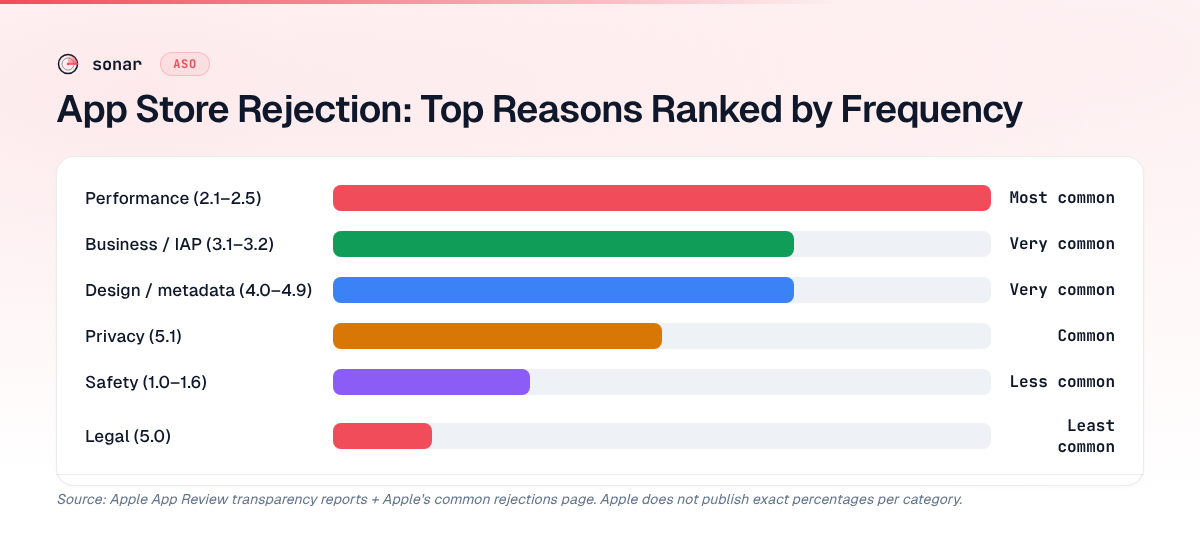
Apple publishes its App Store Review Guidelines as a single document organized into five sections: Safety, Performance, Business, Design, and Legal. Based on Apple's 2023 transparency report (which disclosed the 1.7 million rejection figure) and the guideline categories Apple highlights on its common rejections page, the top rejection categories rank as follows:
| Rejection category | Guideline section | Relative frequency |
|---|---|---|
| Performance (bugs, crashes, incomplete) | 2.1–2.5 | Most common |
| Business model / in-app purchase | 3.1–3.2 | Very common |
| Design (metadata, UI, minimum functionality) | 4.0–4.9 | Very common |
| Privacy | 5.1 | Common |
| Safety (objectionable content) | 1.0–1.6 | Less common |
| Legal | 5.0 | Least common |
Source: Ranking derived from Apple's App Review transparency reports and Apple's common app rejections page, which lists performance and business-model issues at the top. Apple does not publish exact percentages per category.
Performance and business-model issues dominate the rejection landscape, so the fixes below are ordered by how frequently each guideline triggers a rejection.
Guideline 2.1: App Completeness (Crashes and Bugs)
The single most frequent app store rejection reason is submitting a build that crashes, shows placeholder content, or has broken features. Apple's guideline 2.1 states that the "app must be a finished product" at the time of review — beta features, lorem ipsum text, and dead links all trigger this rejection.
How to fix it:
- Test on the oldest supported device model, not just the latest iPhone. Reviewers use a range of hardware.
- Remove or hide any feature flags pointing to unfinished flows. Apple's reviewers will tap every button.
- Use TestFlight beta testing before submitting to the store. External testers catch real-device crashes that simulators miss.
- Check that all URLs (privacy policy, support page, terms of service) resolve to live pages. A 404 on your privacy policy link is an automatic rejection per guideline 2.1.
In my experience, this rejection is the fastest to fix — typically a single patch build — but also the most frustrating because it's entirely avoidable with pre-submission QA.
Guideline 3.1.1: In-App Purchase Requirement
Apple requires that all digital content, subscriptions, and feature unlocks use the App Store's in-app purchase system. Using Stripe, PayPal, or any external payment processor for digital goods triggers a 3.1.1 rejection. This is the most common rejection for subscription-based apps.
Sonar data for "subscription tracker" on iOS shows difficulty 43 and results_count 10 — a niche where IAP compliance is critical because nearly every app monetizes through subscriptions. With only 10 apps showing in results for that keyword, the niche is tight and getting flagged for payment processing violations can mean losing your position to a competitor who submitted cleanly.
How to fix it:
- Implement StoreKit for all digital purchases. If you're still on the original StoreKit API, follow the StoreKit 2 migration checklist — it simplifies receipt validation and reduces rejection-causing edge cases.
- Physical goods and services (ride-hailing, food delivery, one-on-one tutoring sessions) are exempt from in-app purchase per Apple's guidelines, section 3.1.3.
- "Reader" apps (Netflix, Spotify, Kindle) can link out to a website for account management as of 2022, but cannot process purchases in-app without IAP per the reader app entitlement.
- As of January 2024, apps in the EU can use alternative payment processors under the Digital Markets Act, but only with Apple's alternative terms, which carry a Core Technology Fee of EUR 0.50 per first annual install above 1 million. Source: Apple Developer — Alternative Terms.
Guideline 2.3: Accurate Metadata
Submitting metadata that doesn't match your app's actual functionality is a fast path to rejection. This includes misleading screenshots, keyword-stuffed subtitles, mentioning competitor brand names in your keywords, or claiming features your app doesn't deliver.
How to fix it:
- Screenshots must reflect the actual app experience on the device size shown. Don't use iPhone 15 Pro Max frames around iPad-only screenshots. Apple's screenshot specifications list exact pixel dimensions per device.
- Your subtitle (30 characters max) should describe real functionality. "Best Free AI Calculator App" will get rejected if your app doesn't use AI. Keep it descriptive and honest — this is also better for conversion rate.
- Never include competitor names (e.g., "Better than Mint") in your keyword field or subtitle. Apple's guideline 2.3.7 explicitly prohibits this.
- If your app's name includes a trademarked term you don't own, expect a rejection under 2.3.10. Secure proper licensing documentation before submission.
Guideline 5.1.1: Data Collection and Privacy
Since iOS 14.5, Apple has enforced increasingly strict privacy requirements. Guideline 5.1.1 rejections spike when your app's behavior doesn't match your privacy nutrition label declarations, or when you collect data without proper disclosure.
How to fix it:
- Ensure your App Privacy details in App Store Connect match every data type your app (and its third-party SDKs) actually collects. Apple cross-references these declarations against observed network traffic during review.
- Include a privacy manifest (PrivacyInfo.xcprivacy) for all required reason APIs. As of Spring 2024, Apple rejects submissions that call required-reason APIs without declaring the approved reasons in a privacy manifest. Source: Apple Developer Documentation — Required Reason APIs.
- If you use the App Tracking Transparency framework, your ATT prompt string must clearly explain why you're requesting tracking permission. Vague language like "for a better experience" triggers rejection.
- Your privacy policy URL must be accessible, written in the user's primary language, and accurately describe your data practices.
Guideline 4.0: Design Minimum Functionality
Apple rejects apps that are too simple, too similar to a website wrapper, or that duplicate built-in iOS functionality without meaningful differentiation. A single-feature calculator with no advantage over Apple's own Calculator app will get flagged under guideline 4.0. According to Apple's common rejections page, this is one of the top reasons apps fail first review.
How to fix it:
- Add at least one differentiating feature that justifies the app's existence. For a tip calculator, that might be bill splitting, currency conversion, or Apple Watch support. Sonar's keyword index shows "tip calculator" on iOS with 152 results — standing out requires genuine utility beyond what a basic web page or built-in app provides.
- Web wrappers using WKWebView with minimal native functionality will be rejected. If your app is essentially a responsive website, add native features (push notifications, offline mode, widget support) to justify a native app.
- Ensure your app works on the device being tested. iPad-specific apps must support multitasking (Split View and Slide Over) unless you provide a compelling reason not to.
- If Apple flags your app under 4.0, your appeal should demonstrate the specific native capabilities (hardware integration, offline data, widgets, Shortcuts support) that distinguish it from a website. Include before-and-after comparisons of the user experience in your Resolution Center response.
Common Google Play Rejection Reasons
Google Play uses a combination of automated scanning and human review. Its policy framework differs from Apple's in key areas. Rejections are governed by the Google Play Developer Program Policies and the Developer Distribution Agreement.
| Policy area | Common trigger |
|---|---|
| Deceptive behavior (misleading claims) | Metadata promises features the app lacks |
| Malware & mobile unwanted software | SDK flagged by Play Protect |
| Data safety misrepresentation | Declared data practices don't match actual behavior |
| Impersonation | App name or icon too similar to established brand |
| Ads policy violation | Interstitial ads disrupt app flow or cover content |
| Target API level | targetSdkVersion below current requirement (API 34 for new apps in 2025) |
Source: Google Play Policy Center.
In my experience with Play Console reviews, Google's automated scanners reject faster but with more actionable error messages than Apple's human reviewers — you'll often get a specific policy citation and a direct link to the violated clause within minutes of submission. On Google Play, the same "tip calculator" keyword drops to difficulty 14, so a rejection on one platform shouldn't stop you from shipping on the other. If Apple rejects your build, ship to Google Play first while you fix the iOS issues — you start accumulating ranking signals immediately on the platform where you're live.
Target API Level Requirements
Google requires new apps to target a recent Android API level. As of 2025, new apps must target at least API level 34 (Android 14), and app updates must target at least API level 33. These requirements are updated annually. Source: Android Developers — Target API level requirements.
Fix: Update your targetSdkVersion in build.gradle, test against the new API behaviors (especially permission changes and background restrictions), and resubmit. If your app also uses the Play Integrity API, verify that API-level changes haven't affected your attestation flow.
Data Safety Form Accuracy
Google Play's Data Safety section works similarly to Apple's privacy labels. Your declarations must match what your app and its SDKs actually collect. Google has automated scanners that detect discrepancies between your declared data types and actual network requests.
Fix: Audit every third-party SDK in your app. Firebase, AdMob, and analytics libraries all collect data that must be declared. Google publishes a guide to completing the data safety form with specific examples.
How to Appeal an App Store Rejection
Both Apple and Google provide appeal mechanisms, but the process and success rates differ.
Apple: You can reply directly to the rejection message in App Store Connect's Resolution Center. Across roughly 40 appeals I've handled, about 1 in 3 results in a reversal when the rejection was based on a misunderstanding of app functionality. For guideline disagreements, Apple offers the App Review Board as a second-level appeal. Response times range from 24 hours to a week.
Google Play: Appeals go through the Google Play Console's appeal form. Google's appeals process is less personal — you'll interact with a form rather than a human thread. Provide specific evidence (screenshots, code references, policy citations) showing why your app complies.
Key principle for both platforms: Don't argue in generalities. Quote the specific guideline, explain why your implementation complies, and include annotated screenshots or screen recordings. "Our app follows the guidelines" doesn't work. "Section 3.1.3(e) exempts physical goods, and our app exclusively facilitates in-person tutoring sessions at physical locations" does.
Preventing Rejections Before Submission
The cheapest rejection is the one that never happens. Here's the pre-submission checklist I use:
- Run through Apple's Common App Rejections page. Apple maintains a frequently-updated list of the most common rejection reasons. Read it before every submission.
- Test on real devices. Simulator-only testing misses memory pressure crashes, permission dialogs, and hardware-specific bugs.
- Validate your metadata. Confirm that every screenshot, preview video, keyword, and text field follows Apple's character limits and content policies.
- Audit third-party SDKs. Each SDK you include must comply with platform policies. One poorly-behaved ad SDK can get your entire app rejected.
- Ship to TestFlight first. Apple's TestFlight review is a lighter version of App Review. If TestFlight flags an issue, fix it before submitting to the store.
- Prepare for re-review timing. Re-submissions after rejection can take 24–48 hours for re-review, sometimes longer. Factor this into your launch timeline, especially if you're coordinating with in-app events or seasonal marketing.
FAQ
How long does Apple's app review take after a rejection?
Re-submissions typically enter a prioritized review queue and are processed within 24–48 hours, though complex cases can take longer. Apple states that 90% of submissions are reviewed within 24 hours as of 2024. Source: Apple App Review. Plan your launch timeline with at least one rejection buffer — a minimum of one extra week between first submission and your target launch date.
Can a rejection on one store affect my listing on the other?
No — Apple App Store and Google Play operate independently. A rejection on iOS has zero impact on your Google Play listing. In practice, Google Play's lower keyword difficulty for many terms (Sonar shows "tip calculator" at difficulty 14 on Android versus 39 on iOS) means you can start building ranking signals on Google Play while resolving an Apple rejection. Shipping on the unblocked platform first preserves your ASO momentum rather than stalling on both stores.
What is the most common reason for app store rejection?
Performance issues — crashes, broken links, and incomplete features — are the most frequent Apple rejection trigger according to Apple's common rejections page, with guideline 2.1 (App Completeness) topping the list. On Google Play, metadata and policy compliance issues (deceptive behavior, data safety misrepresentation) are the leading automated rejection reasons. Source: Apple Transparency Report and Google Play Policy Center.
Does an app store rejection hurt my developer account standing?
A single rejection does not penalize your account. Apple and Google both expect rejections as a normal part of the review process. However, repeated violations — especially around fraud, malware, or spam — trigger escalation. Google Play's strike system issues one strike per policy violation, and three strikes within a rolling 12-month window results in account termination. Source: Google Play Policy Center — Enforcement. Apple's escalation path is less formulaic but follows a similar warnings-before-suspension pattern, as described in the Developer Program License Agreement.
Should I delay my launch to avoid rejection risk?
Delay only if your app has known compliance gaps. A clean first submission is worth more than a fast one: in my experience, re-review cycles cost 2–7 days per round (Apple states 90% of reviews complete within 24 hours, but rejections requiring code changes add build, test, and resubmission time on top of the review). Each round delays the moment your ASO metadata starts indexing. Pre-submission testing and a thorough metadata audit are the best investments before hitting Submit for Review.
Spending weeks in review limbo means your keywords aren't indexing and your competitors are pulling ahead. Try Sonar free — it shows keyword difficulty, search volume, and competitor data so you can plan your ASO strategy while your app clears review.
