sonar
sonar
How to name an app: the short answer
To name an app, generate 20 or more candidates around the keyword people search for, then shape the best ones into a "Brand: keyword" title that fits in 30 characters. Before you commit, check that the name is free on both the App Store and Google Play, run a trademark search, and confirm the domain. This page works as an app title generator framework: candidates first, then the store and legal checks, then the keyword decision.
The title matters because it is indexed for search. Apple's App Store Connect reference caps the app name at 2–30 characters (Apple), and Google Play allows 30 characters or less (Play Console Help). On iOS, Apple allows a name to be used "for one app per localization" (App Store Connect Help), so a name is a claim, not just a label.
What top-10 app names look like: data from 25 keywords
Most names that rank in the top 10 carry the exact phrase people searched for, and most use a "Brand: keyword" structure. We pulled the top 10 results for 25 common category keywords on both stores, 242 App Store names and 250 Google Play names (source: Sonar /api/v1/apps/search, US, queried 2026-10-12).
| Metric | App Store | Google Play |
|---|---|---|
| Top-10 names containing the exact search phrase | 62.8% (152/242) | 68.4% (171/250) |
| Top-3 names containing it | 68% (51/75) | 69% (52/75) |
| Positions 4–10 containing it | 60% (101/167) | 68% (119/175) |
| #1 app's name contains the exact phrase | 15 of 25 | 17 of 25 |
| Names with none of the keyword's words | 30.6% | 26.0% |
| Names using a "Brand: keyword" or "Brand - keyword" separator | 57.0% | 64.8% |
| Names that start with the keyword | 21.9% | 20.8% |
| Median name length | 28 characters | 28 characters |
| Names over 30 characters | 1 | 0 |
The keywords were: habit tracker, budget planner, meditation, photo editor, pdf scanner, calorie counter, period tracker, sleep sounds, language learning, workout planner, recipe, weather, vpn, qr code reader, note taking, to do list, translator, flashcards, intermittent fasting, step counter, white noise, journal, expense tracker, password manager and baby tracker.
What the #1 results look like on iOS:
- Keyword as the whole name: "Habit Tracker".
- Keyword first, brand second: "Calorie Counter - MyNetDiary".
- Brand first, keyword second: "Fleur - Budget Planner App", "Flo Cycle & Period Tracker", "Adobe Scan: PDF & Doc Scanner".
- Brand-led or first-party names: "Journal" (Apple, 330,741 ratings), "Weather" (1,842,970 ratings), "Passwords", "Google Translate", "Duolingo: Language Lessons", "Insight Timer: Meditate, Sleep".
On Google Play the #1s include "Loop Habit Tracker", "Step Counter - Pedometer", "Sleep Sounds - relaxing sounds", "Google Tasks" and "Hevy - Gym Log Workout Tracker".
Three patterns stand out. Brand plus the searched phrase is the majority format on both stores. Names without the keyword that still reach #1 belong to big brands or Apple's own apps with huge rating counts, not to new indie apps. And names use nearly all 30 characters: the median is 28.
Method and caveats. "Exact phrase" means the keyword string appears verbatim, case-insensitive, in the app name. "Separator" means the name contains " - ", " – ", " | " or ": ". This is 25 keywords, one storefront (US) and one day, and exact matching misses variants like "to-do". The numbers are correlational: top apps also have more ratings, downloads and history, so the data shows what ranking names look like, not that a keyword in the name causes the rank.
How to come up with app name candidates
Generate at least 20 names, then cut to five with the checks below. Most candidates fail at the availability step, so a list of three is often a list of zero.
Four methods that produce usable brand halves:
- Compound words. Two short words that hint at the outcome, like "HabitKit" or "Goodbudget".
- Metaphor or mascot. A noun that carries the feeling of the app, like "Finch" or "Atoms". Distinctive, but no keyword value on its own.
- Invented words. Coined names make the strongest trademarks, according to the USPTO's ranking of mark strength (USPTO: Strong trademarks). Nobody searches for them until you make them known.
- Outcome names. "Onrise", "Productive". They describe what the user gets.
Then filter:
| Test | Pass | Fail |
|---|---|---|
| Say it out loud once | Listener can spell it | Needs spelling out |
| Length | Brand of about 15 characters or less, leaving room for a keyword | Brand eats the whole 30 |
| Distinctive | Coined or unusual word | Just "Habit Tracker" or "Budget App" |
| Other brands inside it | None | Contains a competitor's brand |
| Your top markets | Neutral meaning | Awkward meaning in a target language |
Title formulas and keyword placement
A ranking app name has two halves: a brand that makes it ownable and a keyword that makes it findable. The three formulas below are the ones that appear among the #1 results above.
| Formula | Example from the data | When it fits |
|---|---|---|
| Brand: keyword | "Adobe Scan: PDF & Doc Scanner" | Default for a new app; 57.0% of top-10 App Store names use a separator |
| Keyword - Brand | "Calorie Counter - MyNetDiary" | Your brand has no search demand yet |
| Brand containing the keyword | "Loop Habit Tracker" | The brand and keyword read as one phrase |
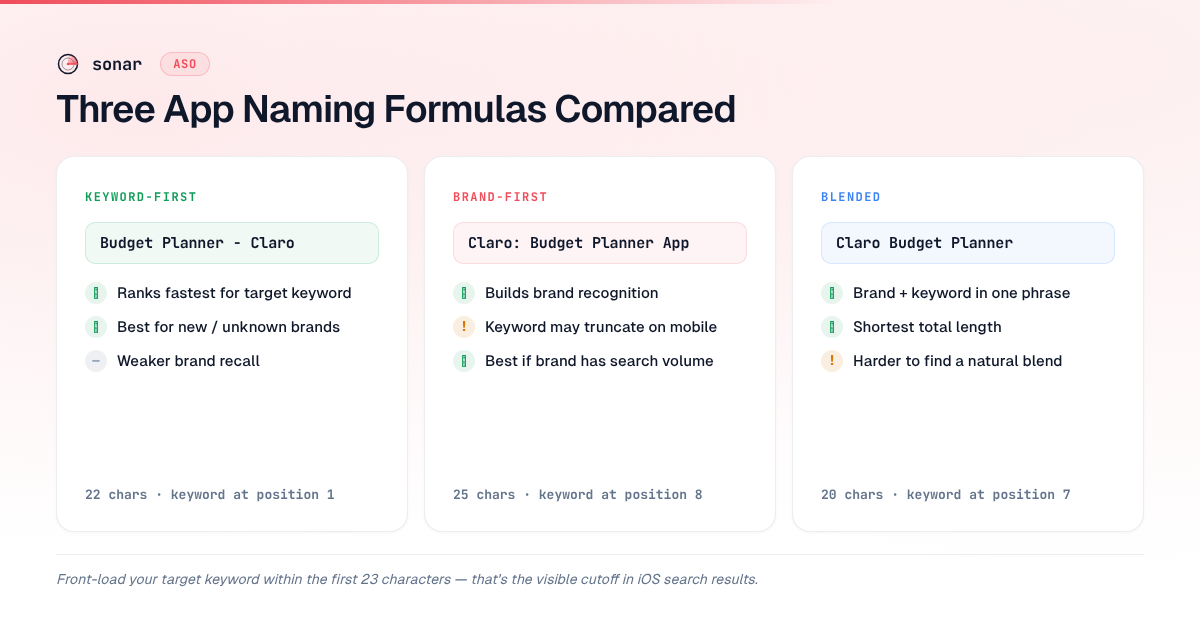
A worked batch for a hypothetical budget app with the brand "Claro":
| Candidate | Characters | Formula |
|---|---|---|
| Claro: Budget Planner | 21 | Brand: keyword |
| Budget Planner - Claro | 22 | Keyword - Brand |
| Claro Budget Planner | 20 | Brand containing keyword |
| Claro: Budget & Expenses | 24 | Brand: keyword |
| Claro - Expense Tracker | 23 | Brand - keyword |
Three placement rules:
- One primary keyword in the name. Apple's Guideline 2.3.7 says "don't try to pack any of your metadata with trademarked terms, popular app names, pricing information, or other irrelevant phrases just to game the system" (App Store Review Guidelines). Put secondary terms in the subtitle and the iOS keyword field.
- Don't repeat words across fields. On iOS, a word already in the name doesn't need to appear in the keyword field again; the keyword field guide covers how to spend those 100 characters.
- Mind truncation. Long names are often truncated in search results, so the brand or keyword you care about most goes first. iOS app title length has the exact cutoffs.
Pick the keyword with data. When most of the top 10 already carry the phrase, it is an entry fee rather than an edge. In an earlier Sonar check, 8 of the top 10 iOS apps for "habit tracker" had the term in their title (difficulty 67, popularity 57), against 5 of 10 for "budget planner" (difficulty 64, popularity 51) (source: Sonar /api/v1/keywords/search, US, queried 2026-09-29). For a real before-and-after, the ReelMeal app title case study shows one indie app moving its keyword to the front of the name, including what it lost. For finding the keyword in the first place, use the 6-step keyword research workflow.
Store rules every app name must follow
Both stores ban prices, promotional text and other people's brands in the name. Break these and the name is rejected at review.
| Rule | Apple App Store | Google Play |
|---|---|---|
| Length | 2–30 characters (Apple) | 30 characters or less (Play) |
| Uniqueness | One app per name per localization (Apple) | No title uniqueness requirement |
| Prices and promo | Not allowed (Guideline 2.3.7) | No price or promotional info (Play) |
| Ranking claims | 2.3.7 bans "irrelevant phrases" | No text indicating store performance or ranking (Play) |
| Other brands | Not without the developer's approval (Guideline 4.1) | Must not imply ties to Google Play programs (Play) |
| Emoji and caps | Not addressed in 2.3.7 | No emoji; no all caps unless it's your brand (Play) |
How to check if an app name is available
Run five checks: both stores, App Store Connect, the Android applicationId, a trademark database and the domain. Only App Store Connect gives a hard yes or no, and only when you try to create the app record.
Step 1: Search both stores
Search the exact name on the App Store and Google Play in every storefront you plan to launch in. An exact match in your category is a stop sign even on Google Play, where duplicate titles are allowed, because you'd be fighting an incumbent for your own brand query. A missing result doesn't prove a name is free on iOS: names can be held by apps in development, removed from sale or live only in another country (Apple Developer Forums).
Step 2: Try it in App Store Connect
Creating the app record is the definitive iOS check. App Store Connect asks for the app name, primary language, bundle ID and SKU when you add an app (Apple). A taken name is blocked there.
Step 3: Pick the Android applicationId carefully
Google Play doesn't require unique titles, but the applicationId is unique and permanent. It "uniquely identifies your app on the device and in the Google Play Store," and if you change it, "Google Play Store treats the upload as a completely different app" (Android Developers). Base it on a domain you control, such as com.yourbrand.app, so a later rename doesn't leave a mismatched ID.
Step 4: Run a trademark search
Search the USPTO trademark database and your target markets' equivalents for the name and close variants. The next section covers what to look for.
Step 5: Check the domain and handles
Check the .com, or a clean variant like getbrand.com or brandapp.com, and the social handles your launch plan depends on.
How to trademark an app name: the basics
A trademark search tells you whether your name is likely to collide with an existing mark; registration gives you rights you can enforce. This is general information, not legal advice. For a name you plan to build a business on, talk to a trademark attorney.
The USPTO "strongly recommends" searching registered and pending marks before filing, and lists "likelihood of confusion" with an existing mark as one of the most common reasons for refusal (USPTO). Marks can conflict if they "look alike, sound alike, have similar meanings, or create similar commercial impressions," depending on whether the goods or services are related (USPTO: Likelihood of confusion).
- Search variants, not only the exact string. "Habbit" and "Habit-ly" can collide with "Habitly". The USPTO says most searches involve "searching multiple times using different combinations of terms" (USPTO).
- Generic names are weak marks. The USPTO ranks descriptive and generic terms as the weakest marks and coined words as the strongest (USPTO). "Budget Planner" alone is hard to protect, which is another reason the brand half matters.
- Budget for filing. The base application fee is $350 per class of goods or services, plus $200 per class for custom descriptions (USPTO 2025 fee changes).
A registered mark also helps inside the App Store: if another developer uses your trademarked name, Apple's help points you to its app name dispute process (Apple). Guideline 5.2.1 forbids using "protected third-party material such as trademarks" without permission (App Store Review Guidelines), so don't name your app after someone else's mark either.
Reserving an app name: what locks and what doesn't
Creating the App Store Connect record is how you claim an iOS name. The display name stays editable; the identifiers on both stores don't.
| Item | Editable later? | Source |
|---|---|---|
| iOS app name | Yes, until submission, then with a new version | App Store Connect reference |
| iOS bundle ID | No, after you upload a build | App Store Connect reference |
| iOS SKU | No, after you add the app | App Store Connect reference |
| Play applicationId | No, after publishing | Android Developers |
- Apple doesn't document how long an unsubmitted record holds a name. Create the record when you're committed, then get a build submitted.
- Deleting a Play app can burn its package name. A deleted app with any lifetime installs keeps its package name locked; it "can't be reused by any other app, including apps created by the developer account that created the deleted app" (Play Console Help).
FAQ
How do I know if an app name is already taken?
Search the exact name on both stores, then try to create the app record in App Store Connect. Apple allows one app per name per localization, so a taken name is blocked there. Google Play doesn't require unique titles, but the applicationId must be unique. Search the USPTO database for existing marks too.
Can two apps have the same name?
On Google Play, yes: there is no title uniqueness rule. On the App Store, a name can be used by one app per localization, according to Apple's App Store Connect Help. Even where duplicates are allowed, sharing a name with an incumbent makes your own brand search harder to win.
Should my app name include a keyword?
Usually, yes, as a descriptor after a distinctive brand. In Sonar's sample of 25 keywords, 62.8% of top-10 App Store names and 68.4% of Google Play names contained the exact search phrase (source: Sonar /api/v1/apps/search, US, queried 2026-10-12). That is a correlation, not proof of cause, but brand-only #1s were almost all big brands or Apple's own apps.
Do I need a trademark before publishing my app?
No store requires a registered trademark to publish. A USPTO search before launch lowers the risk of a forced rename, and a registered mark lets you file an App Store name dispute if someone copies it. The base filing fee is $350 per class. This isn't legal advice.
Will the App Store autocorrect my app's name?
It can, when your brand is close to a common word. Test it on a device in the target storefront; the fix is covered in app not showing in App Store search.
How long can an app name be?
30 characters on both stores, with a 2-character minimum on Apple. Search results often truncate long names, so see iOS app title length for the truncation points.
Naming is the first ranking decision you'll make. Sonar shows popularity, difficulty and the apps ranking for any keyword on both stores, so you can pick the keyword half before you lock the name. Start free trial.