 sonar
sonar
How to Use an App Store Keyword API for Difficulty and Popularity Data
Most ASO dashboards show you keyword difficulty and popularity behind a login screen. That is fine for manual research, but it falls apart the moment you need to check 50 keywords across two stores every Monday, pipe results into a spreadsheet, or feed data to an AI agent. An app store keyword API gives you these numbers as structured JSON — callable from curl, a Node script, or a Python notebook.
When I built Sonar's keyword endpoints, the design constraint was simple: one HTTP call should return everything a developer needs to make a keyword decision — difficulty, popularity, download estimates, and competing result count — without pagination, sessions, or multi-step auth flows. This article walks through exactly how to call that API in three languages, interpret the popularity_source field, run bulk queries, and build a weekly keyword report script.
What an App Store Keyword API Returns
A keyword API call returns the metrics you would otherwise look up manually in Apple Search Ads and a third-party ASO dashboard. Here is the data structure from Sonar's /api/v1/keywords/search endpoint.
| Field | Type | What It Tells You |
|---|---|---|
keyword | string | The exact keyword queried |
store | "ios" or "android" | Which store the data covers |
difficulty | 0–100 integer | How hard it is to rank in the top 10 (source: Sonar's difficulty formula) |
popularity | 5–100 integer | Relative search volume — Apple-reported on iOS, proxy-estimated on Android |
popularity_source | "apple" or "proxy" | Whether the popularity score comes directly from Apple Search Ads or from Sonar's estimation model |
est_downloads_at_1 | integer or null | Estimated daily downloads if you ranked #1 for this keyword |
results_count | integer | Number of apps competing for this keyword |
Concrete example: Sonar's keyword endpoint returns "budget planner" at iOS difficulty 66, Apple-reported popularity 51, and 191 competing results (source: Sonar /api/v1/keywords/search, queried 2026-07-27). That single JSON response replaces three manual lookups — Apple Search Ads for popularity, a difficulty tool for competition, and an App Store search for result count.
The popularity_source Field
This field matters more than most developers realize. On iOS, Apple publishes a Search Popularity score (SP) through the Search Ads API — a 5-to-100 scale based on a 7-day moving average of search impressions (source: Apple Search Ads documentation, developer.apple.com/search-ads). When Sonar's API returns "popularity_source": "apple", the number comes directly from Apple's data.
On Android, Google does not expose any equivalent metric. The Play Console shows relative search volume inside Search Analytics, but there is no public API for it (source: Google Play Console documentation, play.google.com/console). So Sonar estimates Android popularity using a proxy model built on autocomplete ranking, result counts, and download velocity. When you see "popularity_source": "proxy", the number is an estimate, not a platform-reported figure.
The practical takeaway: treat iOS popularity scores with higher confidence than Android ones, and always check popularity_source before comparing numbers across stores.
Fetching Keyword Data with curl
The fastest way to test an app store keyword API is a single curl command. Sonar's keyless tier requires no auth token for basic queries.
curl "https://trysonar.app/api/v1/keywords/search?q=budget+planner&country=us&store=ios"This returns JSON with difficulty, popularity, and related keyword variations. For authenticated access with higher rate limits, add a Bearer token:
curl -H "Authorization: Bearer aso_your_key_here" \
  "https://trysonar.app/api/v1/keywords/search?q=budget+planner&country=us&store=ios"
To compare the same keyword across stores, run a second call with store=android:
curl "https://trysonar.app/api/v1/keywords/search?q=tip+calculator&country=us&store=android"Cross-platform comparison via Sonar shows "tip calculator" at iOS difficulty 38 vs Android difficulty 17 — iOS is more than twice as competitive for this term (source: Sonar /api/v1/keywords/search, queried 2026-07-27). This kind of cross-store gap is common: iOS has fewer total apps but higher metadata competition for consumer keywords, while Google Play's larger catalog dilutes per-keyword density (source: Statista, App Store and Google Play app counts, Q1 2026).
Fetching Keyword Data with JavaScript
For Node.js or browser-based workflows, a fetch call works identically to curl. Here is a minimal example that queries a keyword and logs the difficulty score:
const API_BASE = "https://trysonar.app/api/v1";

async function getKeywordData(keyword, store = "ios", country = "us") {
  const params = new URLSearchParams({ q: keyword, store, country });
  const res = await fetch(`${API_BASE}/keywords/search?${params}`, {
    headers: { Authorization: "Bearer aso_your_key_here" },
  });
  const json = await res.json();
  return json.data;
}

// Usage
const results = await getKeywordData("budget planner");
console.log(results[0].difficulty);   // 66
console.log(results[0].popularity);   // 51
console.log(results[0].popularity_source); // "apple"
For bulk keyword research, you can wrap this in a loop. The /api/v1/keywords/metrics endpoint accepts up to 25 keywords per call, which avoids hammering the single-keyword endpoint in a for loop:
async function bulkMetrics(keywords, store = "ios", country = "us") {
  const res = await fetch(`${API_BASE}/keywords/metrics`, {
    method: "POST",
    headers: {
      Authorization: "Bearer aso_your_key_here",
      "Content-Type": "application/json",
    },
    body: JSON.stringify({ keywords, store, country }),
  });
  return res.json();
}

const batch = ["budget planner", "expense tracker", "money manager"];
const metrics = await bulkMetrics(batch);
Fetching Keyword Data with Python
Python is the most common choice for data pipelines and scheduled reports. The requests library keeps things straightforward:
import requests

API_BASE = "https://trysonar.app/api/v1"
HEADERS = {"Authorization": "Bearer aso_your_key_here"}

def get_keyword(keyword, store="ios", country="us"):
    params = {"q": keyword, "store": store, "country": country}
    r = requests.get(f"{API_BASE}/keywords/search", headers=HEADERS, params=params)
    r.raise_for_status()
    return r.json()["data"]

# Single keyword
data = get_keyword("budget planner")
print(f"Difficulty: {data[0]['difficulty']}")   # 66
print(f"Popularity: {data[0]['popularity']}")   # 51
print(f"Source: {data[0]['popularity_source']}") # apple
For bulk lookups, use the metrics endpoint to stay within rate limits:
def bulk_metrics(keywords, store="ios", country="us"):
    payload = {"keywords": keywords, "store": store, "country": country}
    r = requests.post(f"{API_BASE}/keywords/metrics",
                      headers=HEADERS, json=payload)
    r.raise_for_status()
    return r.json()

keywords = ["budget planner", "tip calculator", "expense tracker"]
results = bulk_metrics(keywords)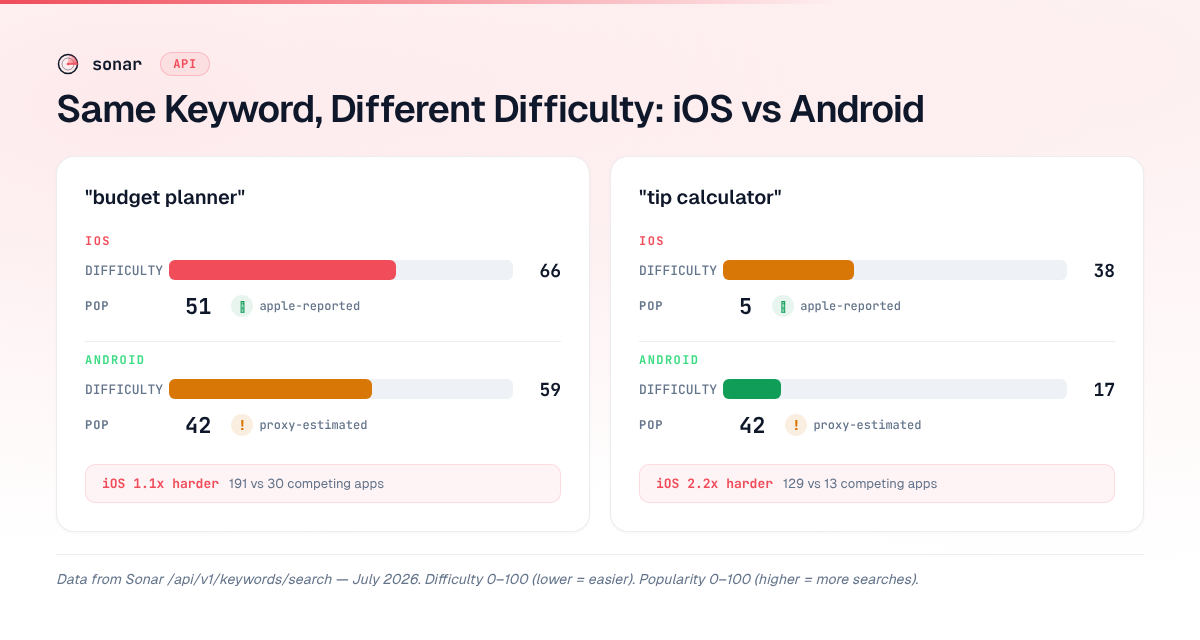
Keyword Suggestions: Expanding Seed Terms Programmatically
Beyond looking up known keywords, the suggestions endpoint generates autocomplete-driven variations from a seed term. This mirrors what a user sees as they type in the App Store search box — the long-tail phrases that real users actually search for.
Sonar's suggestions endpoint for "budget" on iOS returns autocomplete-driven variations including "budget app", "budget planner", "budget bestie", and "the smart budget" (source: Sonar /api/v1/keywords/suggestions, queried 2026-07-27).
curl "https://trysonar.app/api/v1/keywords/suggestions?q=budget&store=ios&country=us"In my experience building keyword lists for finance apps, these autocomplete suggestions reveal patterns that manual brainstorming misses. "Budget bestie" is a branded term you would never guess, but it shows up in Apple's autocomplete — meaning real users are typing it. The suggestions endpoint turns this discovery into a repeatable, scriptable process. For a structured approach to working with these terms, see the 6-step keyword research workflow.
Free-Tier Limits and Authenticated Access
Sonar's app store keyword API offers three access levels. The right one depends on your query volume.
| Tier | Auth Required | Rate Limit | Bulk Endpoint | Best For |
|---|---|---|---|---|
| Keyless | No | ~10 requests/minute | No | Quick manual checks, prototyping |
| Free API key | Yes (email signup) | ~60 requests/minute | Yes (up to 25 keywords) | Side projects, early-stage apps |
| Paid prepaid | Yes (Bearer token) | Higher limits | Yes (up to 25 keywords) | Production pipelines, weekly reports |
Paid access starts at $10 prepaid with no subscription — you buy credits and spend them on API calls. See the full pricing and tier comparison.
The keyless tier is deliberately generous for a reason: I wanted developers to test the API with real data before deciding whether to authenticate. Run a curl command, see the JSON, and only then decide whether the data fits your workflow. For a broader comparison of how Sonar's pricing stacks up against AppTweak, Appfigures, and ASOMobile, see our ASO APIs compared guide.
Building a Weekly Keyword Report Script
Here is a complete Python script that pulls keyword data weekly, compares iOS and Android difficulty, and writes the results to a CSV file. I run a version of this for Sonar's own app to catch difficulty shifts before they become a problem.
#!/usr/bin/env python3
"""Weekly keyword report — fetches difficulty + popularity for a
keyword list across iOS and Android, writes a timestamped CSV."""

import csv
import requests
from datetime import date

API_BASE = "https://trysonar.app/api/v1"
HEADERS = {"Authorization": "Bearer aso_your_key_here"}
KEYWORDS = ["budget planner", "expense tracker", "money manager",
            "tip calculator", "savings app"]

def fetch_metrics(keywords, store, country="us"):
    """Fetch bulk metrics for up to 25 keywords."""
    r = requests.post(f"{API_BASE}/keywords/metrics",
                      headers=HEADERS,
                      json={"keywords": keywords,
                            "store": store,
                            "country": country})
    r.raise_for_status()
    return {item["keyword"]: item for item in r.json().get("data", [])}

def main():
    today = date.today().isoformat()
    ios_data = fetch_metrics(KEYWORDS, "ios")
    android_data = fetch_metrics(KEYWORDS, "android")

    filename = f"keyword-report-{today}.csv"
    with open(filename, "w", newline="") as f:
        writer = csv.writer(f)
        writer.writerow(["date", "keyword",
                         "ios_difficulty", "ios_popularity", "ios_pop_source",
                         "android_difficulty", "android_popularity", "android_pop_source"])
        for kw in KEYWORDS:
            ios = ios_data.get(kw, {})
            android = android_data.get(kw, {})
            writer.writerow([
                today, kw,
                ios.get("difficulty", ""),
                ios.get("popularity", ""),
                ios.get("popularity_source", ""),
                android.get("difficulty", ""),
                android.get("popularity", ""),
                android.get("popularity_source", ""),
            ])
    print(f"Report saved: {filename}")

if __name__ == "__main__":
    main()
Schedule this with cron (0 9 1 python3 weekly_kw_report.py) and you get a Monday-morning CSV showing how difficulty and popularity shifted since last week. Over time, these CSVs form a trend dataset you can feed into a spreadsheet or BI tool.
For more advanced automation — including feeding this data into Claude for AI-powered keyword analysis — see the MCP setup guide for ASO automation.
Cross-Platform Difficulty: Why It Varies
One of the most useful things an app store keyword API reveals is how wildly difficulty differs between iOS and Android for the same keyword. The same term can be easy on one platform and fiercely competitive on the other.
| Keyword | iOS Difficulty | Android Difficulty | Gap |
|---|---|---|---|
| tip calculator | 38 | 17 | iOS 2.2x harder |
| budget planner | 66 | 59 | iOS 1.1x harder |
Source: Sonar /api/v1/keywords/search, queried 2026-07-27.
The "tip calculator" gap is striking. On iOS, the top results include apps with 60,000+ reviews, making it moderately competitive. On Android, despite 10 out of 10 top results having "tip calculator" in their title, the median competitor strength is much lower — the apps themselves are smaller (source: Sonar difficulty breakdown data, queried 2026-07-27). This means an indie developer would have a significantly better shot ranking on Google Play for this term.
For a deeper explanation of how difficulty scores are calculated and what the "sweet spot" is for indie developers, read our keyword difficulty breakdown.
FAQ
What is an app store keyword API?
An app store keyword API is an HTTP interface that returns keyword-level metrics — difficulty, search popularity, download estimates, and competitive data — for the Apple App Store and Google Play. Instead of manually checking keywords in a dashboard, developers can query these metrics programmatically via curl, JavaScript, Python, or any HTTP client. Sonar's API, for example, returns these fields in a single JSON response from the /api/v1/keywords/search endpoint (source: Sonar API documentation).
Does Apple provide a keyword difficulty API?
Apple does not offer a public API for keyword difficulty scores. Apple Search Ads exposes a Search Popularity score (a 5-to-100 relative volume metric) through its campaign management API, but it does not calculate competition or difficulty (source: Apple Search Ads API documentation, developer.apple.com/search-ads). Third-party ASO tools like Sonar compute difficulty by analyzing the strength of apps currently ranking for a given keyword.
How does popularity_source affect keyword decisions?
The popularity_source field tells you whether a popularity score comes from Apple's official data ("apple") or from a proxy model ("proxy"). On iOS, Apple reports popularity scores through the Search Ads API for keywords that meet a minimum search threshold (source: Apple Search Ads API documentation, developer.apple.com/search-ads). On Android, all popularity scores are proxy-estimated because Google does not expose search volume data through a public API. When comparing keywords across stores, weight iOS popularity scores more heavily than Android ones.
Can I fetch keyword metrics in bulk?
Yes. Sonar's /api/v1/keywords/metrics endpoint accepts up to 25 keywords in a single POST request, returning difficulty, popularity, and popularity_source for each. This is significantly more efficient than making 25 individual calls to the search endpoint, and it stays within rate limits on the free tier. For keyword lists larger than 25, batch your requests into groups and add a short delay between calls.
Is there a free app store keyword API?
Sonar offers a free keyless tier that requires no account or API key — you can run a curl command and get JSON back immediately. The keyless tier is rate-limited to roughly 10 requests per minute, which is enough for manual exploration and prototyping. For production use, a free API key raises the limit to approximately 60 requests per minute. Paid access starts at $10 prepaid with no subscription. See the full pricing breakdown.
Building keyword research into your development workflow? Try Sonar's API free — fetch difficulty, popularity, and download estimates for any App Store or Google Play keyword with a single HTTP call.
