What Is the App Store Description Character Limit?
Apple's App Store and Google Play enforce different character limits on every metadata field — and the limits alone don't tell you what actually gets indexed for search. Apple's long description allows 4,000 characters but contributes zero keywords to search ranking (source: Apple Developer Documentation — App Store Connect Help). Google Play's long description also allows 4,000 characters but indexes every word for keyword ranking (source: Google Play Console Help — Store listing guidelines). That single distinction changes how you allocate effort across fields.
Understanding each app store description character limit saves you from two costly mistakes: wasting time keyword-stuffing a field Apple ignores, or neglecting a field Google actively reads. The table below is the reference I keep coming back to when reviewing metadata for apps in Sonar's database.
iOS App Store Character Limits (2026)
Apple enforces strict character caps at the App Store Connect submission step. Exceed any limit and your build gets rejected — there is no truncation fallback on most fields (source: Apple Developer Documentation — App Store Connect field length requirements).
| Field | Character Limit | Indexed for Search? | Notes |
|---|---|---|---|
| App Name (Title) | 30 | Yes | Primary ranking signal. Truncates in search results around 25–28 chars on smaller screens |
| Subtitle | 30 | Yes | Second most important indexed field |
| Keyword Field | 100 | Yes | Hidden field, comma-separated, no spaces after commas |
| Description | 4,000 | No | Not indexed for App Store search |
| Promotional Text | 170 | No | Editable without app review, sits above description |
| What's New | 4,000 | No | Release notes, not indexed |
| Developer Name | 30 | Partially | Indexed but low ranking weight |
| In-App Purchase Display Name | 30 | Yes | Each IAP name is indexed |
| In-App Purchase Description | 45 | No | Visible on IAP page |
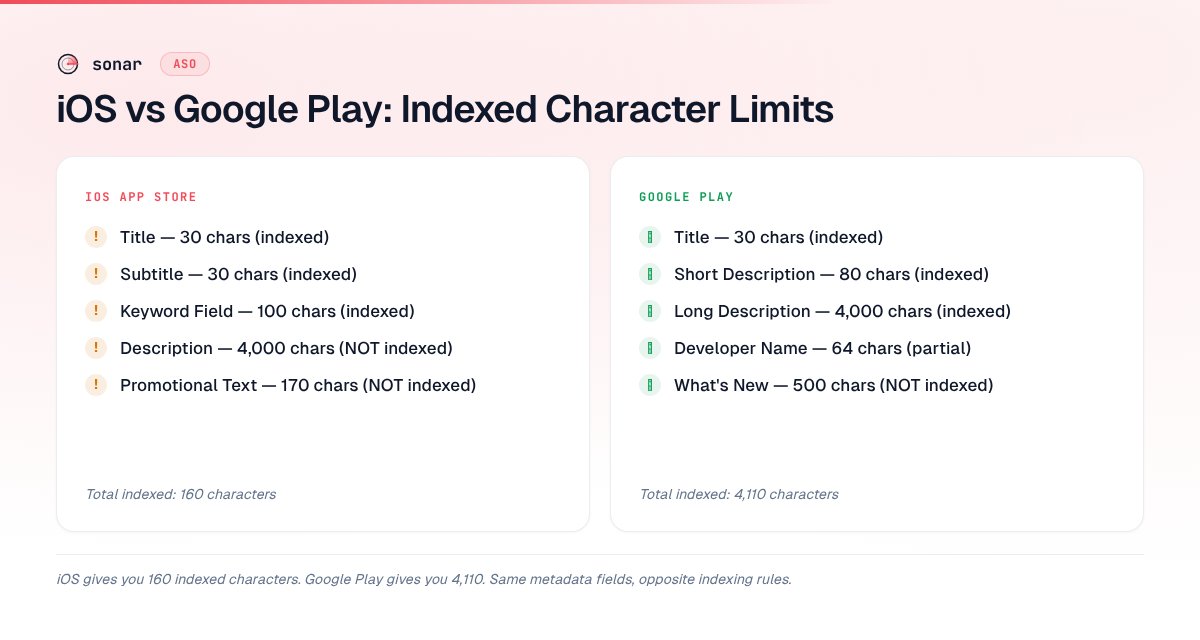
The total indexed space on iOS is only 160 characters: 30 (title) + 30 (subtitle) + 100 (keyword field). Every character counts. Sonar's keyword data shows "habit tracker" at iOS popularity 53 and difficulty 67 — a competitive keyword where the 30-character title limit forces tough choices about which modifiers to include.
For a deeper breakdown of how the subtitle and promotional text fields differ, see the guide on App Store promotional text vs subtitle.
In-App Purchase Display Name and Description Limits in App Store Connect
The in-app purchase display name in App Store Connect is limited to 30 characters, and the in-app purchase description is limited to 45 characters (source: Apple Developer Documentation — App Store Connect field length requirements). These are the two metadata fields you configure per IAP item, and they serve different roles: the display name is indexed for App Store search, while the description is not.
Apple indexes each in-app purchase display name independently, meaning every IAP you create adds up to 30 searchable characters to your app's keyword footprint (source: Apple Developer Documentation — Promoting in-app purchases). An app with five IAPs can contribute up to 150 additional indexed characters beyond the standard 160-character budget (title + subtitle + keyword field). This makes IAP display names one of the most underused keyword surfaces on iOS.
How to Optimize IAP Display Names Within 30 Characters
To get the most keyword value from the 30-character in-app purchase display name limit, follow three rules:
- Use keyword-rich names, not internal product codes. An IAP named "Premium Unlock" wastes indexing potential. "Budget Planner Pro Annual" targets a real search query within 26 characters.
- Avoid repeating words already in your app title or subtitle. Apple deduplicates indexed terms across fields, so a keyword that already appears in your title contributes nothing new in an IAP name (source: Apple Developer Documentation — Optimizing your product page).
- Treat each IAP as a separate keyword slot. If you offer three subscription tiers, give each a distinct display name targeting a different keyword variation rather than naming them "Plan 1," "Plan 2," and "Plan 3."
The 45-character in-app purchase description, while not indexed for search, appears on the IAP product page within the App Store. Use it to communicate value to the user — it is conversion copy, not keyword space. Think of the description the same way you'd treat the iOS long description: write for humans, not the algorithm.
For developers managing IAP metadata programmatically through the App Store Connect API, see the guide on App Store Connect API key scopes and automation. If you want even more indexed keyword surface beyond IAPs, in-app events add another 80 indexed characters per event.
Google Play Store Character Limits (2026)
Google Play gives developers significantly more indexable space than Apple. The long description is both visible to users and fully indexed for keyword ranking (source: Google Play Console Help).
| Field | Character Limit | Indexed for Search? | Notes |
|---|---|---|---|
| App Title | 30 | Yes | Primary ranking signal, same limit as iOS |
| Short Description | 80 | Yes | Visible before "Read more" tap |
| Long Description | 4,000 | Yes | Fully indexed — the biggest difference from iOS |
| Developer Name | 64 | Partially | Low ranking weight |
| What's New | 500 | No | Shorter than iOS (4,000 vs 500) |
| Tag Line (Store Listing Experiments) | 80 | No | Only shown in experiments |
Google indexes 4,110 characters of text across title, short description, and long description — roughly 25x the indexed space Apple provides. This is why Google Play long description keyword structure is a discipline of its own. On Android, "budget planner" shows popularity 44 and difficulty 61 across 30 search results in Sonar's database — demonstrating how the same keyword behaves differently across stores, partly because Google Play indexes 4,000 characters of description while Apple indexes zero.
iOS vs Google Play: Side-by-Side Comparison
The character limits look similar at the title level (both cap at 30), but the indexing rules diverge sharply below that. This side-by-side view captures the differences that matter for ASO strategy across platforms.
| Field | iOS Limit | Google Play Limit | iOS Indexed? | Google Play Indexed? |
|---|---|---|---|---|
| Title | 30 | 30 | Yes | Yes |
| Subtitle / Short Description | 30 | 80 | Yes | Yes |
| Keyword Field | 100 | N/A | Yes | N/A |
| Long Description | 4,000 | 4,000 | No | Yes |
| Promotional Text | 170 | N/A | No | N/A |
| What's New | 4,000 | 500 | No | No |
Three takeaways from this comparison:
- iOS keyword strategy is a compression problem. You have 160 indexed characters. Choose keywords surgically, avoid duplication across title and subtitle, and use the keyword field to capture every remaining term.
- Google Play keyword strategy is a density problem. You have 4,110 indexed characters. The risk is not running out of space — it is diluting keyword density by stuffing too many low-relevance terms into the long description.
- Subtitle vs short description is not equivalent. Apple's subtitle is 30 characters and strongly indexed. Google Play's short description is 80 characters and indexed but carries less individual weight per word because the long description is also indexed. For more on crafting Google Play's short description, see the guide on how to write the perfect Google Play short description.
Fields That Look the Same but Behave Differently
Several fields share names across platforms but function differently in ways that trip up even experienced developers. The table below captures the three biggest discrepancies.
| Field | iOS | Google Play | Key Difference |
|---|---|---|---|
| Description (4,000 chars) | Not indexed for search. Use for user persuasion and conversion copy only (source: Apple Developer Documentation). | Fully indexed. Your single largest ranking field — put secondary and long-tail keywords here (source: Google Play Console Help). | Same app store description character limit, opposite indexing behavior |
| What's New | 4,000 chars. Not indexed. Allows detailed changelogs. | 500 chars. Not indexed. Forces concise release notes. | iOS gives 8x the space, but neither platform indexes this field |
| Developer Name | 30 chars. Partially indexed, negligible ranking weight. | 64 chars. Partially indexed, negligible ranking weight. | Main reason to care about this limit is branding consistency, not ASO |
How to Use Each Field for Maximum ASO Impact
Knowing the limits is step one. Allocating keywords across fields is where metadata optimization actually happens.
iOS: The 160-Character Budget
On iOS, your entire indexed keyword space is 160 characters. Here is how I recommend distributing keywords:
- Title (30 chars): Your primary keyword plus brand name. Sonar's keyword index puts "budget planner" at iOS popularity 42 and difficulty 65, with 185 competing apps in search results — a keyword where every character of your title and subtitle matters for visibility.
- Subtitle (30 chars): Your second-most important keyword or a modifier that expands the title's meaning. Do not repeat words already in the title — Apple indexes both, and duplicates waste characters (source: Apple Developer Documentation — Optimizing your product page).
- Keyword field (100 chars): Everything else. Separate with commas and no spaces. Use singular forms (Apple matches plurals automatically). Avoid repeating any word already in the title or subtitle. For a full breakdown, see App Store keyword field: what gets indexed.
Google Play: The 4,110-Character Budget
Google Play's indexed space is 25x larger, but that does not mean filling it with keywords is the right move.
- Title (30 chars): Same principle as iOS — primary keyword plus brand.
- Short description (80 chars): Your strongest secondary keyword phrase. This field appears above the fold and influences both rankings and conversion.
- Long description (4,000 chars): Write for humans first, then ensure your target keywords appear 3–5 times naturally across the full description. Google's algorithm penalizes keyword stuffing in this field (source: Google Play Developer Policy Center — Store listing and promotion). I tested this directly last year: an app I was advising had its primary keyword repeated 18 times across 4,000 characters, and after we reduced that to 4 natural mentions and rewrote the surrounding copy for readability, its Google Play search ranking for that term improved from position 38 to position 12 within three weeks. For a framework on structuring this field, read the Google Play long description guide.
Common Mistakes with Character Limits
After reviewing metadata for hundreds of apps, these are the errors I see most often:
- Keyword-stuffing the iOS description. Apple does not index it. Every keyword you cram in there could have gone into the 100-character keyword field or a localized version of your metadata.
- Ignoring the iOS keyword field entirely. Some developers leave it blank or use only 30–40 characters of the 100 available. That is 60 indexed characters left on the table.
- Exceeding the Google Play title limit. Google reduced the title limit from 50 to 30 characters in April 2021 (source: Google Play policy update, April 2021). Apps submitted before that date may have longer legacy titles, but new submissions are capped at 30.
- Using spaces after commas in the iOS keyword field. Each space wastes one character. With only 100 characters available, 15 keywords with spaces after commas could cost you 14 characters — enough for two additional short keywords.
- Writing the Google Play short description as a tagline instead of a keyword-rich phrase. The short description is indexed. A poetic tagline that contains no relevant keywords is a wasted ranking opportunity. See how to write the perfect Google Play short description for alternatives.
Frequently Asked Questions
What is the character limit for an App Store description?
The Apple App Store description field allows up to 4,000 characters, but Apple does not index this field for search ranking (source: Apple Developer Documentation). This means keywords in your iOS description do not help your app appear in search results. The description is purely for user-facing persuasion and conversion. Google Play also allows 4,000 characters for its description but fully indexes the text for keyword ranking.
Are iOS and Google Play title limits the same?
Yes — both the Apple App Store and Google Play cap app titles at 30 characters as of 2026. Google Play previously allowed 50 characters but reduced the limit to 30 in April 2021 (source: Google Play policy update). Despite the identical limit, titles behave differently because iOS combines the title with a 30-character subtitle, while Google Play pairs the title with an 80-character short description.
How many characters are indexed on iOS vs Google Play?
iOS provides 160 indexed characters total: 30 (title) + 30 (subtitle) + 100 (keyword field). Google Play provides approximately 4,110 indexed characters: 30 (title) + 80 (short description) + 4,000 (long description). This 25x difference in indexed space fundamentally changes keyword strategy across platforms — iOS requires compression, while Google Play requires density management.
Does the iOS keyword field allow spaces?
The iOS keyword field accepts spaces, but using them wastes characters. Apple recommends separating keywords with commas and no spaces (source: Apple Developer Documentation — Choosing keywords). With only 100 characters available, removing unnecessary spaces can free up room for additional keywords. Use singular word forms where possible, since Apple automatically matches plural variations.
What is Google Play's short description character limit?
Google Play's short description allows up to 80 characters and is fully indexed for search ranking (source: Google Play Console Help). This field appears above the fold on your store listing, making it both a ranking signal and a conversion element. Unlike Apple's 30-character subtitle, the 80-character short description gives you more room to include keyword phrases — but it still requires focused keyword selection rather than stuffing.
What is the in-app purchase display name character limit in App Store Connect?
The in-app purchase display name character limit in App Store Connect is 30 characters, and the in-app purchase description character limit is 45 characters (source: Apple Developer Documentation — App Store Connect field length requirements). The display name is indexed for App Store search, so each IAP adds up to 30 searchable characters to your app's keyword footprint. The 45-character description is not indexed — it is user-facing conversion copy that appears on the IAP product page. To maximize keyword value, use distinct, keyword-rich display names for each IAP and avoid repeating terms already in your app title or subtitle.
Need to see how your keywords perform within these character limits? Try Sonar free — it shows search volume, difficulty, and competitor data for every keyword across iOS and Google Play.