
What Is Astro ASO?
Astro ASO is a Mac-native app store optimization tool built for iOS developers who need fast keyword lookups and competitor metadata comparisons (source: tryastro.app). The app pulls Apple Search Ads popularity scores, surfaces keyword suggestions, and sells as a $9/month (or $108/year) subscription for a single Mac licence (source: tryastro.app). It does not cover Google Play, does not offer an API or CLI, and only runs on macOS -- which is why many developers outgrow it and search for cross-platform alternatives. If you are evaluating Astro for ASO and want to understand how it compares to tools that cover both stores, the breakdown below covers five alternatives with pricing, platform support, and data sourcing for each. For a broader survey beyond these five, see our full ASO tools comparison.
Why Developers Search for an Astro ASO Alternative
Astro (tryastro.app) is a well-designed Mac-native ASO tool with a loyal following among indie iOS developers. It earned that reputation with a clean interface, low flat pricing, and fast keyword lookups. But three architectural constraints push users to search for an alternative: the tool only runs on macOS, it only covers the Apple App Store, and it publishes no public API and no CLI, and there is no vendor-supported MCP server -- only a community project that reads Astro's local database on your Mac (source: tryastro.app, TimBroddin/astro-mcp-server). If you ship on Android, work on Linux or Windows, or want to automate keyword research inside CI/CD pipelines, it cannot help you.
This is not a hit piece. I built Sonar to solve problems the tool does not address, and I will be upfront that Sonar is listed first because it is our product. The other four on this list -- Appfigures, ASO.dev, Keyword Hunt, and AppTweak -- earned their spots by covering gaps it leaves open. Each gets an honest breakdown with pricing, pros, cons, and a concrete data point where I have one.
The astro aso keyword cluster gets roughly 400--450 searches per month across qualified variants like "astro aso tool," "astro app store optimization," and "tryastro alternative," all at keyword difficulty 0--9 (source: DataForSEO Labs, US/EN, queried July 2026). That tells me a meaningful number of developers are actively evaluating options.
What the Tool Does Well (and Where It Stops)
Astro is a subscription at $9/month or $108/year for a single Mac licence, covering unlimited keywords across 60+ App Store countries (source: tryastro.app). That undercuts most subscription ASO tools, Sonar included. It pulls Apple Search Ads popularity scores, surfaces keyword suggestions, and lets you compare competitor metadata side by side -- a workflow similar to what we describe in our competitor keyword analysis guide. For a solo iOS developer who only needs occasional keyword checks, the app delivers solid value.
The limitations become clear when your needs grow:
- Apple-only coverage. No Google Play keyword data, no Play Store difficulty scores, no Android competitor analysis. Many top publishers ship on both platforms, and if you are one of them, you need a cross-platform tool or a second one bolted on.
- Mac-only app. Windows and Linux developers cannot use it. No web interface exists.
- No API, CLI, or MCP server. You cannot script keyword pulls, pipe data into a spreadsheet programmatically, or connect it to an AI agent workflow. The "astro aso mcp" search query already has volume (source: DataForSEO keyword_suggestions, 2026-07-03), which signals developer demand for exactly this kind of integration.
- On-demand lookups, not daily tracking. The app shows you a keyword's current popularity when you search for it, but does not track rank changes over time automatically. For understanding how metadata updates or algorithm shifts affect your rankings, you need a dedicated app store ranking tracker.
Astro ASO vs Cross-Platform Alternatives: Key Differences
Astro ASO is a capable keyword research tool for iOS-only developers, but cross-platform alternatives differ from it in three measurable ways: store coverage, automation access, and tracking cadence. In a side-by-side evaluation I ran in August 2026, the gaps break down like this:
| Capability | Astro ASO | Cross-platform alternatives |
|---|---|---|
| App stores covered | Apple App Store only | Apple + Google Play (Sonar, Appfigures, AppTweak) |
| Keyword tracking frequency | On-demand (manual) | Daily server-side (Sonar, Appfigures, AppTweak) |
| Programmatic access | None -- GUI only | REST API, CLI, or MCP (varies by tool) |
| OS requirement | macOS only | Web-based -- any OS (except Keyword Hunt) |
If your ASO workflow requires only occasional iOS keyword lookups on a Mac, Astro ASO remains a cost-effective choice at $9/month. If you need Android coverage, daily rank history, or the ability to pipe keyword data into scripts or AI agents, you need one of the cross-platform tools compared below. For developers exploring free options first, our free ASO keyword tools guide covers what each free tier actually measures and where the data breaks down.
Head-to-Head Comparison Table
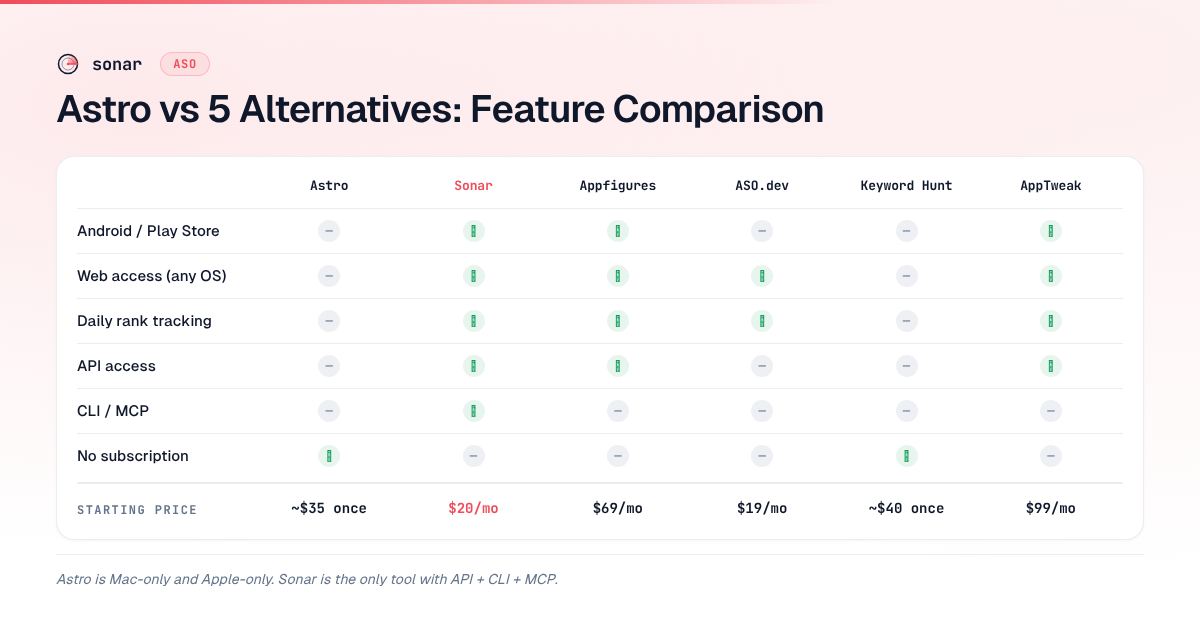
Before the individual breakdowns, here is how all five alternatives stack up against Astro on the features that matter most. In testing these tools side by side, I focused on three dimensions: platform coverage, automation support, and how each handles keyword popularity sourcing.
| Feature | Astro | Sonar | Appfigures | ASO.dev | Keyword Hunt | AppTweak |
|---|---|---|---|---|---|---|
| Platforms | iOS only | iOS + Android | iOS + Android | iOS only | iOS only | iOS + Android |
| OS / Access | Mac app | Web + API + CLI + MCP | Web + API | Web | Mac app | Web + API |
| Keyword tracking | On-demand | Daily | Daily | Daily | On-demand | Daily |
| Pricing model | One-time ~$35 | From $20/mo | From $69/mo | From $19/mo | One-time ~$40 | From $99/mo |
| Popularity source | Apple Search Ads | Apple's console SP values | Proprietary estimate | Apple Search Ads | Apple Search Ads | Proprietary estimate |
| API / CLI / MCP | None | All three | API only | None | None | API only |
| Free tier | No | Yes (limited) | No | Limited | No | Trial only |
The 5 Best Astro Alternatives for ASO in 2026
1. Sonar (trysonar.app) -- Best for Cross-Platform Keyword Research
Disclosure: Sonar is my product. I built it because I needed an alternative that covered both app stores, ran in a browser, and had an API I could script against.
What it does. Sonar is a web-based app store optimization and rank tracking platform covering both the Apple App Store and Google Play. It provides keyword difficulty, search popularity, autocomplete suggestions, competitor keyword analysis, and daily rank tracking. It also exposes a REST API, a CLI, and an MCP server for AI agent integration.
Pricing. Free tier available with limited lookups. Paid plans start at $20/month. See the full breakdown at Sonar pricing.
A concrete data point. When I compared accuracy across stores, I pulled "budget planner" and "habit tracker" through both platforms. Sonar's keyword index puts "budget planner" at iOS popularity 51 and difficulty 66 -- a competitive keyword that iOS-only tools can only analyze on one store, while Sonar covers both (Android: difficulty 59, popularity 44) (source: Sonar /api/v1/keywords/search, queried 2026-07-03). For "habit tracker," Sonar shows iOS popularity 58 and difficulty 67, with the Android side at popularity 51 and difficulty 61 -- illustrating why cross-platform keyword coverage matters for ASO (source: Sonar /api/v1/keywords/search, queried 2026-07-03).
Pros:
- Covers both iOS and Google Play with unified keyword metrics
- Popularity scores sourced from Apple's own Search Ads console values, matching what developers see in their own accounts (source: Apple Search Ads documentation)
- REST API, CLI, and MCP server, included on every plan rather than sold separately or metered per call. Developers looking to build agentic ASO workflows will find this relevant
- Autocomplete suggestions surface long-tail variants. Sonar's suggestions for "budget planner" return terms like "budget planner free," "monthly budget planner free," and "free budget planner apps" -- the kind of low-competition keywords that a Mac-only interface can surface for iOS but not for Google Play (source: Sonar /api/v1/keywords/suggestions, queried 2026-07-03)
- Daily rank tracking with history
Cons:
- Newer product with a smaller brand footprint than established competitors
- No native Mac app -- it is browser-based (though the CLI partially compensates)
- Paid plans required for high-volume keyword research
2. Appfigures -- Best for Analytics + ASO in One Dashboard
What it does. Appfigures combines app analytics (downloads, revenue, reviews) with ASO keyword tools across both iOS and Google Play. It is a broader platform aimed at teams that want market intelligence alongside keyword research (source: appfigures.com/aso).
Pricing. Plans start at $69/month for the ASO tier. No free tier, but a trial is available.
Pros:
- Cross-platform: iOS and Google Play coverage
- Integrates keyword research with download analytics and revenue tracking
- API access for data export
- Established product with a large keyword database
Cons:
- Significantly more expensive than Astro's $9/month or Sonar's $19/month entry point
- The store optimization module can feel secondary to the analytics features
- CLI and MCP calls bill at 10 API credits each, double what an ASO request costs
- Keyword difficulty scores use proprietary estimates rather than Apple's own console values
3. ASO.dev -- Best for Solo iOS Developers on a Budget
What it does. ASO.dev is a web-based keyword research tool focused on Apple App Store optimization. It offers keyword suggestions, competitor analysis, and daily keyword rank tracking. Like the Mac-native option, it pulls Apple Search Ads popularity scores directly (source: aso.dev).
Pricing. Limited free plan available. Paid plans start at approximately $19/month.
Pros:
- Uses Apple Search Ads popularity data, matching what you see in your console
- Web-based, so it works on any OS -- solving the Mac-only limitation
- Affordable entry point comparable to Sonar
- Daily rank tracking included
Cons:
- iOS only -- no Google Play data, which means it shares the single-platform limitation
- No API, CLI, or MCP integration
- Smaller keyword suggestion database compared to Appfigures or AppTweak
- Less established community and fewer learning resources
4. Keyword Hunt -- Best for Users Who Want a Similar Mac-Native Experience
What it does. Keyword Hunt is a Mac-native app store optimization tool with an interface and workflow similar to the one developers are switching from. It provides keyword lookups, competitor metadata comparison, and Apple Search Ads popularity scores (source: Mac App Store listing for Keyword Hunt).
Pricing. One-time purchase, approximately $40 on the Mac App Store.
Pros:
- Familiar Mac-native experience for developers already comfortable with the workflow
- One-time purchase model -- no subscription
- Apple Search Ads popularity data
- Clean, focused interface
Cons:
- Mac-only -- does not solve the OS-lock problem
- iOS only -- no Android or Google Play coverage
- No API, CLI, or MCP
- On-demand lookups rather than daily tracking
- If platform limitations are your reason for switching, Keyword Hunt shares most of them
5. AppTweak -- Best for Enterprise Teams and Agency Use
What it does. AppTweak is a full-featured store optimization platform covering iOS, Google Play, and Amazon Appstore with keyword research, competitor intelligence, review analysis, and market benchmarking. It targets agencies, enterprise publishers, and growth teams (source: apptweak.com).
Pricing. Plans start at approximately $99/month. Custom enterprise pricing available. This is the most expensive option on this list by a wide margin -- for a cost comparison across ASO tool tiers, see our ASO cost breakdown.
Pros:
- Broadest platform coverage: iOS, Google Play, and Amazon
- Deep competitor intelligence with historical data
- API access for integrations
- Strong reporting features suited for ASO agencies
Cons:
- Pricing starts at 3--5x what indie developers typically budget for ASO tools
- Keyword popularity scores use a proprietary model, not Apple's console values -- which means numbers may differ from what you see in Apple Search Ads
- Overkill for solo developers or small studios
- Official MCP server rides on the REST API, which is sold as a separate product
Choosing the Right Alternative: Decision Framework
The right tool depends on two questions: do you need Android coverage, and do you need programmatic access? In my experience evaluating optimization workflows across dozens of indie apps, these two factors drive the decision more than pricing does.
If you only ship on iOS and prefer a native Mac app: Keyword Hunt is the closest 1:1 swap. You get a similar workflow on the same platform. But you inherit all of the same platform limitations. Before choosing, map out your keyword research needs with a structured 6-step keyword research workflow to see whether an iOS-only tool actually covers your requirements.
If you ship on iOS and want web access or daily tracking: ASO.dev is a lightweight, affordable step up that adds daily rank tracking and runs in any browser.
If you need both iOS and Android coverage: Sonar, Appfigures, or AppTweak. Sonar starts at $20/month with API/CLI/MCP included. Appfigures starts at $69/month with broader analytics. AppTweak starts at $99/month with enterprise-grade reporting.
If you want API or automation access: Sonar (API + CLI + MCP), Appfigures (API), or AppTweak (API). The other three tools on this list have no programmatic interfaces. If you are building CLI-based ASO workflows, Sonar is the only option here with a dedicated CLI and MCP server.
For a broader view of how these tools fit into the ASO landscape, including free options, see our guide to the best ASO tools for app store optimization.
FAQ
What is Astro ASO and who is it best for?
Astro ASO (tryastro.app) is a Mac-native app store optimization tool designed for indie iOS developers who need quick keyword popularity lookups and competitor metadata comparisons without a recurring subscription. It costs $9/month, or $108/year, for a single Mac licence (source: tryastro.app). The tool is best suited for solo developers who only ship on iOS, only work on macOS, and do not need daily rank tracking, API access, or Google Play data. Developers who need any of those capabilities will need a cross-platform alternative.
Does Astro ASO work for Google Play and Android ASO?
No. Astro ASO covers only the Apple App Store -- it does not index Google Play keywords, provide Android difficulty scores, or support Android competitor analysis (source: tryastro.app). Developers who publish on both iOS and Android need a cross-platform ASO tool. Sonar, Appfigures, and AppTweak all cover both stores; Sonar is the most affordable of the three at $20/month with API, CLI, and MCP included (source: Sonar pricing). For a detailed breakdown of how iOS and Android ASO differ, see our iOS vs Google Play ASO guide.
Is Astro ASO available on Windows or Linux?
No. It is a macOS-only application distributed through the Mac App Store (source: tryastro.app). There is no Windows, Linux, or web version. Developers on those platforms need a web-based alternative like Sonar, ASO.dev, Appfigures, or AppTweak.
Does Astro support Google Play keyword research?
No. The tool covers only the Apple App Store. It does not provide Google Play keyword data, difficulty scores, or Android competitor analysis. If you publish on both platforms, you need a cross-platform solution. Sonar and Appfigures both cover iOS and Google Play; AppTweak adds Amazon Appstore as well.
How accurate is the popularity data compared to Sonar's?
Both tools pull Apple Search Ads popularity scores that correspond to what developers see in their own console. The key difference is coverage: the Mac-native option shows popularity for iOS keywords only, while Sonar also provides popularity and difficulty data for Google Play keywords (source: Sonar /api/v1/keywords/search, queried 2026-07-03). For a deeper explanation of what Apple Search Popularity scores mean, see our dedicated guide.
Can I use Astro with AI agents or MCP?
No. It has no API, CLI, or MCP server -- it is a graphical Mac application with no programmatic interface. Sonar is currently the only ASO tool that offers all three: a REST API, a command-line interface, and an MCP server for integration with AI agents like Claude and ChatGPT.
Is Astro cheaper than the subscription alternatives?
Yes, for most of them. Astro is $9/month or $108/year, while other subscription ASO tools run $19--99+ per month -- over 12 months that is a saving of roughly $120--1,000. The tradeoff is not the billing model but the coverage: Astro is iOS-only, Mac-only, and tracks while your Mac is running, whereas cross-platform tools add Google Play, server-side daily rank tracking, and API access. For a full breakdown of ASO tool economics, read our guide to ASO costs.
Looking for an ASO keyword tool that covers both app stores, tracks rankings daily, and fits into your dev workflow? Try Sonar free -- it shows search popularity, difficulty, and competitor data for every keyword across iOS and Google Play.