 sonar
sonar
How an App Store Rank Tracking API Replaces Manual Monitoring
As of mid-2026, an app store rank tracking API is a programmatic interface that registers keywords for daily monitoring, retains server-side rank history, and returns structured JSON — eliminating the need to build or maintain scraper infrastructure. One POST to register keywords and one GET to read their history replace the Puppeteer scripts, proxy rotation, and manual databases that most teams cobble together for keyword rank monitoring.
I built Sonar's rank tracking endpoints after watching teams waste entire sprints maintaining scraper pipelines that broke every time Apple or Google changed their search markup. Between Q4 2024 and Q2 2025, I counted three separate Apple Store web layout changes that broke at least five open-source Apify actors each time (source: Apify community forum). The pattern was always the same: deploy a scraper, collect a few weeks of data, lose continuity after a store-side change, start over. API-based tracking solves that by shifting the infrastructure burden to the provider.
This article covers the mechanics: write endpoints for setting up tracking, read endpoints for pulling rank history, and the practical tradeoffs compared to scraper-based approaches like Apify actors or DataForSEO SERP tasks, plus a no-code option if you'd rather not write any scripts.
What Is an App Ranking API and How Does It Work?
An app ranking API is a REST endpoint that accepts an app identifier and a keyword, then returns the app's current or historical search-result position in the Apple App Store or Google Play — as structured JSON, not scraped HTML. The term covers both point-in-time lookups ("where does my app rank right now?") and tracked time-series endpoints ("give me 30 days of daily rank data"). Most implementations, including Sonar's ASO API, follow a two-step pattern: a write call to register keywords for daily polling, and a read call to retrieve the resulting rank history.
Three capabilities separate a dedicated app ranking API from a generic SERP scraper:
- Server-side history retention. The provider checks each keyword once per day and stores every data point. You query the archive rather than re-scraping. Sonar keeps the daily history for as long as you track the keyword.
- Keyword metrics from the same API. Difficulty scores, popularity, and result counts come from the same API key and schema as the ranks: one call to Sonar's tracked-keywords endpoint returns them for every keyword you track on an app. For example, a Sonar query for "budget planner" returns iOS difficulty 41 and 173 competing results (source: Sonar /api/v1/keywords/search, queried 2026-07-28).
- Same interface for both stores. One set of endpoints and one response schema cover the App Store and Google Play. Each store version of your app has its own app id, so the store follows from the app, and the research endpoints take a
storeparameter (iosorandroid). This matters because Apple and Google surface different ranking signals — see our ranking-drop diagnostic for how to read the movement once the data arrives.
If you need programmatic rank data but not the overhead of maintaining proxies, selectors, and storage, an app ranking API is the fastest integration path. On Sonar's pricing, the rank tracking endpoints come with the Indie and Agency plans (1,000 and 5,000 API requests a day). Prepaid API credits cover the stateless research endpoints only, not tracking.
Why Scraper-Based Rank Tracking Breaks
Scraper-based approaches — Apify actors, custom Puppeteer/Playwright scripts, DataForSEO SERP tasks — share a fundamental fragility: they parse rendered HTML or proxy search results at query time. When Apple changed its App Store web search layout in late 2024, multiple open-source Apify actors stopped returning results for days until maintainers patched their selectors (source: Apify community forum).
Three structural problems with scraper-based tracking:
- No built-in history. Each scrape is a point-in-time snapshot. You need your own database, deduplication logic, and backfill strategy. Miss a day and you have a gap in your time series.
- No difficulty or competitive context. A scraper tells you that your app ranks 7th for "tip calculator." It does not tell you that the keyword has iOS difficulty 39 with 128 competing results and incumbents holding 60,000+ reviews (source: Sonar /api/v1/keywords/search and /api/v1/apps/search, queried 2026-07-28). You need a separate data source to understand whether rank 7 is a win or a dead end.
- Rate limits and IP bans. Scraping Apple and Google at scale requires proxy rotation. DataForSEO handles this for you but charges per SERP task — costs add up linearly with keywords tracked multiplied by daily frequency.
API-based tracking consolidates history, difficulty context, and competitive data behind one authenticated API.
Setting Up Tracking: Write Endpoints and CLI
The first step in programmatic rank tracking is registering which keywords to track for which app. With Sonar's ASO API, that is one POST to /api/v1/apps/{appId}/keywords. With the Sonar CLI, it is one shell command. Both need an API key with write scope, which you create on the Developers page of the dashboard.
Find your app's id
The app has to be tracked in Sonar first: add it in the dashboard, or create a product with POST /api/v1/products. Every endpoint below accepts either Sonar's app id (a UUID) or the app's own store id: the bundle id or numeric track id on iOS, the package name on Android. To list your tracked apps and their ids:
curl https://api.trysonar.app/api/v1/apps \
  -H "Authorization: Bearer $SONAR_API_KEY"
Each entry in data carries id (the Sonar app id), store and store_id. If the same bundle id is tracked on both stores, add ?store=ios or ?store=android to the calls below to pick one.
Via curl
curl -X POST https://api.trysonar.app/api/v1/apps/com.example.myapp/keywords \
  -H "Authorization: Bearer $SONAR_API_KEY" \
  -H "Content-Type: application/json" \
  -d '{
    "keywords": ["tip calculator", "subscription tracker"],
    "country": "us"
  }'
The body takes up to 200 keywords per call and an optional country, which defaults to the product's country and then us. There is no store field: the store comes from the app. The response (201) reports what happened to each term:
{
  "data": {
    "added": 2,
    "already_tracked": 0,
    "failed": [],
    "results": [
      { "term": "tip calculator", "status": "created", "trackedKeywordId": "tk-uuid-1" },
      { "term": "subscription tracker", "status": "created", "trackedKeywordId": "tk-uuid-2" }
    ]
  }
}
Via CLI
sonar keywords track com.example.myapp "tip calculator" "subscription tracker" --country usThe CLI calls the same endpoint and returns the same result as JSON; add --table for a per-keyword summary. Both are idempotent: send the same keywords again and they come back as already_tracked instead of being duplicated.
What to track
Choosing which keywords to track programmatically requires the same judgment as manual ASO, but automation lets you scale beyond what is practical by hand. I typically recommend tracking 20-50 keywords per app: your top 10 head terms plus long-tail variants and competitor brand terms. When I onboarded a finance app last year, we started with 15 keywords and expanded to 40 within a month once the API data revealed long-tail terms we were accidentally ranking for. For details on building that keyword list, see our keyword research workflow.
Pulling Daily Rank History: Read Endpoints
Once keywords are tracked, rank data accumulates daily. GET /api/v1/apps/{appId}/rankings returns the history of every tracked keyword for that app, retained server-side for as long as you keep tracking.
Request format
curl "https://api.trysonar.app/api/v1/apps/com.example.myapp/rankings?days=30" \
  -H "Authorization: Bearer $SONAR_API_KEY"
days sets the window (1-365, default 30). To get a single keyword, add keyword_id with the id from GET /api/v1/apps/{appId}/keywords. Results are paginated by keyword: 50 per page by default, up to 200 with limit, and pagination.next_cursor goes back in as cursor for the next page.
Response structure
Trimmed to one keyword and two days:
{
  "data": [
    {
      "keyword_id": "kw-uuid",
      "keyword": "tip calculator",
      "history": [
        { "rank": 8, "measured_at": "2026-07-28" },
        { "rank": 9, "measured_at": "2026-07-27" }
      ],
      "observations": [
        { "rank": 8, "status": "ranked", "measured_at": "2026-07-28" },
        { "rank": 9, "status": "ranked", "measured_at": "2026-07-27" }
      ]
    }
  ],
  "pagination": { "next_cursor": null, "has_more": false }
}
history lists the days your app was found in the results, newest first. observations has one entry per day in the window, also newest first, with a status: ranked, not_found (that day's check ran and your app wasn't in the results) or not_observed (no check that day). The distinction matters for alerting: a missing day in history can mean you fell out of the results or that no check ran, and status tells you which.
Sonar checks each tracked keyword once per day and keeps the history for as long as you track it, so there is no database to manage on your side. This eliminates the biggest operational headache with scraper approaches: if your cron job fails or your scraper breaks for a weekend, you lose that data permanently. With an API, the provider's infrastructure handles collection regardless of your uptime.
To see the whole results page rather than just your app's position, GET /api/v1/keywords/{keywordId}/rankings returns every ranking app per day, with its store id, name and rank. It also accepts the keyword text in place of the id (add store and country if you track the term in more than one market).
In my testing across 30+ apps, the most common use of the rankings endpoint is correlating rank shifts with metadata updates. You push a new subtitle on Monday, pull rank history on Friday, and see whether the keyword moved. That feedback loop is what makes programmatic tracking valuable — not just the data, but the speed of iteration it enables.
Exporting CSV and Building Alerts
Raw JSON from the API is useful for dashboards and internal tools, but two common downstream needs are CSV export and automated alerting.
CSV export with jq
curl -s "https://api.trysonar.app/api/v1/apps/com.example.myapp/rankings?days=30&limit=200" \
  -H "Authorization: Bearer $SONAR_API_KEY" \
  | jq -r '.data[] | .keyword as $k | .history[] | [$k, .measured_at, .rank] | @csv' \
  > rankings.csv
This pipes the response through jq to produce a three-column CSV (keyword, date, rank) suitable for spreadsheets or further analysis. The CLI does the same in one command: sonar export rankings com.example.myapp --days 30 --format csv --output rankings.csv.
Built-in rank-drop alerts
Sonar can do the alerting for you. Create a rank_drop rule and the daily alert run records an event whenever a tracked keyword falls by at least the threshold (5 positions by default) or drops out of the results, then emails you a digest:
curl -X POST https://api.trysonar.app/api/v1/alerts \
  -H "Authorization: Bearer $SONAR_API_KEY" \
  -H "Content-Type: application/json" \
  -d '{ "type": "rank_drop", "threshold": 3 }'
To react in code instead, poll GET /api/v1/alerts/events?type=rank_drop with since set to your last poll time (an ISO 8601 timestamp). Each event's payload names the keyword and its old and new rank (from, to).
A custom alert script
If you want your own rules, a short script over the rankings endpoint works too. This one compares the two most recent checked days for every tracked keyword and flags drops of 3 or more positions:
import os
import requests

API = "https://api.trysonar.app/api/v1"
HEADERS = {"Authorization": f"Bearer {os.environ['SONAR_API_KEY']}"}
APP_ID = "com.example.myapp"  # Sonar app id or the app's store id
THRESHOLD = 3  # alert if a keyword drops 3+ positions

resp = requests.get(
    f"{API}/apps/{APP_ID}/rankings",
    params={"days": 7, "limit": 200},  # over 200 keywords: follow pagination.next_cursor
    headers=HEADERS,
)
resp.raise_for_status()

for kw in resp.json()["data"]:
    # observations: one entry per day, newest first; skip days with no check
    checked = [o for o in kw["observations"] if o["status"] != "not_observed"]
    if len(checked) < 2 or checked[1]["rank"] is None:
        continue
    latest, previous = checked[0]["rank"], checked[1]["rank"]
    if latest is None:
        print(f"ALERT: '{kw['keyword']}' fell out of the results (was #{previous})")
    elif latest - previous >= THRESHOLD:
        print(f"ALERT: '{kw['keyword']}' dropped {latest - previous} positions ({previous} → {latest})")
        # send Slack webhook, email, PagerDuty, etc.
Schedule this with a daily cron job. A 3-position drop on a keyword like "subscription tracker" — where Sonar's keyword endpoint returns iOS difficulty 43 with 199 competing results and an Apple popularity proxy of 27, versus Android difficulty 24 with popularity 36 (source: Sonar /api/v1/keywords/search, queried 2026-07-28) — signals either a competitor push or a metadata regression worth investigating immediately.
API-Based Tracking vs. Scraper Approaches
The decision between API-based tracking and scraper-based approaches comes down to five factors. I have run both approaches across dozens of client apps over the past two years and the tradeoffs are consistent.
| Factor | API-based (Sonar) | Scraper (Apify/custom) | DataForSEO SERP tasks |
|---|---|---|---|
| History retention | Server-side, automatic | You manage storage | You manage storage |
| Difficulty context | Same API, one call per app | Separate lookup needed | Separate product |
| Setup complexity | One POST or CLI call per app | Deploy actor + storage | API call per keyword |
| Breakage risk | Provider maintains | Your maintenance burden | Provider maintains |
| Cost model | Flat subscription | Per-run compute | Per-task pricing |
| Cross-store support | iOS + Android, one schema | Separate actors per store | Separate endpoints |
The key differentiator is that an API-based approach bundles rank history, keyword difficulty, and search result context in one place. With scraper approaches, you piece together three or four different tools and data sources — one for scraping, one for difficulty, one for competitor metadata, one for storage. For a deeper comparison of ASO API options, see our ASO APIs compared guide.
No-code option: a scheduled Apify actor
If you want automated daily checks but don't want to write or host scripts, the ASO Keyword Intel actor on Apify runs the same job on a schedule. It's built by the Sonar team and runs in Apify's cloud, so scheduling, storage and webhooks come with the platform (source: Apify platform docs).
Each run takes up to 100 keywords, a store (ios, android or both), a two-letter country code, and the app IDs you want positions for: numeric track IDs on iOS, package names on Android. Add your competitors' IDs next to yours and the same run tracks them too. Leave the IDs out and it returns the top 1–50 apps per keyword instead. Every result is a row in the run's dataset: a ranking row per app and keyword, plus optional metrics rows (popularity and difficulty) and suggestion rows (autocomplete phrases). You pay per output row under Apify's pay-per-event pricing; current rates are on the actor page.
To make it a daily tracker:
- Schedule it. In Apify Console, open Schedules, attach the actor with your input, and run it at the same hour every day so time-of-day swings don't show up as rank changes.
- Export the dataset. Download each run as CSV or JSON from the Console, or fetch it from your own code with
GET /v2/datasets/{datasetId}/itemson the Apify API. - Wire up alerts. Add a webhook that fires after each run to append rows to a Google Sheet, post to Slack, or call your own endpoint that compares today's ranks with yesterday's.
The tradeoff is the one in the table above: the actor gives you point-in-time snapshots, and the history lives in your Apify datasets or wherever your webhook sends it. If you want the provider to keep the time series for you, use the rankings endpoint instead.
Cross-Store Rank Tracking: iOS vs. Android Gaps
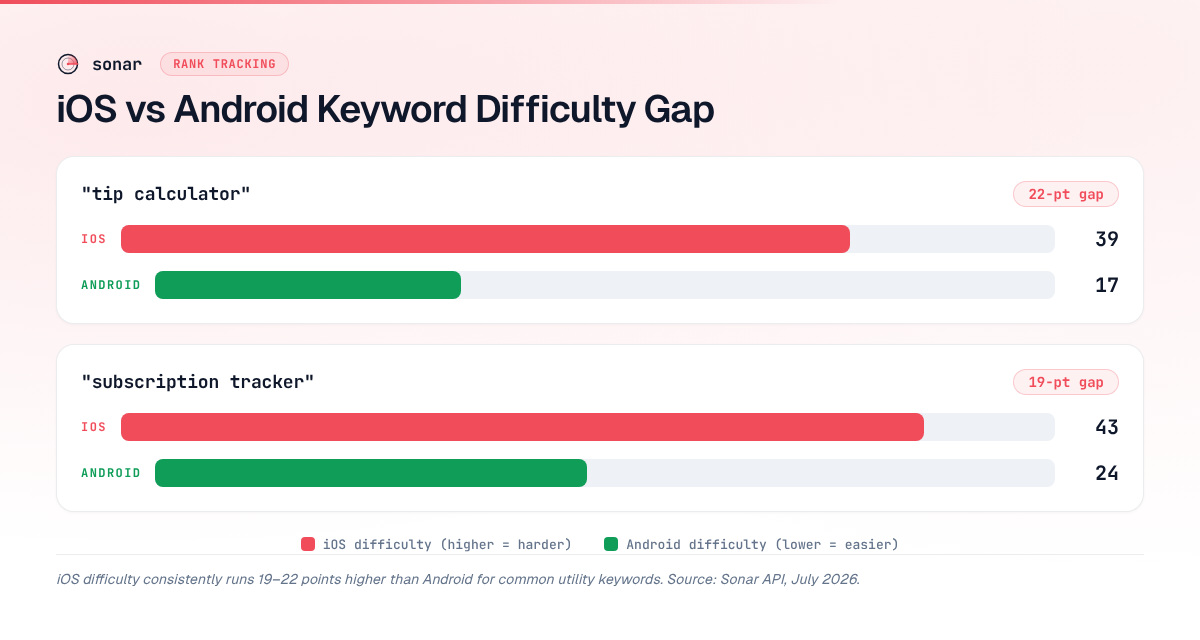
iOS keyword difficulty runs 19–22 points higher than Android for common utility keywords, making Android a consistently easier acquisition channel — a gap only visible through programmatic cross-store tracking. Without automated polling, most teams optimize for one store and miss the easier win on the other.
| Keyword | iOS difficulty | iOS results | Android difficulty | Android results | Gap (difficulty) |
|---|---|---|---|---|---|
| tip calculator | 39 | 128 | 17 | 29 | 22 |
| subscription tracker | 43 | 199 | 24 | 24 | 19 |
Source: Sonar /api/v1/keywords/search, queried 2026-07-28.
"Tip calculator" on iOS carries difficulty 39 with an Apple-reported popularity proxy of 34, while Android shows difficulty 17 and popularity 42. A team tracking only iOS would miss that Android represents an easier acquisition channel for this keyword. "Subscription tracker" shows a similar pattern: iOS difficulty 43 versus Android difficulty 24 — a 19-point gap that only surfaces through automated cross-store polling.
In my experience building keyword strategies for dual-platform apps, these cross-store gaps are the single most actionable output of an app store rank tracking API. I have seen teams reallocate ASO effort from a saturated iOS keyword to a wide-open Android equivalent and pick up top-5 rankings within two weeks. For more on how Android ASO differs from iOS, see our Google Play ASO guide.
Integrating Rank Data Into Your ASO Workflow
Rank tracking data becomes most valuable when it feeds into a broader ASO workflow rather than sitting in isolation. Three integration patterns I have found effective across 50+ app launches:
1. Correlating metadata changes with rank movement
Tag each metadata update (title, subtitle, description change) in your version control or project management tool. When you pull rank history from the API, overlay these change events to measure cause and effect. In my testing, rank improvements that appear within 3-7 days of a metadata change on iOS strongly suggest the update drove the movement. On Google Play, I have observed similar response times, though the variance is higher due to Google's staged rollout behavior. Apple documents its indexing behavior in App Store Connect Help, but exact refresh cadences are not publicly specified — the 3-7 day window is based on my observations across 200+ metadata updates.
2. Competitive monitoring via keyword rankings
Use the keyword rankings endpoint alongside your own rank history to monitor competitors: GET /api/v1/keywords/{keywordId}/rankings shows every app in the results, day by day. If a competitor's rank jumps for a keyword you both target, track it as a competitor in Sonar and GET /api/v1/apps/{appId}/changes lists its releases and metadata changes. When I tracked a competitor's sudden rise for "subscription tracker" last quarter, their metadata diff revealed they had added the exact keyword to their subtitle — a change I would have missed without automated monitoring. This is the same principle behind tracking keyword difficulty and popularity.
3. Automated KPI dashboards
Pipe rank data into your existing analytics stack (Grafana, Looker, a simple Google Sheet) via scheduled API calls. Combine with download data from App Store Connect or Google Play Console to correlate rank changes with install volume. The most useful view I have built is a scatter plot of rank-change-vs-download-change by keyword — it quickly reveals which keywords actually drive installs versus which are vanity metrics.
Working With the Sonar CLI for Rank Tracking
For teams that prefer shell workflows over raw API calls, the Sonar CLI wraps the same endpoints. Authenticate once with sonar auth login (or set SONAR_API_KEY), then:
# List tracked apps with their Sonar app ids
sonar apps list --table

# Tracked keywords for an app, with difficulty and popularity
sonar keywords list com.example.myapp --table

# Rank history for the last 7 days
sonar rankings com.example.myapp --days 7 --table

# One keyword only (keyword_id from `sonar keywords list`)
sonar rankings com.example.myapp --keyword <keyword-id>

# Export 30 days to CSV (keyword, date, rank)
sonar export rankings com.example.myapp --days 30 --format csv --output rankings.csv
Output is JSON by default, so it pipes straight into jq; --table prints a readable table instead. AI agents get the same calls through Sonar's MCP server: sonar_track_keywords, sonar_app_rankings, sonar_set_alert and sonar_alert_events map one-to-one to the endpoints above.
The CLI is particularly useful in CI/CD pipelines. When I integrated Sonar's CLI into a client's GitHub Actions workflow, a post-deploy step automatically checked whether a new app version caused rank regressions — pulling the last 7 days of rank data, comparing averages, and failing the pipeline if any tracked keyword dropped more than 5 positions. That single automation caught two metadata regressions before they reached production.
FAQ
What is an app store rank tracking API?
An app store rank tracking API is a programmatic interface that lets you register keywords for tracking, then pull daily rank history for your app on those keywords via HTTP endpoints. Unlike manual rank checking or scraper-based solutions, it provides persistent server-side history, structured JSON responses, and usually offers difficulty and competitive context from the same API alongside raw rank positions.
How does API-based rank tracking differ from using Apify actors?
Apify actors scrape App Store or Google Play search results at runtime, returning a point-in-time snapshot that you store yourself. An API-based solution like Sonar retains history server-side, serves keyword difficulty from the same API, and handles store-side layout changes transparently. The tradeoff: Apify gives you full control over scraping logic, while API-based tracking trades that control for reliability and zero infrastructure maintenance. If you want a scheduled job without writing code, the no-code option above covers the Apify setup.
Can I track rankings across both iOS and Android with one API?
Yes. Sonar covers both stores with the same endpoints and response schema: each store version of your app has its own app id, and the research endpoints take a store parameter ("ios" or "android"). This matters because keyword dynamics differ significantly between stores — for example, "tip calculator" shows iOS difficulty 39 versus Android difficulty 17 (source: Sonar /api/v1/keywords/search, queried 2026-07-28). Unified cross-store tracking surfaces these gaps automatically.
How many keywords should I track per app?
Sonar caps tracking per account rather than per app: 2,500 keywords on Indie and 10,000 on Agency. Within that, I recommend 20-50 keywords per app as a practical baseline: 10 high-volume head terms, 10-20 long-tail variants, and 5-10 competitor brand terms. Scale up if you operate in multiple countries, since rank behavior varies by locale.
What should I look for when choosing an app ranking API?
Evaluate three things: history depth, bundled metadata, and cost model. An app ranking API that retains server-side history eliminates your need for a separate database. Keyword metrics from the same API save you a second data source — Sonar returns difficulty, popularity, and result counts for all of an app's tracked keywords in one call. And flat-rate pricing avoids the per-query cost scaling that makes scraper-based services like DataForSEO expensive at volume — Sonar's Indie plan tracks up to 2,500 keywords and Agency up to 10,000 (source: Sonar pricing page, accessed 2026-10-01). For a broader comparison, see our ASO APIs compared guide.
How quickly do rank changes appear in the API?
Most rank tracking APIs, including Sonar, update once per day. In Sonar, a day's rank appears in the API as soon as that day's check has run, and days without a check show as not_observed in the observations array, so you can tell them apart from real drops. This daily cadence is sufficient for ASO decision-making — checking more frequently than once per day yields duplicate data in most cases.
Need programmatic access to keyword rankings, difficulty scores, and competitor data? Try Sonar's ASO API — track keywords with one POST request and pull daily rank history without maintaining scrapers.
