 sonar
sonar
Google app campaigns: Start with the event, not a keyword list
Google app campaigns automate targeting and bidding around your goal and creative assets. You don't supply a positive keyword list to choose which searches trigger your ads; Google handles matching. That changes the setup job: define the outcome you want to buy, then make sure you can measure it. Sources: Google's API overview, automated targeting documentation.
Google universal app campaigns, or UAC, is the former name. Google announced the change to App campaigns in February 2019. The rename itself didn't change functionality. Google's naming announcement
Google Ads app campaigns can distribute ads across Search, Google Play, YouTube, Discover, and the Display Network. Google separates campaigns for installs, engagement, and pre-registration. This guide focuses on acquiring users for a released app through the installs subtype. Google's campaign overview
My recommendation for an indie: prepare measurement before opening the campaign builder. Treat the launch as a bounded acquisition experiment with a written stop condition. For the broader channel decision, read Apple Search Ads vs Google Ads.
By Peter. Google documentation checked September 13, 2026. Recommendations below are editorial judgments; budget examples are hypothetical, not campaign results.
When should an indie try Google app campaigns?
I recommend trying Google app campaigns when you can identify a valuable user action, verify its measurement, and fund a useful experiment. I would postpone paid acquisition if you still can't explain what a successful acquired user does after installing.
Google recommends choosing a more frequent optimization event if fewer than 10 different users complete your valuable action daily. Its example scopes that activity to users in your App campaigns; repeated events from the same person aren't the same signal. Google's goal-specific guidance
For a hypothetical subscription tracker, consider tracking a first saved subscription, a trial start, and a completed purchase. I would only optimize for the earlier action after checking whether users who complete it subsequently pay. Don't assign commercial value to an event just because it's easy to generate.
What budget should you plan?
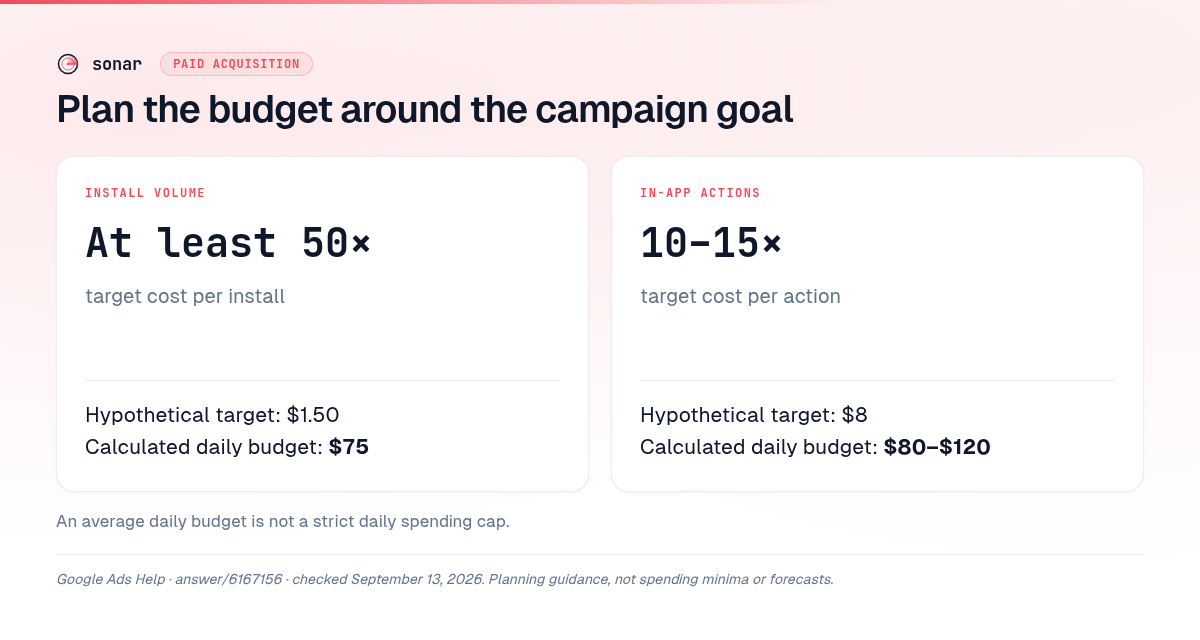
Google publishes budget-to-bid recommendations for learning. These are planning recommendations, not platform spending minima or promises of results. The examples below apply the cited multipliers to invented targets.
| Optimization focus | Google's budget recommendation | Hypothetical target | Calculated daily budget |
|---|---|---|---|
| Install volume | At least 50 times target CPI | $1.50 per install | $75 |
| In-app actions | 10–15 times target CPA | $8 per action | $80–$120 |
Sources: Google's bidding tips for the install ratio; Google's goal-specific guide for the in-app-action range. CPI means cost per install; CPA means cost per action.
An average daily budget also isn't a strict daily cap. For most campaigns, Google specifies a daily spending limit of twice the average daily budget and a monthly limit of 30.4 times that budget; budget changes affect those limits. Google's spending-limit documentation
I would write down an affordable total loss before choosing a bid. If the suggested experiment exceeds that amount, postpone it or narrow the question you expect it to answer. Use the user acquisition cost guide to build your cost worksheet before committing cash.
Set up conversion tracking before spending
Google app campaigns need conversion measurement aligned with the campaign goal. Google's supported setup paths include Firebase, third-party app analytics, and Google Play. Google Play download tracking doesn't require app-code changes; first-open and deeper-event tracking require code access or an analytics integration. Google's conversion setup requirements
For an indie already using Firebase, I would start by auditing that integration. If you already have a measurement partner, check its Google Ads connection before adding another SDK.
Connect the event pipeline
To connect Firebase to Google app campaigns, Google's workflow is to install the Google Analytics for Firebase SDK, implement events, enable Analytics, mark the relevant events as key events, link Google Ads, and create Ads conversions from those events. Follow the Google Play linking step where applicable to in-app purchases. Google's Analytics integration guide
Before launch, I recommend this acceptance check:
- Perform the intended action in a test journey and inspect the recorded event.
- Check that the event name describes the completed action, rather than a button tap that can fail.
- Inspect the imported conversion in Google Ads and select it deliberately for the campaign.
- Document the counting rule, conversion window, and any purchase-value handling.
- Keep a record of which analytics integration owns each conversion.
These are verification tasks, not evidence that the campaign will be profitable. Don't launch while the event pipeline remains an assumption.
Avoid counting the same acquisition twice
For new-user measurement, Google says to count either the install or the first open as the conversion. Keep one primary acquisition signal, while tracking other useful interactions separately. Google also recommends collecting events leading toward the main outcome, including activity attributed to other channels. Google's conversion-counting guidance
Check this again when adding a measurement provider. Google's migration guidance says newly imported Analytics actions should remain secondary if you're already optimizing toward primary third-party conversions. Google's imported-event guidance
For iOS, add SKAdNetwork configuration to the preparation work; Google explicitly recommends it for iOS App campaigns. Keep that implementation separate from the Android checklist. Google's measurement best practices
Build the first campaign around a clear goal
For Google app install campaigns, choose App promotion → App installs, then select Android or iOS and the correct app. Google's current setup flow lets you identify the app by name, package, publisher, or store URL. Google's install-campaign setup instructions
Follow that documented sequence:
- Name the campaign. Include the operating system; I would also include the market and intended outcome.
- Set locations and languages. Inspect location options. Google doesn't translate your ad text.
- Set budget and bidding. Choose the focus, target users, and relevant install or in-app event. Available bidding choices depend on campaign settings.
- Build the ad group. Add text and visual assets, then inspect the recommendations and previews.
- Review and publish. Recheck the selected app, conversions, geography, and budget before using the publish control.
Source for the interface sequence: Google's campaign builder guide.
Choosing in-app actions as the optimization goal doesn't automatically make this a re-engagement campaign. Google's API distinguishes acquiring users through the installs subtype from targeting existing users through the engagement subtype. Google's campaign-goal mapping
For your first Google app campaigns experiment, I recommend a coherent language and market scope you can support. Resist building separate campaigns for every creative idea before you have a specific reason to separate their budgets.
Build creative assets that work independently
Google combines assets into ads, so every headline and description should make sense alone and alongside the other assets. Google can also retrieve store-listing content, crop or modify assets, and generate a video if you don't upload one. Google's asset mechanics
For Google app campaigns, that makes creative preparation an input to automation. I would prepare distinct product demonstrations and benefit statements before producing cosmetic variations of the same message.
What should your creative pack contain?
Google's current asset specification lists headlines up to 30 characters and descriptions up to 90 characters, with 1–5 of each and a recommendation to supply five. Videos must be uploaded to YouTube before use. Google's asset specifications
| Asset | Documented format | Suggested indie execution |
|---|---|---|
| Horizontal image | 1.91:1; recommended 1200 × 628 pixels | Show the app completing its main job |
| Vertical image | 4:5; recommended 1200 × 1500 pixels | Make the interface readable on a phone |
| Square image | 1:1; recommended 1200 × 1200 pixels | Communicate a standalone benefit |
| Video | 16:9, 9:16, or 1:1; recommended 10–60 seconds | Demonstrate a complete use case |
Source for formats and dimensions: Google's App campaign specifications. Execution ideas are recommendations.
For the hypothetical tracker, draft independent headlines such as “Track recurring bills” and “See upcoming renewals,” provided those features exist. Show the matching workflow. Avoid splitting a sentence between headline and description.
Google recommends grouping assets around an ad group's theme and writing complete, independent thoughts. I would group renewal reminders separately from spending-overview concepts when each has enough supporting creative. Google's creative guidance
Evaluate the campaign without chasing daily noise
Evaluate Google app campaigns after allowing for conversion delays. Google warns that early CPI can look inflated because conversions haven't arrived yet. Review the conversion window before interpreting the latest day's cost as settled performance. Google's campaign maintenance guidance
After significant changes, Google's goal-specific guide recommends 7–14 days for stabilization; its in-app-action guidance recommends a 30-day evaluation window. Those are evaluation guidelines, not a reason to continue through broken tracking or unaffordable spending. Google's learning guidance
I recommend separating your review into these decisions:
- Measurement: Are the intended events arriving with the expected meaning? Pause to fix a broken conversion pipeline.
- User quality: Do acquired users complete the useful action and progress toward payment? Compare groups with equal time to convert.
- Economics: Does the observed acquisition cost fit the loss limit and payback assumptions you wrote down?
- Creative: Which message deserves a new variation? Keep an experiment log rather than rewriting everything together.
Google's asset ratings are relative to other assets in the campaign. Treat “Best” as a creative comparison, not a profitability verdict. Google's asset-report explanation
Google recommends adding variations resembling stronger assets when capacity remains, or gradually replacing weaker assets when you've reached the limit. Google's asset-refresh guidance
My stop rule would be written before launch: pause when tracking fails, the agreed loss budget is reached, or sufficiently mature users miss your commercial threshold. Record “inconclusive” when the experiment doesn't support a decision. Don't turn a small sample into a channel-wide verdict.
Keep store research separate from paid acquisition
Sonar's keyword search for 'subscription tracker' (iOS, US, queried 2026-09-13) returned difficulty 42 and Apple popularity 5 (popularity_source: apple).
That same exact-keyword row returned results_count 197; this is returned search-result count, not all apps in a category.
Source: Sonar /api/v1/keywords/search, exact-keyword row in the supplied API response sonar-subscription-tracker-ios.json, queried September 13, 2026.
These observations concern an iOS store-search keyword. They provide no Google Ads bid, Android demand estimate, paid conversion forecast, or evidence that an advertising test should run. Use the row as a store-research observation and validate paid acquisition with the campaign's own measurement.
For Google app campaigns, I would use store research to draft language worth testing, then inspect the ad and onboarding promise together. Keep the decision about organic investment separate; the Apple Search Ads vs organic ASO guide covers that adjacent question. You can begin the listing review from your apps in Sonar.
FAQ
Are Google universal app campaigns and App campaigns the same?
UAC is the former name for App campaigns. Google announced the rename in February 2019 and said the naming change didn't alter campaign functionality. Google's announcement
Can you choose keywords in Google app campaigns?
You don't supply positive keyword targeting to control matching; Google automates targeting. Account-level webpage and app exclusions are a separate control documented by Google. Google's targeting and exclusions guide
Is Firebase required for Google Ads for apps?
Firebase is a supported measurement route, but Google also supports third-party analytics and Google Play conversion tracking. Google Play downloads can be measured without editing app code; deeper events need an appropriate implementation. Google's conversion setup guide
Should an indie start with installs or in-app actions?
Choose the goal that answers your acquisition question with a dependable conversion signal. Google's campaign settings support install acquisition and optimization toward specific in-app actions; I would postpone deeper-action bidding until the event is verified and frequent enough to support the experiment. Google's campaign-goal documentation
Prepare your store research before planning the paid test. Start free trial.
